

When building or scaling a website, search engine crawlers face a fundamental challenge: discovering every high-value page efficiently across millions of potential paths.
While internal linking forms the backbone of web navigation, automated crawlers need a direct, structured protocol to find new content, monitor updates, and understand site architecture. This is where the XML sitemap becomes essential.
An XML sitemap serves as a clean discovery feed for search engines. It acts as a primary index of URLs you explicitly want Googlebot to find, crawl, and evaluate.
In this technical guide, we will break down how XML sitemaps function under Google’s official specifications, how they differ from other crawl directives, and how to configure them to accelerate crawl discovery across your site.
What Is an XML Sitemap?
An XML sitemap is a structured machine-readable document written in Extensible Markup Language (XML) that lists a website’s essential URLs along with metadata about each page.
Unlike an HTML sitemap, which is designed for human visitors to navigate a site’s layout. An XML sitemap is built specifically for search engine bots like Googlebot or Bingbot.
Discovery vs Indexing: What Google Official Docs Actually Say
A widespread misconception in technical SEO is assuming that submitting a URL inside an XML sitemap guarantees that Google will crawl and index it immediately.
According to Google Search Central documentation, an XML sitemap is a discovery recommendation, not a strict indexing command.
Discovery (What Sitemaps Do): A sitemap informs Googlebot that a specific URL exists, providing direct access to deep or newly published pages without relying solely on internal links.
Indexing (What Sitemaps CANNOT Force): Indexing depends on Google’s evaluation of content quality, canonical signals, page uniqueness, and overall domain authority.
Key Technical Realities from Google’s Documentation:
No Crawl Restriction: Including URLs in a sitemap does not restrict Googlebot from crawling pages outside the sitemap. If an unlisted page has internal or external links, Googlebot will still find and crawl it.
Prioritization Signal: Sitemaps help Google understand which URLs you value most, especially for large e-commerce catalogs, news portals, or sites with vast archives.
Crawl Efficiency: For new websites with few backlinks or large websites with deep subdirectories, sitemaps significantly reduce the time it takes for Googlebot to discover fresh content.
Understanding that a sitemap is a discovery feed is the first step. Next, let’s examine the exact architecture, limits, and directive tags that control how search engines read your XML files.
XML Sitemap Architecture & Syntax Rules
To build a sitemap that search engines can read without parsing errors, you must adhere strictly to the Sitemaps.org protocol (the official standard co-created by Google, Yahoo, and Microsoft).
A standard XML sitemap relies on three foundational XML tags:
<urlset>: The parent wrapper tag that defines the XML protocol standard.<url>: The individual entry container for each web page.<loc>: The absolute, canonical URL location (e.g.,https://example.com/page/).
<?xml version="1.0" encoding="UTF-8"?>
<urlset xmlns="http://www.sitemaps.org/schemas/sitemap/0.9">
   <url>
      <loc>https://example.com/technical-seo/</loc>
      <lastmod>2026-03-24T08:30:00+00:00</lastmod>
   </url>
</urlset>
Sitemaps vs. Sitemap Index Files (The 50,000 URL / 50MB Limit)
As websites expand, placing all URLs into a single .xml file quickly becomes unmanageable. Search engine crawlers enforce strict technical limits on individual sitemap files to prevent memory timeouts during parsing.
The Technical Protocol Limits:
Maximum URLs per sitemap: 50,000 URLs
Maximum uncompressed file size: 50 Megabytes (MB)
If your website exceeds either threshold, you must break your URLs into multiple individual sitemaps and unify them under a Sitemap Index File.
For Example:
- [sitemap_index.xml] (Master Container File)
- [sitemap-pages.xml] (Sub-sitemap 1)
(Max 50K URLs) - [sitemap-posts.xml] (Sub-sitemap 2)
(Max 50K URLs) - [sitemap-products.xml] (Sub-sitemap 3)
(Max 50K URLs)
- [sitemap-pages.xml] (Sub-sitemap 1)
<?xml version="1.0" encoding="UTF-8"?>
<sitemapindex xmlns="http://www.sitemaps.org/schemas/sitemap/0.9">
   <sitemap>
      <loc>https://example.com/sitemap-posts.xml</loc>
      <lastmod>2026-03-24T10:00:00+00:00</lastmod>
   </sitemap>
   <sitemap>
      <loc>https://example.com/sitemap-products.xml</loc>
      <lastmod>2026-03-23T14:15:00+00:00</lastmod>
   </sitemap>
</sitemapindex>
Strategic Segmentation: Categorizing Sitemaps for Pinpoint GSC Audits
A common competitor gap in sitemap management is dumping every page into a single generic sitemap.xml file. While Googlebot can still read it, doing this destroys your ability to troubleshoot indexing issues inside Google Search Console (GSC).
When you submit a single large sitemap containing 30,000 URLs and GSC reports that only 18,000 are indexed, finding which section of your site is failing becomes a needle-in-a-haystack problem.
The Solution: Category-Based Sitemap Segmentation
For e-commerce stores, publishers, or large SaaS domains, segment your sitemap index by post type, page category, or content depth:
Why This Works:
By submitting segmented sitemaps into Google Search Console individually, GSC breaks down Indexation Coverage per sitemap. You can instantly see if your blog posts are indexing fine (e.g., 98% index rate) while your product pages are being rejected (e.g., 28% index rate), allowing you to isolate and fix site-wide technical issues rapidly.
The <lastmod> Directive: Real Timestamp Signal vs. Googlebot Abuse Penalty
The <lastmod> (last modified) tag indicates the exact date and time a specific page was last updated in ISO 8601 format (e.g., 2026-03-24T08:30:00+00:00).
Google explicitly uses <lastmod> as a primary signal to determine whether it needs to re-crawl a page. If the <lastmod> timestamp is newer than the date Googlebot last fetched the URL, Googlebot prioritizes that page in its re-crawl queue.
The Fake <lastmod> Abuse Pitfall:
Many automated SEO plugins or site owners attempt to game this signal by updating the <lastmod> timestamp on every page whenever a site build runs or a minor footer link changes.
Googlebot detects this artificial manipulation.
The Penalty for False Timestamps:
If Googlebot re-crawls pages based on updated
<lastmod>timestamps and discovers no meaningful content changes, it loses trust in your sitemap data. Googlebot will eventually ignore your<lastmod>tags entirely across the domain, falling back to slower, unprioritized crawling schedules.
Best Practice: Only trigger an update to <lastmod> when significant content changes occur (e.g., article rewrites, updated pricing data, or new product listings).
Why priority and changefreq Are Entirely Ignored by Modern Googlebot
In older versions of the Sitemaps protocol, two optional tags were widely used:
<changefreq>: Told crawlers how often a page was expected to change (e.g.,always,daily,weekly).<priority>: A numerical rating from0.0to1.0indicating the relative importance of a page within your site.
The Modern Reality:
Google Search Central representatives (including Gary Illyes and John Mueller) have confirmed repeatedly that Googlebot completely ignores both <changefreq> and <priority> tags.
Webmasters spent years setting every page to <priority>1.0</priority> and <changefreq>daily</changefreq>, rendering the signals useless. Modern search engine crawlers rely instead on real-world signals: internal link architecture, backlink equity, site traffic, and reliable <lastmod> timestamps.
Clean Code Tip:
Strip
<changefreq>and<priority>tags from your XML sitemaps. Removing these redundant lines reduces file sizes by up to 30%, saving server bandwidth and accelerating XML parsing for large sites.
Now that your sitemap syntax is clean, lightweight, and accurately timestamped, let’s compare how XML sitemaps interact with other foundational technical directives like robots.txt and internal links.
Strategic Comparisons: Sitemaps vs. Robots.txt vs. Internal Linking
A common point of confusion in technical SEO is understanding how XML sitemaps interact with robots.txt files and internal HTML linking structures. While all three manage how crawlers navigate a domain, they serve entirely different functions within Google’s crawling and indexing pipeline.
Sitemaps vs. Robots.txt (Roadmap vs. Security Gate)
The simplest way to understand the difference between an XML sitemap and a robots.txt file is through a real-world analogy:
robots.txtis the Security Gate: It tells search engine crawlers where they are forbidden to go. It enforces strict crawling boundaries usingDisallow:directives.XML Sitemap is the Recommended Roadmap: It tells search engine crawlers where you want them to go. It provides a curated list of clean, canonical URLs to accelerate discovery.
The Functional Difference:
| Feature / Directive | XML Sitemap (sitemap.xml) | Robots.txt (robots.txt) |
| Primary Mechanics | Recommendation / Discovery Feed | Strict Crawl Protocol / Directive |
| Action Taken by Bot | Reads URLs to add them to the crawl queue. | Parses rules to block requests to server paths. |
| Can it Block Crawling? | NO (Omitting a URL does not prevent crawling). | YES (Disallow: stops crawlers from fetching). |
| Can it Force Indexing? | NO (Google decides based on quality/canonical). | NO (Cannot force indexing; only blocks crawling). |
| Primary SEO Goal | Accelerates discovery of new/updated pages. | Preserves crawl budget and protects admin routes. |
The Conflict Hazard:
What happens if a URL is listed inside your XML sitemap, but blocked by a Disallow: rule in your robots.txt file?
Googlebot encounters a direct contradiction. In Google Search Console, this triggers a prominent warning: “Indexed, though blocked by robots.txt” or “Sitemap contains blocked URLs”. Always audit your sitemap against your robots.txt rules to ensure your roadmap isn’t sending crawlers toward blocked gates.
Sitemaps vs. Internal Links (Discovery Feed vs. PageRank & Relevance Flow)
While an XML sitemap is a highly efficient shortcut for URL discovery, it can never replace a strong internal link architecture.
Search engine crawlers use sitemaps primarily to discover that a URL exists. However, crawlers rely on internal links to understand a page’s topical importance, hierarchical context, and PageRank equity (link authority).
1. Discovery vs. Contextual Value
A sitemap delivers flat URL discovery. It tells Googlebot where a page lives, but passes zero PageRank authority and provides no contextual anchor text signals.
Conversely, internal contextual links embedded within body text pass link equity from high-authority pages (like your homepage or core hubs) down to deeper target pages, signaling topical relevance to search algorithms.
2. The Crawl Priority Reality
If a page is included in an XML sitemap but receives zero internal links across your entire website, Googlebot treats it as an Orphan Page.
Even if discovered via the sitemap, Googlebot will crawl orphan pages far less frequently because the site’s own navigation structure fails to validate their importance.
The Technical Synergy:
Use XML sitemaps to get new or deep URLs discovered instantly in Google’s crawl queue. Use internal links to pass PageRank equity, establish topical clusters, and prove to Googlebot that the page deserves to rank.
Now that we understand how sitemaps fit into the broader crawling ecosystem, let me walk you through the strict hygiene rules required to keep your sitemap files free from technical errors.
Sitemap Hygiene: What to Include (and What to Strictly Exclude)
A corrupted or bloated XML sitemap wastes crawl budget and sends conflicting signals to search algorithms. If your sitemap is filled with broken links, redirected paths, or non-canonical variations, Googlebot will treat your sitemap file as unreliable.
Maintaining clean sitemap hygiene requires adhering to a single core technical directive.
The Golden Rule: 100% Indexable, 200 OK, Canonical URLs Only
Every single URL submitted inside an XML sitemap must represent a final, indexable target destination.
What Must Be Excluded from Your XML Sitemap:
Non-Canonical URLs: Never include duplicate page variations that point to a different master URL via a
rel="canonical"tag. Only list the self-referencing master canonical URL.Redirected URLs (301 / 302 HTTP Status): Sitemaps should never contain redirect chains. Update your sitemap generation script to replace redirected URLs with their final
200 OKdestination endpoints immediately.Blocked URLs (
robots.txtDisallow Rules): Including a URL in a sitemap that is disallowed inrobots.txtcauses direct directive conflicts in Google Search Console.NoindexPages: Pages tagged with<meta name="robots" content="noindex">or served withX-Robots-Tag: noindexheaders must be stripped from the sitemap. Listing anoindexURL creates an indexing contradiction.Soft 404s and Dead Pages (4xx / 5xx Status): Including deleted products, empty category hubs, or broken URLs lowers the overall crawl efficiency score of your domain.
Solving the Orphan URL Problem via Strategic Sitemap Signals
An Orphan Page is a live, functional web page that lacks internal HTML links pointing to it from any other section of your website.
Because search engine crawlers rely on internal link paths to traverse site structures, orphan pages frequently remain undiscovered for months.
How Sitemaps Bridge the Orphan Discovery Gap:
When internal link paths fail or get broken during site migrations, an XML sitemap acts as a safety net for discovery.
The Technical Limitation:
While including an orphan URL in your sitemap forces Googlebot to discover its existence, a sitemap entry alone will rarely help an orphan page rank on page one.
Google’s ranking algorithms evaluate internal link distribution to determine a page’s relative weight (PageRank equity) within a domain’s architecture.
Diagnostic Action Plan for Orphan Pages:
Use your XML sitemap to trigger immediate crawl discovery for orphan pages, but immediately follow up by linking to those orphan URLs from related high-authority blog posts or category hubs to supply necessary PageRank signals.
Keeping your sitemap clean is essential, but how do you manage sitemap generation across complex e-commerce stores, custom code bases, or specialized media formats? Let’s break down platform implementation next.
Specialized Sitemaps: Image, Video, and News Extensions
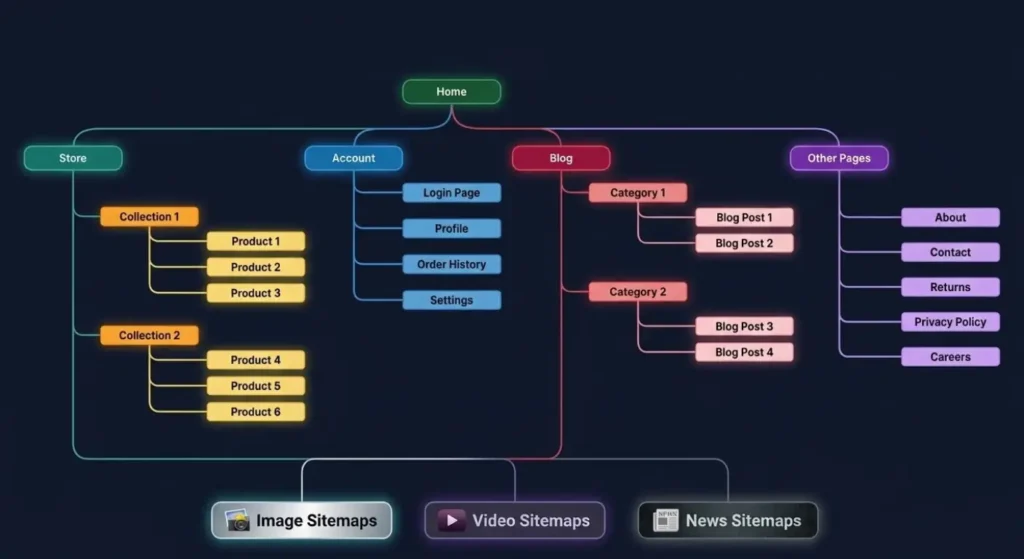
While standard XML sitemaps focus on core HTML webpage discovery, specialized media formats require custom XML namespaces. These extensions help Googlebot parse rich media assets that JavaScript or lazy-loading mechanisms might otherwise obscure.
1. Image Sitemaps (Google Images Discovery)
Image sitemaps pass specific image metadata (such as image location, caption, and title) directly to Googlebot-Images.
<?xml version="1.0" encoding="UTF-8"?>
<urlset xmlns="http://www.sitemaps.org/schemas/sitemap/0.9"
        xmlns:image="http://www.google.com/schemas/sitemap-image/1.1">
  <url>
    <loc>https://example.com/products/leather-jacket/</loc>
    <image:image>
      <image:loc>https://example.com/images/leather-jacket-front.jpg</image:loc>
      <image:title>Premium Men's Leather Jacket</image:title>
    </image:image>
  </url>
</urlset>
When to Use: E-commerce product catalogs, photography portfolios, or sites where organic image search drives substantial conversion traffic.
Pro Tip: Modern Googlebot can parse images directly from HTML
<img>tags and Structured Data (JSON-LD). A dedicated image sitemap is only necessary if your images are dynamically loaded via JavaScript execution or hosted on a CDN domain.
2. Video Sitemaps (Video Search & Rich Snippets)
Video sitemaps provide Google with essential metadata required to render Video Rich Snippets and video carousel results in SERPs.
<?xml version="1.0" encoding="UTF-8"?>
<urlset xmlns="http://www.sitemaps.org/schemas/sitemap/0.9"
        xmlns:video="http://www.google.com/schemas/sitemap-video/1.1">
  <url>
    <loc>https://example.com/tutorials/technical-seo-audit/</loc>
    <video:video>
      <video:thumbnail_loc>https://example.com/thumbs/audit.jpg</video:thumbnail_loc>
      <video:title>How to Perform a Technical SEO Audit</video:title>
      <video:description>Complete step-by-step technical SEO audit workflow.</video:description>
      <video:content_loc>https://example.com/videos/audit.mp4</video:content_loc>
      <video:publication_date>2026-03-24T09:00:00+00:00</video:publication_date>
    </video:video>
  </url>
</urlset>
Key Tags Required:
<video:thumbnail_loc>,<video:title>,<video:description>, and<video:content_loc>(or<video:player_loc>).Why It Matters: Without a video sitemap or schema markup, Googlebot cannot determine the duration, publication date, or exact video file destination embedded inside JS players.
3. Google News Sitemaps (Fast-Track Publication Indexing)
News sitemaps are built specifically for news publishers approved for or aiming to appear in Google News and Google Discover.
<?xml version="1.0" encoding="UTF-8"?>
<urlset xmlns="http://www.sitemaps.org/schemas/sitemap/0.9"
        xmlns:news="http://www.google.com/schemas/sitemap-news/0.9">
  <url>
    <loc>https://example.com/news/google-algorithm-update-2026/</loc>
    <news:news>
      <news:publication>
        <news:name>Tech SEO Daily</news:name>
        <news:language>en</news:language>
      </news:publication>
      <news:publication_date>2026-03-24</news:publication_date>
      <news:title>Google Releases New Core Crawl Architecture Update</news:title>
    </news:news>
  </url>
</urlset>
The Strict 2-Day Google News Rule:
Unlike standard sitemaps, a Google News sitemap must only contain articles published within the last 48 hours.
Once an article passes the 48-hour mark, it automatically expires from the news sitemap (though it remains in your standard XML sitemap index). This keeps the news index lean and ensures real-time discovery for Google News crawlers.
The "Discovered - Currently Not Indexed" Dilemma: Why Sitemaps Aren't Enough
One of the most frustrating experiences in technical SEO is submitting a perfectly clean XML sitemap containing thousands of URLs, only to check Google Search Console months later and see those exact pages categorized under: “Discovered – currently not indexed”.
The Underlying Mechanics: Why Google Arrests the Crawl
When GSC reports a URL as Discovered – currently not indexed, it means Googlebot parsed the URL from your XML sitemap and added it to its crawl queue, but explicitly chose NOT to fetch or render the HTML page.
The Primary Causes Behind Crawl Arrest:
Lack of Contextual Internal Links: The sitemap told Google the URL exists, but no live HTML pages on your site link to it. Googlebot treats unlinked URLs as low-priority utility pages.
Crawl Budget Allocation Limits: For large websites (100,000+ pages), Googlebot dynamically calculates a crawl capacity limit based on server responsiveness and domain demand. If your server slows down, Google postpones fetching queued sitemap URLs.
Thin or Programmatic Content Patterns: If Googlebot detects that thousands of generated URLs share near-identical template structures (e.g., empty filter parameter variations), it deprioritizes the entire directory batch at the discovery layer.
Key Takeaway:
A sitemap gets your URLs onto Google’s radar, but internal link architecture and server health determine whether Google actually opens the door.
Implementation Blueprint: How to Deploy Sitemaps Across Platforms
Deploying an XML sitemap varies across Content Management Systems (CMS) and custom web development frameworks. Below are the optimal technical configurations for both environments.
WordPress & CMS Platforms (Core Sitemaps vs. SEO Plugins)
Since WordPress, the platform includes a Native Core XML Sitemap enabled by default at example.com/wp-sitemap.xml.
Plugin Configuration Best Practices:
Disable Attachment Sitemaps: Image attachment pages in WordPress create low-quality, empty URLs. Disable media/attachment sitemaps inside your SEO plugin settings.
Exclude Private Taxonomies: Strip post formats, admin tags, or utility category feeds from your sitemap index.
Auto-Sync Directives: Ensure your plugin automatically removes URLs from the XML sitemap the moment they are tagged with a
<meta name="robots" content="noindex">directive.
Custom Stacks & Dynamic Sitemaps (Shopify, Node.js, Next.js, & Static Generators)
For custom codebases and headless e-commerce platforms, relying on static, manually edited .xml files leads to outdated URLs and broken paths. Sitemaps must be generated dynamically via endpoint routing or build scripts.
1. Shopify Architecture
Shopify generates and updates a master sitemap index automatically at example.com/sitemap.xml.
Structure: It partitions URLs automatically into sub-sitemaps:
sitemap_products_1.xml,sitemap_pages.xml,sitemap_collections_1.xml, andsitemap_blogs_1.xml.Customization: To exclude specific canonical product variants or locked pages in Shopify, edit the
robots.txt.liquidtheme file or use custom liquid liquid header tags to passnoindexsignals.
2. Next.js (App Router Dynamic Endpoint)
In modern Next.js applications (App Router), create a dynamic sitemap.ts or sitemap.js file inside your /app directory. Next.js automatically executes the file logic and serves a fully valid XML feed at /sitemap.xml.
// app/sitemap.ts
import { MetadataRoute } from 'next';

export default async function sitemap(): Promise<MetadataRoute.Sitemap> {
  const baseUrl = 'https://example.com';

  // Fetch dynamic product slugs from API or DB
  const products = await fetch('https://api.example.com/products').then((res) => res.json());

  const productUrls = products.map((product: any) => ({
    url: `${baseUrl}/products/${product.slug}`,
    lastModified: new Date(product.updatedAt),
    changeFrequency: 'weekly',
    priority: 0.8,
  }));

  return [
    {
      url: baseUrl,
      lastModified: new Date(),
    },
    ...productUrls,
  ];
}
3. Node.js / Express Dynamic Endpoint
For Node.js backends, generate dynamic XML streams on request or cache them using Redis to reduce database hits:
// Express.js Route Handler
app.get('/sitemap.xml', async (req, res) => {
  res.header('Content-Type', 'application/xml');

  const urls = await getIndexableDatabaseUrls(); // Fetches strictly 200 OK canonicals

  let xml = `<?xml version="1.0" encoding="UTF-8"?>\n`;
  xml += `<urlset xmlns="http://www.sitemaps.org/schemas/sitemap/0.9">\n`;

  urls.forEach(item => {
    xml += `  <url>\n    <loc>${item.url}</loc>\n    <lastmod>${item.updatedAt}</lastmod>\n  </url>\n`;
  });

  xml += `</urlset>`;
  res.send(xml);
});
With your dynamic sitemap deployed and generating clean XML endpoints, let’s explore a real-world case study where cleaning up a bloated sitemap restored indexation velocity for an e-commerce platform.
Real-World Case Study: Cleaning a 200,000-URL Bloated Sitemap to Restore Indexation Velocity
The Challenge
A large enterprise e-commerce client operating on a custom headless stack was experiencing a severe decay in organic indexation velocity. Despite publishing 500+ new product SKUs and detailed category guides every week, new pages took up to 6 weeks to appear in Google search results.
Upon performing a technical audit, I uncovered a massive sitemap architecture breakdown:
The website was serving a single, monolithic
sitemap.xmlfile containing over 210,000 URLs.Over 65% of the URLs inside the sitemap were low-value parameter variations (
?sort=price_asc,?color=blue), 301 redirect chains, and outdated out-of-stock product pages returning404 Not Found.Every automated deployment updated the
<lastmod>tag for all 210,000 URLs simultaneously, destroying Googlebot’s trust in the site’s update timestamps.
The Remediation Strategy
I executed a 4-step sitemap overhaul to restore crawl efficiency and align with Google’s Sitemaps protocol:
Strict Canonical Filter Pipeline: Re-engineered the backend sitemap generation script to fetch strictly
200 OK, self-referencing canonical URLs. All query parameter URLs and redirect chains were stripped immediately.Category-Based Sitemap Segmentation: Split the monolithic XML feed into a structured Sitemap Index File pointing to sub-sitemaps capped at 10,000 URLs each:
/sitemap-products-1.xmlthrough/sitemap-products-12.xml/sitemap-categories.xml/sitemap-editorial.xml
Accurate
<lastmod>Timestamp Triggers: Bound the<lastmod>tag exclusively to actual database edit events (such as price updates or inventory changes), eliminating false build timestamps.GSC Re-submission & Verification: We removed the old monolithic sitemap from Google Search Console and submitted the clean
/sitemap_index.xml.
The Results
Within 14 days of submitting the cleaned sitemap index:
88% reduction in total sitemap footprint: Total submitted URLs dropped from 210,000 to 45,000 clean canonical pages.
Indexation Velocity Acceleration: New product SKUs were crawled and indexed within 18 to 24 hours (down from 6 weeks).
Organic Search Visibility: Organic impressions increased by 34% over the next quarter as Googlebot redirected its crawl budget toward high-converting product pages instead of parsing dead parameters.
Now let’s understand how to submit sitemap in Google also and how to audit and fix sitemap errors in GSC.
Diagnostic Workflow: Submitting, Auditing, and Fixing Sitemap Errors in GSC
To maintain optimal crawl health, you must establish a continuous diagnostic workflow using Google Search Console and server-level testing tools.
Step 1: Submitting Your Sitemap Index to GSC
Log into Google Search Console and select your target domain property.
Navigate to Indexing → Sitemaps in the left sidebar.
Under Add a new sitemap, enter the relative path of your master sitemap index file (e.g.,
sitemap_index.xml).Click Submit.
Step 2: Diagnosing Common GSC Sitemap Errors
1. Fixing ‘Sitemap Contains Blocked URLs’:Directive Conflict Alert.
Cause: A URL listed inside your XML sitemap is forbidden from being crawled by a Disallow: rule inside your robots.txt file.
Fix: Decide whether the URL should be crawled. If it should be indexed, remove the Disallow: rule in robots.txt. If it should remain blocked, remove the URL entry from your XML sitemap.
2. Fixing ‘Sitemap Contains Noindex URLs’:Indexing Contradiction Alert.
Cause: A URL in your sitemap returns a <meta name=”robots” content=”noindex”> tag or an X-Robots-Tag: noindex HTTP response header.
Fix: Update your automated sitemap generator to filter out any page tagged with noindex directives.
3.Fixing ‘Parsing Error / Invalid XML Syntax’:Formatting Malfunction.
Cause: Unescaped special characters (such as &, <, >) inside URL strings or missing closing tags (e.g., </loc>).
Fix: Replace unescaped characters with XML entity references (e.g., replace & with &) and validate your XML feed using an online XML validator.
Step 3: Terminal Workflow: Verifying Sitemap Response Headers via cURL
Before submitting a new sitemap endpoint to GSC, run a cURL request in your terminal to verify that your server delivers the correct Content-Type header and HTTP response status:
# Verify HTTP Response Status and Content-Type Header
curl -I -A "Googlebot" https://example.com/sitemap.xml
Expected Terminal Output:
HTTP/2 200
date: Wed, 24 Mar 2026 10:15:00 GMT
content-type: application/xml; charset=UTF-8
x-robots-tag: noindex
cache-control: max-age=3600, public
Critical Header Check:
Ensure the
content-typeheader explicitly returnsapplication/xmlortext/xml. If your server serves the sitemap astext/html, Googlebot will fail to parse the XML directives and report a parsing error inside Search Console.
How to Remove an Entire Sitemap or Exclude Specific URLs from Live Sitemaps
Whether you are consolidating legacy sitemaps during a site overhaul or purging broken 404 pages from your crawl feed, maintaining absolute control over what search engines discover is critical.
Here is the exact technical breakdown for removing an entire sitemap or purging individual URLs across major search crawlers (Googlebot and Bingbot).
Part 1: How to Remove an Entire Sitemap (Googlebot & Bingbot Workflows)
When replacing a bloated or legacy sitemap (e.g., transitioning from /sitemap.xml to /sitemap_index.xml), simply submitting the new URL is not enough, you must cleanly revoke the old sitemap file from search engine webmaster panels.
1. Removing a Sitemap in Google Search Console (Googlebot)
In the updated Google Search Console interface, the “Delete” button is hidden inside an inline context menu:
1. Navigate to the Sitemaps Report: Search Console Navigation.
Log into Google Search Console → Select your property → Click Sitemaps under the Indexing menu in the left sidebar.
2. Click the Legacy Sitemap Entry: Select Target File.
Under the Submitted sitemaps table, click directly on the sitemap file you want to remove (e.g., /old-sitemap.xml).
3. Access the Top-Right Menu & Remove: Revoke Directives.
In the top-right corner of the detail screen, click the three vertical dots (⋮) menu icon and select Remove sitemap.
Server-Level Cleanup Step:
Removing the file from GSC stops Googlebot from checking that console entry. However, to prevent Googlebot from re-discovering the old file via direct URL requests or
robots.txtreferences, delete the physical.xmlfile from your server host or configure it to return a 410 Gone status code.
2. Removing a Sitemap in Bing Webmaster Tools (Bingbot)
Log into Bing Webmaster Tools and select your property.
In the left menu, click Sitemaps.
Locate the target sitemap in the Sitemap details list.
Click the three dots (⋮) or check the box next to the sitemap URL and click Delete / Unsubmit.
Part 2: How to Exclude Specific URLs from Live Sitemaps (200 OK vs. 404/410 Handling)
What happens when a page is deleted, un-published, or changed to a 404 Not Found or 410 Gone status? How do different platforms handle URL removal?
1. Automated SEO Plugins (Yoast SEO, Rank Math, SEOPress)
Modern SEO plugins query the database dynamically when rendering the XML endpoint.
How It Works: The moment a post or page is set to Draft, Trashed, Noindex, or returns a
404/410status code, the plugin’s database query automatically excludes that URL string from the generated XML payload.Do You Need to Do Anything Manually? No. As long as your plugin is running, URLs returning non-200 HTTP status codes are purged automatically on the very next crawler request.
2. Custom Stacks & Static XML Files (Manual Purge Requirement)
If your website uses a static physical sitemap.xml file or a basic custom generator that does not validate HTTP response codes before building:
The Problem: The dead URL remains inside your XML file, forcing search engines to fetch
404or410endpoints continuously, wasting server bandwidth and triggering GSC errors.The Solution:
Manual File Edit: Open your physical
sitemap.xmlfile, locate the<url>...</url>block corresponding to the dead URL, delete it, and re-upload the updated XML file to your server root.Automated Backend Logic (Recommended for Custom Stacks): Ensure your dynamic sitemap router includes an HTTP response check prior to outputting XML strings:
// Express.js / Node.js Dynamic Sitemap Filter Example
app.get('/sitemap.xml', async (req, res) => {
  const pages = await getDatabasePages();

  // Filter out any pages tagged as draft, deleted, or noindex
  const indexablePages = pages.filter(page =>
    page.status === 'published' &&
    page.httpStatus === 200 &&
    !page.isNoindex
  );

  // Generate clean XML stream using only indexablePages
  const xmlPayload = generateXmlStream(indexablePages);
  res.header('Content-Type', 'application/xml').send(xmlPayload);
});
Many guides only explain how to add and manage an XML sitemap. But what about removing an entire XML sitemap or outdated URLs from a live sitemap? That’s something you usually learn from people who have actually dealt with these situations.
So, based on my own experience, I’ve shared what I’ve learned. Now, let’s move on to the FAQs.
Frequently Asked Questions (XML Sitemap SEO)
What does an XML sitemap do?
An XML sitemap serves as an efficient URL discovery map for search engine bots. It performs three core technical functions:
Accelerates URL Discovery: Informs crawlers about new, updated, or deep-level pages that might lack strong internal link paths.
Signals Modification Timestamps: Uses the
<lastmod>tag to signal when content was last edited, helping crawlers re-fetch updated pages faster.Improves Crawl Efficiency: Helps search engine engines prioritize high-value canonical pages, minimizing crawl budget waste across large domains or complex e-commerce catalogs.
What does an XML sitemap look like?
An XML sitemap looks like a plain text document formatted with standardized XML code tags. Instead of styled HTML elements, it contains raw data wrapped in structural tags like <urlset>, <url>, <loc>, and <lastmod>.
<?xml version="1.0" encoding="UTF-8"?>
<urlset xmlns="http://www.sitemaps.org/schemas/sitemap/0.9">
  <url>
    <loc>https://example.com/canonical-page/</loc>
    <lastmod>2026-03-24T10:00:00+00:00</lastmod>
  </url>
</urlset>
How can I create an XML sitemap for a website?
To create an XML sitemap for a website, use the method that best matches your website stack:
Content Management Systems (WordPress, Shopify): Use built-in features or dedicated SEO plugins (e.g., Yoast SEO, Rank Math) to auto-generate dynamic sitemaps at
/sitemap.xml.Custom Frameworks (Next.js, Node.js): Create dynamic endpoints (such as
app/sitemap.tsin Next.js) that query your database to generate XML arrays automatically upon build or request.Static Sites: Use command-line build tools or static sitemap generators to build a physical
sitemap.xmlfile and place it in your server’s root directory (public/sitemap.xml).
How to submit an XML sitemap to Google?
To submit an XML sitemap to Google Search Console (GSC):
Log in to Google Search Console and select your domain property.
Go to Indexing $\rightarrow$ Sitemaps in the left sidebar menu.
Under Add a new sitemap, enter your sitemap file URL (e.g.,
sitemap_index.xmlorsitemap.xml).Click Submit. Googlebot will process the file, display a green “Success” status, and add your URLs to its discovery queue.
Is sitemap.xml still relevant?
Yes, absolutely. While search engine algorithms and web rendering technologies have evolved, sitemap.xml remains a foundational technical SEO protocol. It is especially vital for:
New Websites: Lacking external backlinks for initial discovery.
Large & E-commerce Sites: Containing thousands of URLs where automated discovery paths can miss deep product pages.
Dynamic & Headless Stacks: Where JavaScript rendering might temporarily obscure standard HTML links from initial crawl passes.
Google officially confirms that XML sitemaps remain one of the primary feeds used by Googlebot to populate its URL discovery queue.
Does an XML sitemap guarantee indexing?
No. An XML sitemap is a discovery recommendation, not an indexing directive. Submitting a URL in an XML sitemap tells Googlebot that the page exists, but Google only indexes pages that pass its content quality thresholds, canonical consistency checks, and internal link evaluations.
Final Thoughts
An XML sitemap is your site’s primary discovery feed: a clean, machine-readable roadmap designed to help search engines crawl and prioritize your most valuable pages efficiently.
By keeping your sitemap strictly populated with 200 OK canonical URLs, splitting large domains into category-based sitemap indexes, and maintaining reliable <lastmod> timestamps, you eliminate crawl budget waste and ensure Googlebot discovers content updates rapidly.
Is Crawl Friction or Indexing Delays Suppressing Your Organic Traffic?
A single corrupted directive, a bloated sitemap file, or an accidental crawl blockade can quietly stall search engine discovery and suppress your keyword rankings. Whether you are scaling an enterprise e-commerce platform, migrating site architecture, or troubleshooting a sudden drop in indexed pages, maintaining total control over your crawl path is essential for long-term growth.
Build a Scalable Search Engine Path: Ensure your rendering pipeline, crawl architecture, and canonical signals are bulletproof with our Technical SEO Services.
Diagnose Hidden Crawl & Indexation Bottlenecks: Get an exhaustive, line-by-line inspection of your server directives, parameter handling, and sitemap health with a detailed Website SEO Audit.
Facing a complex indexing issue or planning a site architecture update?
Schedule a Technical SEO Consultation, let’s inspect your server directives and restore full crawl efficiency together.
Explore Other Articles Under Technical SEO Side
Pillar Blogs
What is Technical SEO? (Parent Blog)
- Crawlability and Indexability in SEO (Child Blog)