
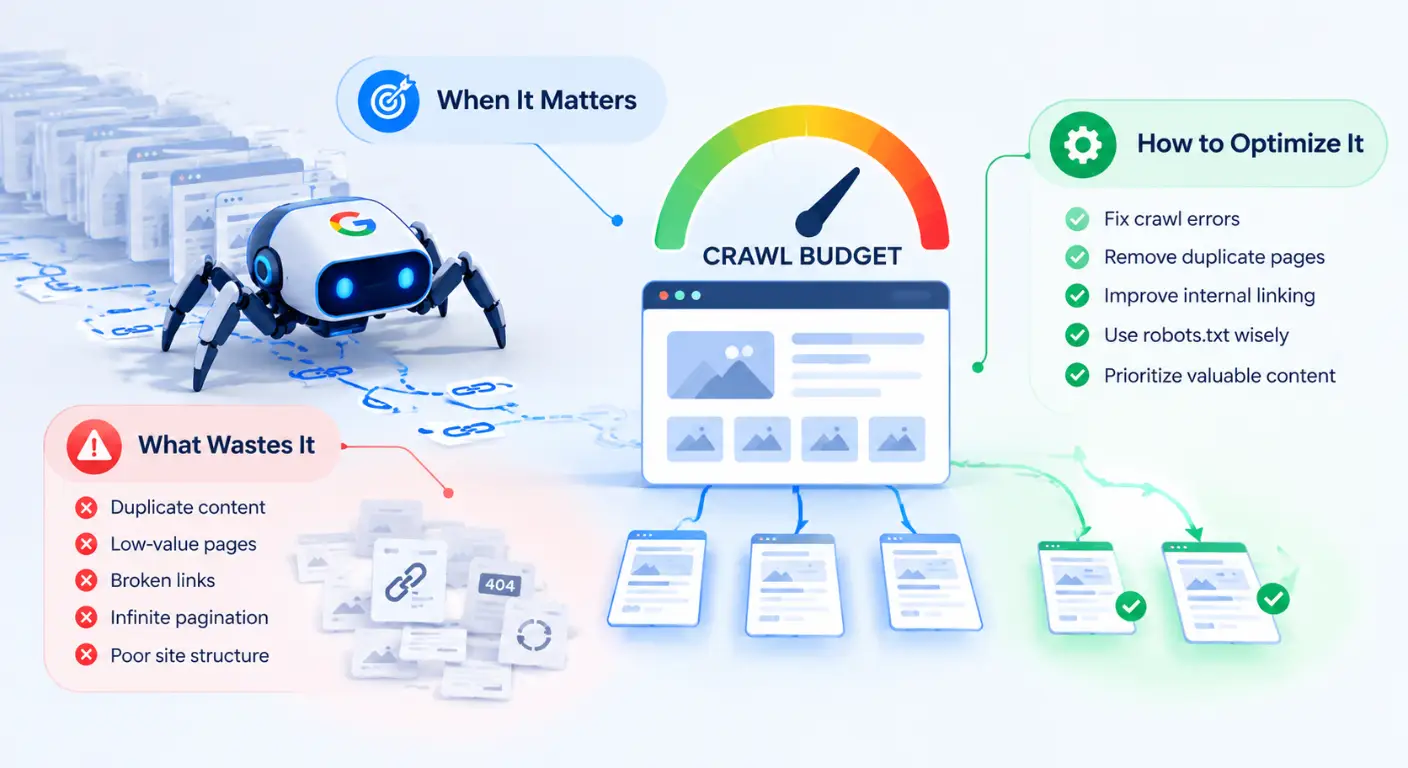
When search engines attempt to index the web, they face a finite constraint: computing resources. Googlebot cannot dedicate unlimited bandwidth or infinite server requests to a single website.
For small websites, crawl resource limits are rarely an issue. However, as an e-commerce platform scales to hundreds of thousands of product variants, or a programmatic SEO setup generates millions of dynamic pages, managing search engine crawl resources becomes critical for maintaining search visibility.
Understanding Crawl Budget allows technical SEOs and engineering teams to eliminate server waste, accelerate the discovery of revenue-generating pages, and prevent low-value URLs from diluting search engine attention.
In this guide, we will break down the exact technical mechanics of crawl budget, establish the scale thresholds for when optimization is actually necessary, and dissect the five primary culprits that drain Googlebot’s efficiency. You will also get an actionable playbook to eliminate parameter bloat, streamline dynamic rendering, and audit your server log files to ensure search engines prioritize your highest-value pages.
What Is Crawl Budget?
Crawl Budget refers to the total number of URLs Googlebot can and wants to crawl on a website within a given timeframe.
It is not a static number assigned in Google Search Console. Instead, it is a dynamic equilibrium calculated continuously based on two distinct technical mechanisms: Crawl Capacity Limit and Crawl Demand.
The Mechanics: Crawl Capacity Limit vs. Crawl Demand
To optimize crawl efficiency, you must understand the difference between how much Googlebot can crawl versus how much it wants to crawl.
1. Crawl Capacity Limit (Server Capacity)
The Crawl Capacity Limit (historically called Crawl Rate Limit) represents the maximum simultaneous requests Googlebot can make to your server without degrading the user experience for real visitors.
Server Speed (TTFB): If your server responds rapidly (Time to First Byte under 200ms), Googlebot increases its simultaneous connection pool to fetch more pages per minute.
Server Error Thresholds: If your server responds slowly, experiences high latency, or returns HTTP
502 Bad Gatewayor503 Service Unavailablestatus codes, Googlebot immediately throttles its crawl rate to protect your infrastructure.
2. Crawl Demand (Content Popularity & Value)
Even if your server can handle 1,000 requests per second, Googlebot will not crawl your site continuously unless there is sufficient Crawl Demand.
Crawl Demand is driven by three main factors:
Topical Equity & Authority: High-PageRank URLs and pages with strong backlink profiles are fetched much more frequently.
Content Recency & Update Frequency: Pages updated regularly with clean
<lastmod>timestamps trigger higher crawl demand.Domain-Wide Popularity: Trending events, news releases, or major brand searches increase overall Googlebot demand across the domain.
HTML Crawling vs. JavaScript Rendering Budget (Headless & Dynamic Stacks)
A critical gap in traditional SEO guides is ignoring the difference between crawling raw HTML and executing JavaScript for dynamic rendering.
Modern web applications built on client-side React, Vue, or Angular frameworks process pages through a two-wave indexing pipeline.
The Rendering Budget Friction:
Phase 1 (Raw HTTP Crawl): Googlebot fetches the initial HTTP payload. This phase is fast, inexpensive, and governed by standard Crawl Capacity Limits.
Phase 2 (WRS / Rendering Pipeline): Because running Web Rendering Service (WRS) instances requires substantial compute power, Google defers client-side JavaScript execution until system resources are available.
If your web application relies entirely on client-side JS to render navigation links, product catalogs, or canonical tags, your pages experience a second rendering queue delay.
If Googlebot encounters slow API responses during client-side execution, it may abort rendering altogether, wasting your rendering budget and leaving dynamic content unindexed.
Now that we’ve broken down the underlying mechanics of crawl capacity and rendering budget, let’s address the most common misconception in technical SEO: who actually needs to worry about crawl budget optimization?
Who Actually Needs Crawl Budget Optimization? (The Simple Answer)
One of the most persistent myths spread across generic SEO tutorials is that every website must obsessively optimize its crawl budget.
Small business sites, local blogs, and standard corporate brochures often waste months trying to micro-manage crawl paths. In reality, Google explicitly states that crawl budget optimization is unnecessary for the vast majority of web properties.
Why Small-to-Medium Sites (<10,000 URLs) Should Focus Elsewhere
If your website contains fewer than 10,000 URLs, Googlebot can easily fetch, render, and evaluate your entire domain within a fraction of a day.
For smaller sites, indexing delays are almost never caused by a crawl budget bottleneck. Instead, when Googlebot stops crawling a small site, it is reacting to quality or architectural signals:
Poor Internal Link Architecture: The URL is isolated (an orphan page) and receives zero internal link equity.
Low Content Quality or Unoriginal Material: Googlebot discovered the URL but chose not to index it due to thin content or duplicate text.
Lack of External Domain Authority: The site lacks sufficient external backlinks (PageRank) to generate high crawl demand.
Rule of Thumb for Small Sites:
If your site is under 10,000 pages, stop trying to micro-manage Googlebot’s crawl rate. Direct your engineering and SEO resources toward improving content depth, fixing basic HTTP errors, and building high-quality backlinks.
Enterprise Scenarios: E-commerce, Programmatic SEO, Large SaaS, & Frequent Publishers (Who Actually Need to Manage Crawl Budget)
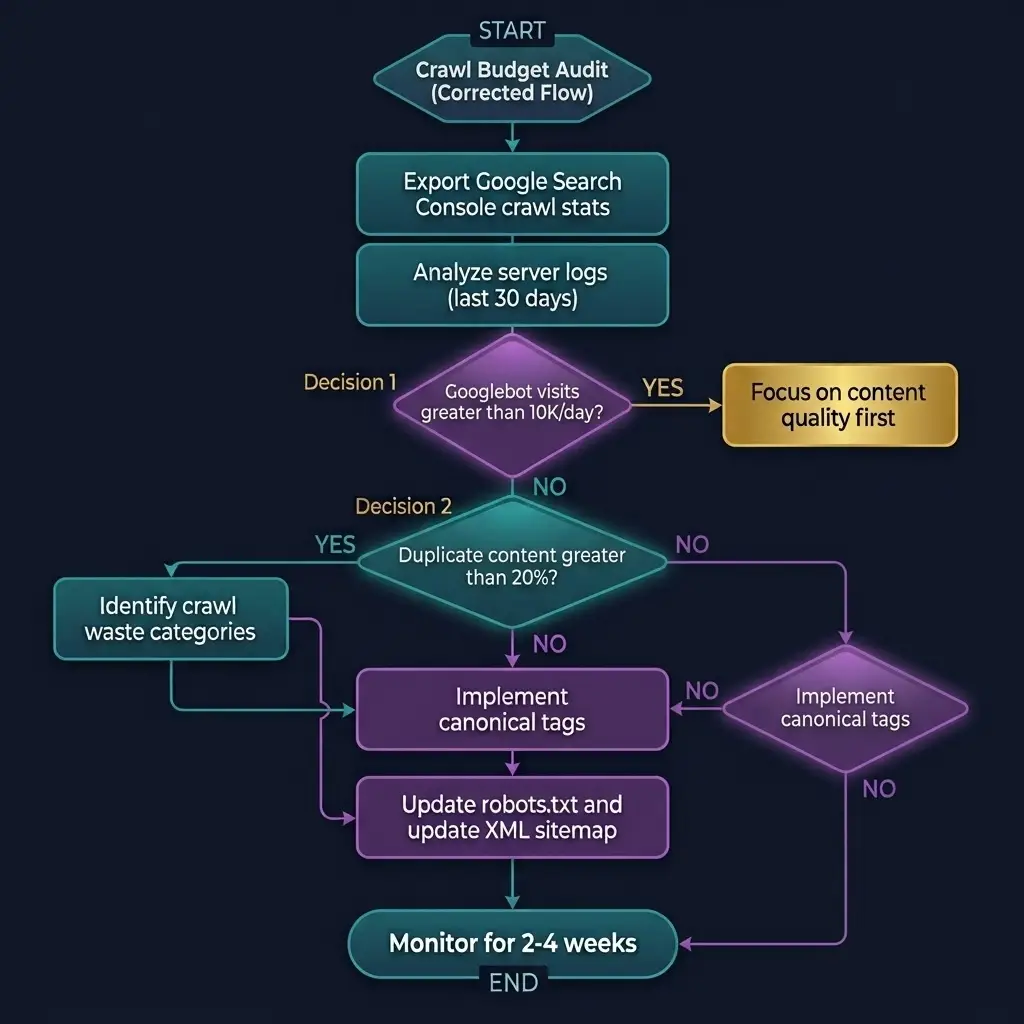
Crawl budget optimization becomes a critical engineering priority when your site architecture crosses specific scale or technical complexity thresholds.
1. Enterprise E-Commerce Platforms (100,000+ SKUs)
Large online stores frequently generate millions of dynamic URL combinations through faceted navigation (filters for color, size, price, and sorting order). If left unmanaged, Googlebot spends 90% of its daily crawl budget fetching duplicate parameter variations instead of indexing new, high-margin product pages.
2. Programmatic SEO & Dynamic Directory Stacks
Websites that generate pages programmatically based on database records (e.g., job boards, real estate listings, comparison engines) can spin up hundreds of thousands of landing pages overnight. Without strict canonical controls and dynamic sitemap management, Googlebot gets trapped crawling low-value or empty parameter pages.
3. Enterprise SaaS & Documentation Hubs
SaaS platforms hosting massive knowledge bases, user forums, API documentation, and multi-tenant subdomains often suffer from legacy URL bloat. Unindexed forum tags and outdated staging environments quietly siphon off Googlebot requests.
4. High-Frequency Digital Publishers (News & Media)
Major media outlets publishing hundreds of articles daily rely on instantaneous Googlebot crawling to surface breaking news in Google News and Google Discover. For publishers, a delayed crawl of even 30 minutes translates directly to lost traffic and ad revenue.
Now that we’ve defined the scale thresholds and identified who actually needs crawl budget management, let’s examine the five primary technical mechanisms that quietly drain Googlebot’s resources.
The 5 Major Culprits That Drain Googlebot's Crawl Budget
When Googlebot allocates its daily crawl budget to your domain, every single HTTP request carries an opportunity cost. If the crawler spends 80% of its request allowance on utility paths, dead-end redirects, or duplicate variations, your primary revenue-generating pages are left waiting in the discovery queue.
Below are the five most severe architectural breakdowns that consume crawl budget at scale.
1. Faceted Navigation & Infinite Parameter Combinations
Faceted navigation allows users to filter and sort products on e-commerce sites (e.g., filtering by size, color, material, brand, and price range). However, without strict URL handling, faceted systems trigger an infinite URL space explosion.
Why Canonical Tags Are Not Enough for Faceted Waste:
A common misconception is relying solely on rel="canonical" tags to solve faceted navigation waste.
While a canonical tag instructs Googlebot which master page to index, Googlebot must still fetch and render the URL to read the canonical directive. Therefore, if your server serves 500,000 parameter variations with canonical tags, Googlebot will still waste 500,000 HTTP fetches discovering those tags.
2. Redirect Chains, Loops, and Soft 404 Traps
Every redirect request forces Googlebot to initiate a second HTTP fetch. When redirects stack into multi-hop chains or circular loops, crawler efficiency drops sharply.
The Impact of Soft 404 Pages:
A Soft 404 occurs when a server returns an HTTP 200 OK status code for a page that actually displays “Out of Stock,” “Page Not Found,” or empty search results.
Because the HTTP header signals a successful response, Googlebot renders the thin content and assigns future crawl capacity to a dead URL space.
3. Low-Value Duplicate Archives & Unindexed Tag Pages
Content Management Systems like WordPress frequently auto-generate low-value archive pages by default, such as:
Date-Based Archives:
/2026/03/Author Archives:
/author/admin/(on single-author blogs)Excessive Tag Pages:
/tag/seo/,/tag/seo-tips/,/tag/technical-seo/
When a site generates thousands of tag archives containing the exact same article snippets, Googlebot allocates valuable crawl cycles to thin duplicate grids rather than core service or pillar pages.
4. Server Bottlenecks: Slow TTFB & High 5xx Server Error Rates
Your server’s physical infrastructure directly governs the Crawl Capacity Limit.
If Googlebot encounters a high Time to First Byte (TTFB) taking longer than 500ms to receive initial HTTP response headers, it automatically reduces its concurrent connection limit to prevent overloading your host.
The 5xx Error Circuit Breaker:
When Googlebot hits 500 Internal Server Error, 502 Bad Gateway, or 503 Service Unavailable responses during a crawl pass, it triggers an emergency throttling mechanism.
5. Unfiltered Internal Search Results & Orphan Dynamic Paths
Allowing search engine crawlers to access internal site search result pages (/search?q=keyword) creates an uncapped crawl trap.
Scraper bots and malicious automated scripts can append arbitrary strings to your site search box, forcing your server to generate thousands of thin, dynamic URLs.
If these dynamic internal search paths are linked internally or exposed in raw HTML feeds, Googlebot will follow the endless trail, wasting thousands of crawl requests on non-indexable utility endpoints.
We’ve looked at the major factors that can waste your crawl budget. But without analyzing website’s crawl data, it’s difficult to understand where and how to fix the issues.
That’s why, before making any changes, we’ll first look at how to analyze your server log files and Google Search Console’s Crawl Stats to identify crawl patterns and potential areas for improvement.
Diagnostic Workflow: How to Analyze Server Log Files & GSC Crawl Stats
To identify where Googlebot is wasting requests on your infrastructure, you must move beyond high-level dashboard summaries and analyze raw crawling data.
Diagnosing crawl budget efficiency relies on two primary data streams: Google Search Console Crawl Stats and Server Access Log Files.
Step 1: Auditing the GSC Crawl Stats Report
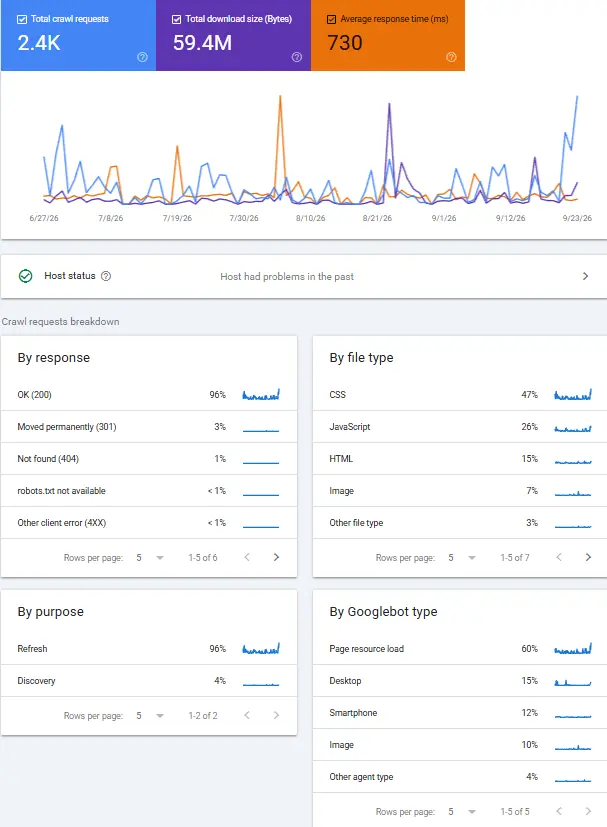
Navigate to Google Search Console → Settings → Crawl stats. This report reveals macro-level patterns in how Googlebot interacts with your host server over a rolling 90-day window.
Key Diagnostic Checks in GSC:
By Response: Check the percentage distribution of HTTP response status codes. Healthy enterprise domains should maintain >90%
200 OKresponses. If301/302redirects exceed 10% or5xxerrors exceed 1%, your site is actively bleeding crawl budget.By Purpose: Compare Discovery (fetching newly discovered URLs) versus Refresh (re-crawling known pages). If Refresh crawling consumes 95% of requests while new product pages remain un-crawled, Googlebot is trapped re-fetching unchanged legacy paths.
By File Type: Verify whether Googlebot is spending excess requests fetching static assets (
CSS,JS,Images) versus rawHTMLdocuments.
Step 2: Advanced Server Log File Analysis
While GSC provides sample aggregated data, Server Access Logs contain the absolute ground truth. Every single time Googlebot fetches a URL, your server records an entry containing the User-Agent, IP address, request timestamp, requested URL, and HTTP status code.
1. Verifying Authentic Googlebot Requests via Terminal
Scrapers often spoof the Googlebot User-Agent string to bypass firewalls. Before analyzing log patterns, verify that requests originate from verified Google IP blocks using reverse DNS lookup:
# Terminal Command: Reverse DNS lookup to verify Googlebot IP
host 66.249.66.1

# Expected Output:
# 1.66.249.66.in-addr.arpa domain name pointer crawl-66-249-66-1.googlebot.com.
2. Isolating Googlebot Hits from Raw Access Logs
Use command-line utilities (like grep and awk) or log analysis software (GoAccess, Screaming Frog Log File Analyser) to isolate bot hits and group by URL pattern:
# Terminal Command: Filter access log for Googlebot hits and extract top 10 requested URLs
grep -i "Googlebot" /var/log/nginx/access.log | awk '{print $7}' | sort | uniq -c | sort -nr | head -n 10
3. Analyzing Key Log Metrics for Crawl Waste:
Crawl Frequency by Directory: Identify which site directories receive the highest fetch volume. If
/tag/or/?sort=directories receive 50,000 requests/day while/product/receives only 2,000, update yourrobots.txtdisallow rules immediately.Orphan URL Detection: Compare your log file hit list against your XML sitemap. If Googlebot is hitting thousands of URLs that do not exist in your sitemap or internal site structure, uncover where those legacy links are leaking.
Status Code Ratio Breakdown: Group Googlebot hits by status code (
200,301,302,404,500,503). Any non-200 cluster indicates an active crawl sink requiring technical remediation.
So now we’ve covered how to analyze crawl budget. Now let’s move on to the main part: Once we’ve identified what is wasting or could potentially waste our site’s crawl budget, what can we do about it?
Let’s explore the best ways to optimize your site’s crawl budget.
How to Optimize Website Crawl Budget? (An Actionable Playbook)
To reclaim lost crawl capacity and direct search engine crawlers toward high-converting URLs, engineering teams and technical SEOs must deploy systematic blocking, server tuning, and canonical filtering protocols.
Step 1: Managing Faceted Navigation (Robots.txt vs. Canonicalization Trade-offs)
Because canonical tags still require Googlebot to fetch the URL to read the tag, controlling faceted parameter waste requires strategic directive layering:
When to Disallow in
robots.txt: Block non-indexable filter parameters that offer zero search intent (e.g.,Disallow: /*?sort=orDisallow: /*?page_size=). This prevents Googlebot from making the HTTP request entirely, saving 100% of the crawl budget allocated to those parameters.When to Allow with Canonical Tags: If a facet target represents a legitimate search query (e.g., “red leather shoes”), keep the parameter crawlable and point it to a clean target or self-referencing canonical URL.
Step 2: Server Infrastructure Optimization (TTFB Target <200ms)
Increasing your Crawl Capacity Limit requires improving your host server’s response time under heavy bot loads.
Implement Edge Caching (CDN Level): Deploy Cloudflare, Fastly, or Cloudfront to cache static HTML pages at the edge. Edge caching returns a
200 OKresponse in under 50ms without hitting your origin database.Optimize Database Queries: High Time to First Byte (TTFB) is frequently caused by unindexed SQL queries fetching dynamic product variations.
Handle 5xx Spikes Gracefully: Ensure your load balancer returns a clean
503 Service Unavailableheader with aRetry-After: 3600directive during maintenance, preventing Googlebot from permanently lowering your daily crawl allowance.
Step 3: Streamlining Redirect Paths & Purging Dead URLs
# Terminal Diagnostic: Audit Redirect Chains & Status Codes
curl -IL -A "Googlebot" https://example.com/legacy-product-path
Flatten Redirect Chains: Audit your site for internal links pointing to 301 paths. Update all internal links to point directly to the final
200 OKdestination.Convert Soft 404s to True 410 Gone: If a product category or SKU is permanently removed, configure your server to return an HTTP
410 Gonestatus code. Googlebot purges410endpoints from its re-crawl queue significantly faster than standard404 Not Foundpages.
Did you know that improving crawl depth can also help optimize crawl budget? Let’s explore the relationship between the two.
The Relationship Between Crawl Depth & Crawl Budget
While Crawl Budget dictates how many total pages Googlebot fetches from your server, Crawl Depth dictates how deep into your site architecture Googlebot is willing to navigate.
I’ve already created a dedicated guide covering what crawl depth is, its role in SEO, how to measure it, and how to fix crawl depth issues. So, we won’t repeat that information here.
If you want to learn more about crawl depth and its role in SEO, you can read the full guide here.
How Crawl Depth Compounds Crawl Budget Waste:
If a high-margin product page is buried 4 or 5 clicks away from the homepage, Googlebot assigns it a low internal PageRank score. When Googlebot’s daily crawl budget allowance runs out while fetching shallow category or parameter pages, it aborts the crawl pass before ever reaching deeper URLs.
Reducing Crawl Depth Protects Crawl Budget: By flattening your site hierarchy so all valuable canonical pages sit within 3 clicks of the homepage, you ensure that even limited crawl budget allocations reach your most important content.
Need a deeper dive into structural link architecture?
For a complete analysis on structuring click paths and internal link equity, read my detailed guide on Crawl Depth vs Crawl Budget.
Frequently Asked Questions (Crawl Budget SEO)
How do I know if Googlebot is wasting my crawl budget?
You can identify crawl budget waste by reviewing your Google Search Console Crawl Stats report and analyzing server log files. Look for two primary warning indicators:
High Non-200 Status Code Ratio: If more than 10-15% of Googlebot’s total requests return
301/302redirects,404errors, or5xxserver failures.High Fetch Volume on Non-Indexable Paths: If server log files show thousands of daily hits on faceted parameter strings (e.g.,
?sort=,?filter=), author archives, or internal search URLs instead of canonical product pages.
Does adding a noindex tag save crawl budget?
No. A noindex directive does not stop Googlebot from crawling a page.
To discover and parse the <meta name="robots" content="noindex"> tag, Googlebot must complete the HTTP fetch and download the page HTML consuming crawl budget in the process. Over time, Googlebot will reduce re-crawl frequency for noindex pages, but to stop crawling immediately and save budget, you must block the path via robots.txt.
Can I manually request Google to increase my crawl budget?
No. Google does not offer a manual button or request form to increase crawl budget.
Crawl budget is calculated automatically based on server response speed and domain authority. The only way to increase your allowance is to reduce server latency (keep TTFB under 200ms), eliminate 5xx server errors, and build high-quality external backlinks to increase overall domain Crawl Demand.
How fast does Googlebot adjust crawl budget after server fixes?
After resolving server speed bottlenecks or fixing 5xx error spikes, Googlebot typically begins adjusting its crawl rate within 24 to 48 hours.
However, full crawl budget stabilization across a large enterprise site (100,000+ URLs) can take 2 to 4 weeks as search engines re-evaluate server reliability over time.
Does JavaScript rendering consume more crawl budget than static HTML?
Yes. Executing client-side JavaScript requires significant computing resources within Google’s Web Rendering Service (WRS).
When Googlebot encounters heavy dynamic scripts, it defers JavaScript execution to a second rendering queue. If your API calls respond slowly during rendering, Googlebot may abort the pass, wasting your rendering allocation and leaving dynamic content un-crawled.
Final Thoughts
Crawl budget optimization is not about forcing Googlebot to index every corner of your website. It is about directing search engine resources toward your highest-value, revenue-generating pages.
For enterprise domains, e-commerce stores, and programmatic stacks, eliminating parameter leaks, flatting redirect chains, and maintaining server response times under 200ms ensures that Googlebot discovers new content rapidly without burning capacity on utility waste.
Is Crawl Waste or Server Latency Stalling Your Search Visibility?
A single unmanaged parameter filter or a surge in server response latency can quietly stall search engine discovery and leave your critical landing pages waiting in the rendering queue. When managing complex site architectures or scaling dynamic catalogs, maintaining absolute control over your server efficiency is essential for sustained growth.
Ensure your rendering pipeline, server directives, and crawl architecture are fully optimized with my Technical SEO Services or Schedule a free SEO Consultation.
Explore Other Articles Under Technical SEO Side
Pillar Blogs
What is Technical SEO? (Parent Blog)
- Crawlability and Indexability in SEO (Child Blog)