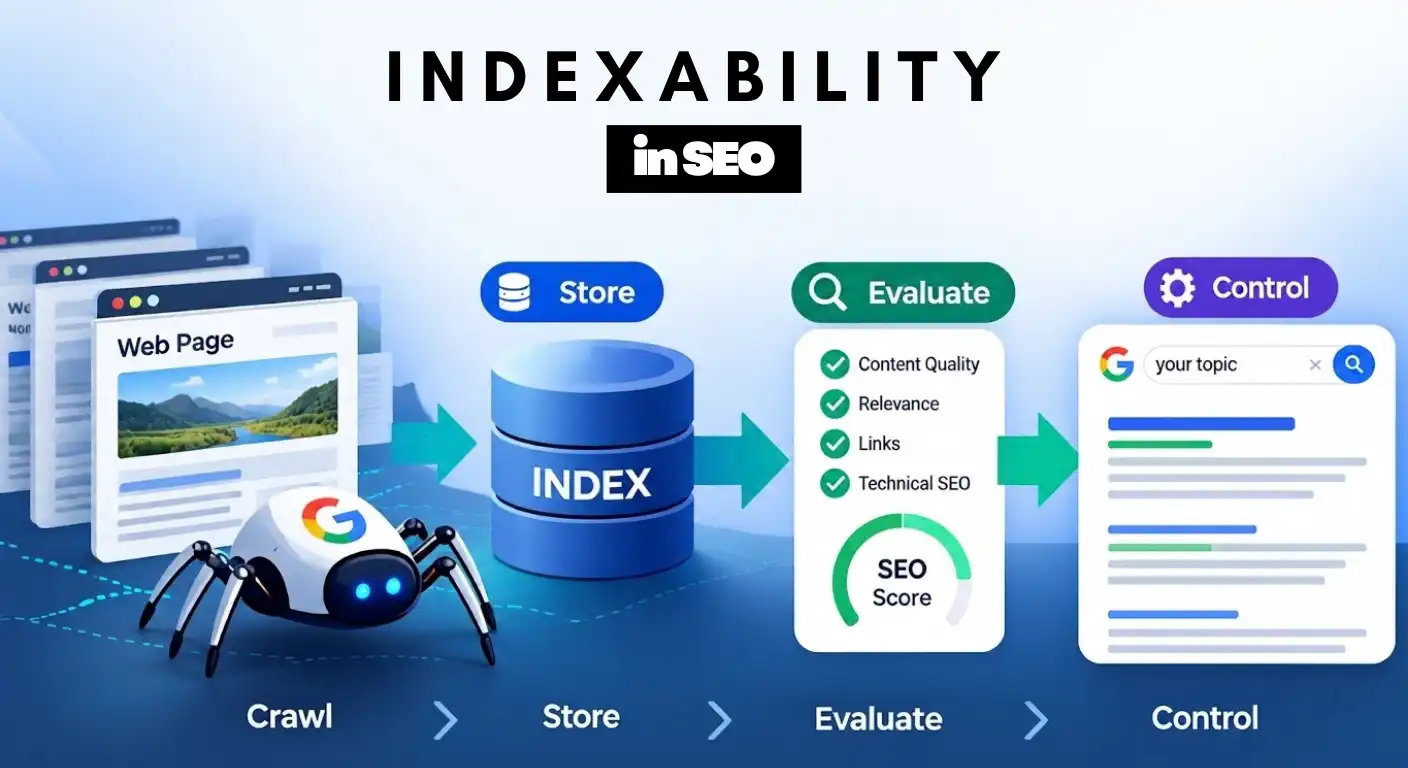
Search engines do not rank raw web pages; they rank stored, processed representations of web pages residing inside their databases. While web crawlability dictates whether a search engine bot can reach and fetch your site’s assets, indexability determines whether that fetched content meets the technical and quality thresholds required to be stored in the search engine’s index.
Without indexability, your content is essentially invisible to search traffic—regardless of how well-written, authoritative, or beautifully designed it might be.
What We Will Cover in This Guide
The Indexation Pipeline: How search engines process raw HTML, execute JavaScript via Web Rendering Services (WRS), and parse content into their database.
Page-Level Control Directives: Complete syntax, execution mechanics, and implementation workflows for Meta Robots tags and HTTP
X-Robots-Tagheaders.Server Configurations: Ready-to-deploy Nginx and Apache
.htaccesscode snippets to control non-HTML files (PDFs, DOCX, API payloads).Directives vs. Signals: How to avoid catastrophic configuration traps like combining
robots.txtdisallows withnoindexdirectives or misusing canonical tags.
How Search Engines Evaluate and Store Your Pages (The Indexing Pipeline)
Crawling vs. Rendering vs. Indexing: Why Discovery Doesn’t Mean Storage
To diagnose organic performance issues accurately, you must separate the search engine discovery process into three distinct, sequential phases:
Crawling (Discovery & Fetch): The process where an automated bot (e.g., Googlebot, Bingbot) requests a URL from your web server, downloading the initial HTTP response payload (raw HTML, server headers, and referenced resource paths).
Rendering (Execution & Processing): The stage where the search engine processes the page’s code. For client-side rendered sites (such as React, Angular, or Vue applications), a Web Rendering Service (WRS) executes JavaScript, fetches deferred CSS, builds the Document Object Model (DOM), and uncovers dynamically injected links and content.
Indexing (Evaluation & Storage): The final stage where the search engine evaluates the parsed text, media, metadata, and structural signals from the rendered DOM. If the page satisfies technical rules and quality standards, its signals are written to the main search database (the Index), making it eligible to be retrieved during user queries.
The 4-Stage Indexing Pipeline: How Googlebot Parses and Categorizes DOM Data
When a search engine indexer receives a rendered page DOM, it passes the document through a structured pipeline before committing it to storage:
Text Parsing & Tokenization: The indexer strips out styling and boilerplate code, breaking the remaining text into tokens (words, entities, and semantic relationships).
Canonicalization & Deduplication: The engine compares the extracted tokens against existing documents in its index. It evaluates canonical headers, internal link clusters, and content similarity to decide whether this URL represents a primary document or a duplicate/variant.
Signal Extraction: The pipeline records page-level attributes, including heading hierarchies (
H1–H6), structured data schemas (JSON-LD), language tags, link equity values (PageRank), and response header directives.Inverted Index Insertion: Finally, the extracted tokens are mapped to the document ID inside an Inverted Index—a massive lookup table that matches terms and entities directly to the URLs containing them.
Why Indexability Is an Earned Signal (Not an Automatic Guarantee)
A common misconception in technical SEO is that successfully crawling a URL guarantees its inclusion in the index. Search engines operate under strict hardware, storage, and energy budgets. Consequently, an HTTP 200 OK status response merely indicates that a page is accessible—it does not grant an automatic right to database storage.
Indexability is an earned outcome gated by two distinct validation stages:
Technical Validation (The Directive Pass): The indexer checks for clear technical permission to store the document. If HTTP response headers, meta directives, or canonical configurations flag a restriction, the document is rejected before any deeper evaluation occurs.
Value Validation (The Inclusion Pass): If technical permission is present, the page enters an evaluation queue where search engine algorithms determine whether storing and serving this URL justifies the ongoing infrastructure cost.
Without passing both technical permission checks and value evaluation criteria, a page remains unindexed regardless of its crawl status.
What Triggers Google to Reject or Accept a URL in Its Index?
Once a page satisfies basic technical requirements, search engine indexers evaluate its structural integrity and informational value. Passing this phase determines whether the page is committed to the primary index or filtered out to preserve index efficiency.
Quality Thresholds: Information Gain, Search Intent, and Thin Content Traps
Modern search engines do not index pages simply because they contain relevant keywords. Indexers evaluate whether a document provides Information Gain: unique, non-redundant value that expands upon the search engine’s existing index of knowledge for a given topic.
Search Intent Satisfaction: The page must directly address the underlying intent of targeted search queries (informational, transactional, commercial, or navigational). Pages that miss intent markers or present mismatched content structures are deprioritized during index processing.
Content Originality & Corpus Redundancy: If an indexer determines that a page merely rephrases, scrapes, or aggregates existing top-ranking content without introducing new perspectives, data points, or unique value, it flags the document as corpus-redundant.
Thin & Auto-Generated Content Filtering: Pages with minimal main content (MC), high template-to-text ratios, or programmatic thin text often fail quality evaluation, resulting in GSC statuses such as “Crawled – Currently Not Indexed”.
Client-Side vs. Server-Side Rendering: Fixing JavaScript Execution Bottlenecks
The architecture used to render your web pages directly impacts how—and when—indexers evaluate content structure and internal links.
Server-Side Rendering (SSR) & Static HTML
Mechanism: The server generates complete HTML document trees before responding to the search bot’s request.
Indexation Impact: Search engine indexers extract text, links, schemas, and meta directives immediately in a single fetch pass. This minimizes processing delays and accelerates initial indexation.
Client-Side Rendering (CSR) & Dynamic Frameworks
Mechanism: The server returns a bare HTML shell containing client-side JavaScript bundles (React, Angular, Vue). The browser or search engine must execute JS scripts to build the final DOM.
Indexation Impact: Search engine indexers handle CSR via a Two-Pass Pipeline:
First Pass: Raw HTML is fetched and indexed (often missing dynamically injected text and internal links).
Second Pass: The URL is placed in a rendering queue for the Web Rendering Service (WRS) to execute JavaScript and compile the final DOM.
The Risk: Queue delays at the WRS stage can cause temporary indexation gaps, missing dynamic meta tags, or missed internal link discovery if dynamic elements take too long to resolve.
How to Master Meta Robots and HTTP Header Directives
While crawlability determines whether search engines can access your files, page-level directives act as the explicit control engine that tells search indexers what to store, how to display it, and what to ignore.
Directives exist in two primary layers: HTML Meta Tags (for standard web pages) and HTTP Headers (for both web pages and non-HTML assets).
Meta Robots HTML Syntax: Setting Page-Level Indexing Rules
Meta Robots tags are HTML attributes placed inside the <head> section of a document. They instruct search engine indexers on how to handle the page once it has been fetched.
Standard HTML Syntax
<head>
  <meta name="robots" content="noindex, follow">
</head>
Note: Setting
name="robots"targets all compliant search engine crawlers. To target Googlebot specifically, usename="googlebot".
Core Directives Breakdown
noindex: Instructs the indexer not to store the URL in the search database. The page remains accessible to users but will not appear in search engine results pages (SERPs).nofollow: Instructs the indexer not to discover or pass PageRank equity through the links found on that page. (Note:noindex, followis common when you want to remove a page from search but still allow Googlebot to discover internal links on it).nosnippet: Prevents search engines from displaying a text snippet or video preview for the URL in SERPs.max-snippet:[number]: Sets a maximum character length for the text snippet displayed in SERPs. Using-1allows Google to determine the optimal snippet length automatically.max-image-preview:[setting]: Controls the visual size of images featured in SERPs or Google Discover. Settings includenone,standard, orlarge.
X-Robots-Tag: Controlling Non-HTML Assets, PDFs, and API Responses
HTML meta tags work well for standard web pages, but they cannot be embedded inside non-HTML files like PDFs, images, spreadsheets (.xlsx), or raw API JSON payloads.
To control indexability for non-HTML assets, you use the X-Robots-Tag HTTP header sent directly by your web server during the initial HTTP response.
Example HTTP Response Header
HTTP/1.1 200 OK
Date: Mon, 05 Oct 2026 12:00:00 GMT
Content-Type: application/pdf
X-Robots-Tag: noindex, nofollow
When search engine indexers receive this HTTP response header, they obey the noindex instruction immediately, even though the file contains no HTML <head> tag.
Nginx & Apache Server Setup: Copy-Paste Code Snippets for HTTP Headers
Implementing the X-Robots-Tag requires configuring your web server or edge network (like Cloudflare). Here are production-ready code snippets for standard server setups:
1. Apache Configuration (.htaccess or httpd.conf)
Scenario A: Apply noindex to all PDF files on the server
<FilesMatch "\.(pdf)$">
    Header set X-Robots-Tag "noindex, nofollow"
</FilesMatch>
Scenario B: Block an entire staging directory from being indexed
<IfModule mod_headers.c>
    Header set X-Robots-Tag "noindex, nofollow"
</IfModule>
2. Nginx Configuration (nginx.conf)
Scenario A: Apply noindex to specific file extensions (PDFs, DOCX, ZIPs)
location ~* \.(pdf|docx|zip)$ {
    add_header X-Robots-Tag "noindex, nofollow";
}
Scenario B: Apply noindex to a specific dynamic URL endpoint or directory
location /private-reports/ {
    add_header X-Robots-Tag "noindex, nofollow";
}
Meta Tags vs. X-Robots-Tag: When to Deploy Each Directive
Choosing between HTML Meta Tags and HTTP Headers depends on file type, CMS access, and infrastructure control.
| Criterion | HTML Meta Robots Tag | HTTP X-Robots-Tag Header |
| Supported File Types | HTML / XHTML pages only | All file types (HTML, PDF, Images, JSON, XML) |
| Execution Point | Parsed after HTML fetch/rendering | Evaluated immediately at the HTTP Response level |
| Implementation Method | On-page code, CMS plugins (Yoast/RankMath) | Server config files (.htaccess, Nginx), CDN edge rules |
| Best Use Case | Individual blog posts, landing pages, taxonomy archives | Protecting PDFs, staging environments, global site subdirectories |
| Technical Requirement | Basic CMS/HTML access | Server administrative access or CDN access |
The “Robots” Distinction (Clear the Confusion):
robots.txtcontrols CRAWLING (Access Layer). It tells search engine bots whether they are allowed to enter or fetch a URL path on your server.
Meta Robots&X-Robots-Tagcontrol INDEXING (Storage Layer). They instruct search indexers whether to store, display, or drop a fetched page in their database (noindex).Blocking a URL in
robots.txtdoes NOT applynoindex,it simply stops search bots from reading the page.
Deadly Directives Conflicts That Silently Kill Indexation
Even when page-level directives are correctly written, technical conflicts between crawlability rules and indexability signals can completely break search engine execution.
The robots.txt Disallow Trap: Why Blocked Pages Ignore Your noindex Tags
The most common enterprise technical SEO error is attempting to remove a page from search results by applying a noindex tag while simultaneously blocking that URL in robots.txt.
How the Execution Failure Happens:
robots.txtDisallow acts at the fetching phase. It instructs search bots not to download the URL.noindexdirectives (via Meta Robots orX-Robots-Tag) act at the parsing phase. To execute anoindexcommand, a search bot must download and read the HTTP headers or HTML DOM.The Result: Because
robots.txtblocks access, search bots never see thenoindexdirective. If the page has external back-links or internal link equity, search engines will still store and display the bare URL in search results as an orphaned index entry (often rendered without a text snippet).
The Correct Removal Workflow:
Keep the URL ALLOWED in
robots.txtso search bots can fetch it.Apply the
noindexdirective (via Meta tag orX-Robots-Tag).Wait for search engines to crawl and parse the page, confirming its removal from the index.
(Optional) Once removed from SERPs, apply a
robots.txtdisallow rule if saving ongoing crawl budget is necessary.
noindex vs. rel="canonical" Conflicts: How Conflicting Signals Confuse Google
A critical architectural distinction exists between indexing directives and canonical signals:
noindexis an EXPLICIT DIRECTIVE: It is a strict command. When search indexers parsenoindex, they must drop the page from search results. It does not transfer PageRank or ranking signals to another URL; it simply removes the document.rel="canonical"is a SUGGESTED SIGNAL: It instructs search engines: “This page is a duplicate or variant; please consolidate its link equity and ranking signals into the primary target URL.” Search engines treat canonicals as hints rather than absolute commands.
The Conflicting Signal Conflict:
Do NOT combine noindex and rel="canonical" on the same page. Adding <meta name="robots" content="noindex"> alongside a rel="canonical" pointing to Page B creates contradictory instructions:
noindextells the search engine to drop the URL completely.rel="canonical"tells the search engine to pass PageRank equity to Page B.
In modern indexer execution, a sustained noindex causes search bots to eventually stop crawling and following links on that page—effectively killing the equity transfer to your canonical target.
Identifying Over-Indexation and Under-Indexation Signals
When monitoring a site’s search health, indexation issues rarely present as simple “indexed” or “not indexed” states. Instead, they typically manifest as two major architectural anomalies: Over-Indexation (having too many junk pages stored) and Under-Indexation (failing to get valuable pages stored).
Over-Indexation Warnings: Early Indicators of Index Bloat
Over-Indexation: commonly referred to as Index Bloat, occurs when search engines discover, render, and store thousands of low-value, duplicate, or auto-generated URLs that offer zero search value.
Common Triggers:
Faceted Navigation & URL Parameters: E-commerce filter combinations (e.g.,
?color=red&sort=price_asc) creating infinite URL variations.Internal Search & Tag Archives: Auto-generated WordPress tag pages, internal search results, or thin author archives exposed to search bots.
Unprotected Staging Environments: Staging subdomains or protocol mixes (
httpvs.https) accidentally leaked and stored in search engine databases.
Why It Harms Technical Performance:
When an indexer stores thousands of low-quality pages alongside your primary content, it dilutes your sitewide quality score. Search engines allocate finite storage resources per domain; flooding the index with low-value parameter URLs reduces the evaluation frequency and ranking strength of your core revenue pages.
Under-Indexation Bottlenecks: Uncovering Discovery & Quality Failures in GSC
On the opposite end of the spectrum is Under-Indexation—where high-value, unique, and strategically important URLs remain outside the search database despite returning 200 OK HTTP status codes.
Primary Diagnosis Flags in Google Search Console:
“Discovered – Currently Not Indexed”: Google knows the URL exists, but has deferred crawling it due to crawl budget constraints, low internal link equity, or server load limits.
“Crawled – Currently Not Indexed”: Googlebot fetched and evaluated the page, but explicitly decided not to store it. This points directly to content quality issues, thin information gain, or unoriginal value compared to existing index results.
Soft 404 Errors: Pages that return a valid
200 OKstatus code, but display empty layouts, broken templates, or missing main content, leading indexers to treat them as broken pages.
Technical Summary: What We Covered in This Article
Let’s wrap up the foundational concepts covered in this guide:
Crawling gets search bots to your page; rendering compiles the DOM; indexability determines whether that DOM deserves storage in the search engine’s database.
Use Meta Robots tags for standard HTML pages, and implement
X-Robots-TagHTTP headers across web servers (Nginx/Apache) to control non-HTML files like PDFs, spreadsheets, and dynamic API endpoints.Never block a
noindexpage insiderobots.txt, as search bots must fetch the HTTP response to parse the instruction. Avoid mixingnoindexcommands withrel="canonical"tags to preserve equity signals.Recognize whether your site suffers from Index Bloat (over-indexation of junk URLs) or GSC Indexing Failures (under-indexation of primary content) to apply the correct technical fix.
Conclusion
Maintaining a healthy search presence requires active governance over your site’s indexability. By separating crawl access from index inclusion, implementing precise directive controls, and actively monitoring search engine rendering behavior, you ensure that search engines evaluate and store only your highest-value content.
Frequently Asked Questions (FAQs)
Q1: What is website indexing in a search engine?
Website indexing is the process where a search engine parses, evaluates, and stores a web page’s content, directives, and metadata in its database (the Index).
While crawling discovers and fetches a page’s raw code, indexing determines whether that content meets the technical and quality thresholds required to be stored and retrieved for user search queries.
Q2: How does Google indexing work?
Google processes web pages through a structured, multi-stage pipeline:
HTTP Fetching: Googlebot downloads the initial HTML document and HTTP server headers.
Web Rendering (WRS): If client-side JavaScript is detected, Google’s Web Rendering Service executes the code to render the full Document Object Model (DOM).
Parsing & Signal Extraction: Google analyzes the rendered DOM to extract text tokens, structured data (
JSON-LD), canonical headers, and page-level directives (meta robots).Index Insertion: If the URL passes technical directives (
noindexchecks) and meets quality standards, it is added to Google’s Inverted Index.
Q3: How do I submit a website or page to Google for indexing?
To notify Google of new or updated content and request indexation:
Submit XML Sitemaps: Upload your XML sitemap URL via Google Search Console (Indexing $\rightarrow$ Sitemaps) to give Googlebot a complete, updated list of valid URLs.
Use the URL Inspection Tool: Input a specific URL into Google Search Console’s top search bar, click “Request Indexing”, and trigger a real-time crawl request.
Build Internal Links: Add contextual internal links from high-authority, frequently crawled pages on your site to accelerate organic discovery.
Q4: How long does Google take to index a new web page?
Indexation timelines vary based on domain authority, internal linking structure, and content quality. For established websites with high crawl frequency, new pages can be indexed in a few minutes to hours. For newer sites or deep pages with low internal link equity, indexation can take anywhere from a few days to several weeks.
Q5: Does a noindex, follow tag continue to pass PageRank equity indefinitely?
No. While Googlebot initially respects the follow directive on a noindex page to discover links, Google has confirmed that long-term noindex pages are eventually treated as noindex, nofollow. Once Google stops crawling the page regularly, it stops processing or passing link equity through those links.
Q6: Should I use a noindex tag or a rel="canonical" tag for duplicate content?
Use
rel="canonical"when you have similar or duplicate pages (e.g., product variants, staging URLs) and want to consolidate ranking signals and PageRank equity into a single primary URL.Use
noindexwhen you want a page completely removed from search results (e.g., thank-you pages, internal search results, admin dashboards) without consolidating signals.
Q7: Can a search engine index a URL without actually crawling it?
Yes. If a URL is blocked via robots.txt but receives strong external backlinks or internal signals, search engines can index the URL based solely on off-page anchor text and context. However, because the crawler cannot fetch the page contents, it will display in SERPs as a bare, snippet-less result.
Explore Other Articles Under Technical SEO Side
Pillar Blogs
What is Technical SEO? (Parent Blog)
- Crawlability and Indexability in SEO (Child Blog)