

For large e-commerce catalogs and massive programmatic directories, user experience relies heavily on faceted navigation. Facets allow shoppers to instantly filter down tens of thousands of products by attributes like color, size, brand, price range, and material.
However, from a search engine crawling perspective, unmanaged faceted navigation is one of the single most destructive architectural issues a site can face. Without strict technical parameters, a single category page can rapidly generate millions of duplicate URL variations.
Understanding how to control faceted navigation allows technical SEOs and engineering teams to eliminate crawl traps, protect indexation bandwidth, and capture valuable long-tail search demand without diluting domain authority.
In this guide, we will break down the mathematical mechanics of parameter bloat, evaluate the four core technical control methods alongside their trade-offs, and provide a decision framework and platform playbook to manage facets across Shopify, WooCommerce, and Headless JavaScript stacks.
What Is Faceted Navigation?
Faceted navigation is an advanced filtering system used by dynamic websites to let users customize product listings or directory databases across multiple dimensions simultaneously.
Unlike standard site navigation, which relies on a static, hierarchical folder structure (e.g., /shoes/mens/running/). Faceted systems generate dynamic URL strings containing query parameters whenever a user checks a filter box.
Facets vs. Standard Navigation: How 10 Filters Create 1,000,000+ URLs
The underlying problem with faceted navigation is combinatorial URL multiplication.
When multiple filter options can be selected independently, the total number of unique URL variations grows exponentially based on the number of available facets.

If a standard apparel catalog category contains 5 simple filter groups, the mathematics quickly spiral out of control.
A single category hub with just 38 filter options can generate 38,610 unique URLs. If your store has 100 top-level categories, your host server suddenly exposes over 3.8 million URLs for search engines to discover, crawl, and render.
The Hidden SEO Costs: Crawl Traps, Index Bloat, & Equity Dilution
When search engine bots encounter unmanaged parameter spaces, three distinct technical breakdowns occur simultaneously:
1. Severe Crawl Budget Waste (Crawl Traps)
Googlebot allocates a finite Crawl Budget (the total number of HTTP requests a crawler can make to your server per day) based on server speed and domain authority.
When millions of parameter variations exist, Googlebot spends 80-90% of its request allowance crawling redundant sorting sequences (?sort=price_asc) and empty filter grids instead of fetching new product releases or core pillar pages.
2. Mass Index Bloat & Thin Content Dilution
When search engines attempt to index thousands of minor parameter combinations, your site suffers from Index Bloat (having vast numbers of low-quality, low-value pages in Google’s index).
Parameter variations that return only 1 or 2 products or empty result grids, are classified as thin content. This dilutes overall site quality signals, lowering performance across the entire domain.
3. Internal Link Equity Dilution & Keyword Cannibalization
Every link on a web page passes a portion of PageRank (internal link equity).
When category pages contain dozens of parameter links in the sidebar, internal authority gets split across thousands of thin URLs instead of concentrating on high-converting category hubs. Furthermore, multiple parameter combinations compete against each other for the exact same target keywords, triggering keyword cannibalization.
Now that we’ve broken down the mathematical mechanics of parameter bloat and its impact on site architecture, let’s establish a clear framework for deciding which facet variations deserve indexing versus which must be blocked.
The Indexation Framework: Which Facets Deserve Indexing?
The biggest strategic mistake in e-commerce technical SEO is taking an all-or-nothing approach to faceted navigation. Either allowing search engines to index every dynamic parameter variation, or blocking the entire filter space completely.
A consultant-grade SEO strategy treats faceted navigation as a selective indexing engine. The goal is to establish a strict gatekeeping framework that permits search engine indexing only for facet combinations that mirror active search demand, while systematically blocking utility variations.
The Search Demand Threshold (Targeting Long-Tail Intent)
To determine whether a specific facet or filter combination should be exposed to search engines, it must pass the Search Demand Threshold.
A facet variation earns the right to be indexable if it satisfies three core criteria:
Proven Organic Search Volume: Users are actively searching for that specific attribute combination in Google (e.g.,
"men's red leather jackets"has consistent monthly search volume).Distinct Product Inventory: The filter selection returns a robust inventory grid (at least 6-10 unique products). Exposing filter variations that yield 1 or 2 items risks triggering thin content flags.
Unique Page Metadata & Content Potential: The page can support a distinct H1 tag, meta tags, custom descriptive text, and a self-referencing canonical tag.
Decision Matrix: Indexable Facets vs. Non-Indexable Utility Filters
FACET INDEXABILITY DECISION MATRIX | ||
Type / Combination | Organic Search Demand State | Indexation Strategy |
Brand Facets Primary Attribute (Color/Mat) Multi-Facet Combinations Price Range / Sorting Multi-Select Same Facet | High (e.g., “Nike Shoes”) High (e.g., “Leather Boots”) Low (e.g., “Red + Size 10”) Zero (Utility Function) Zero (e.g., “Red + Blue”) | Index (Static URL Slug) Index (Static URL Slug) Block or Canonicalize Disallow / AJAX Filtering Disallow / AJAX Filtering |
Why Multi-Select Facets Should Almost Always Be Blocked:
When a user selects two values within the exact same filter category such as checking both Red and Blue under color, the resulting URL (/shoes/?color=red&color=blue) creates a fragmented user state.
Because consumers rarely search for "red and blue shoes" in a single query, multi-select parameter strings fail the search demand test and should be blocked from search engine crawling.
Converting High-Value Facets into Static, Crawlable Subcategories
When a filter combination passes the Search Demand Threshold, do not leave it as a messy dynamic parameter URL (e.g., /shoes/?brand=nike&color=red). Dynamic query strings receive lower crawl priority over time and are prone to canonical confusion.
Instead, transform high-value facet variations into clean, static URL paths integrated directly into your site’s physical hierarchy:
 Dynamic Parameter Path (Avoid for High-Demand Keywords):
 https://example.com/shoes/?category=running&color=red

 Optimized Static Subcategory Path (Recommended Execution):
 https://example.com/shoes/running/red/
By converting high-demand facets into clean subcategories, you capture long-tail organic search traffic while leaving utility filters safely isolated behind technical directives.
Now that we’ve established the Indexation Framework to separate high-value search facets from utility filters, let’s analyze the four core technical control methods used to handle non-indexable parameters.
The 4 Technical Control Methods (Pros, Cons & Critical Trade-Offs)
Managing non-indexable faceted parameter combinations requires balancing two competing technical goals: preserving crawl budget and consolidating internal link equity.
No single directive serves as a universal fix. Every method involves a distinct architectural trade-off that determines how search engine crawlers interact with your host server.
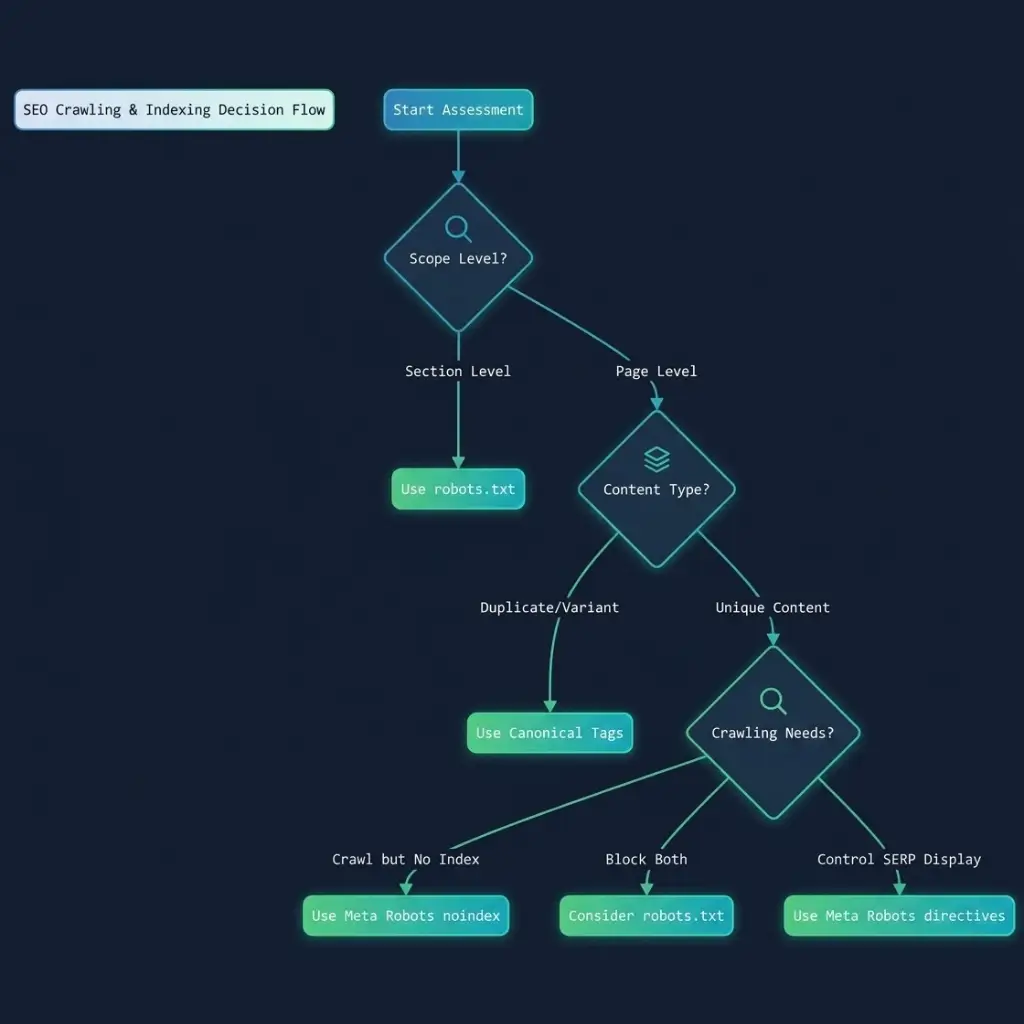
1. Robots.txt Disallow (Maximum Crawl Savings, Zero Link Equity Flow)
Adding disallow rules in your robots.txt file prevents Googlebot from making an HTTP request to matching URL patterns.
# Block non-essential query parameters in robots.txt
User-agent: Googlebot
Disallow: /*?*sort=
Disallow: /*?*price=
Disallow: /*?*size=
Pros: 100% Crawl Budget Preservation. Because Googlebot is forbidden from fetching matching URLs, zero host resources or request allowances are spent on blocked parameters.
Cons: Zero Internal Equity Flow. Internal links pointing to blocked parameters cannot pass PageRank downstream. Furthermore, if external sites link to a disallowed parameter URL, Googlebot cannot crawl the page to read a canonical tag, trapping equity on an un-crawled path.
The Indexation Catch: A
Disallowrule blocks crawling, not indexation. If a blocked parameter receives sufficient internal or external links, Googlebot may still index the bare URL without snippet content.
2. Canonical Tags (Link Equity Consolidation vs. Continued Crawl Waste)
Placing a rel="canonical" tag on parameter URLs instructs search engines to pass ranking signals and PageRank equity back to a master category URL (e.g., pointing /shoes/?color=red to /shoes/).
<!-- Parameter URL Page Header: https://example.com/shoes/?color=red -->
<link rel="canonical" href="https://example.com/shoes/" />
Pros: 100% Link Equity Consolidation. Consolidates duplicate variations back to the primary canonical hub, concentrating signals on core landing pages.
Cons (The “Canonical Trap”): Zero Crawl Budget Savings. This is the most prevalent misconception in e-commerce SEO. Googlebot must complete the HTTP request and render the page HTML to discover and parse the
rel="canonical"directive.
Critical Warning for Enterprise Catalogs:
Relying exclusively on canonical tags for a 500,000-parameter facet space means Googlebot will still execute 500,000 HTTP requests to read those tags, burning your host’s daily crawl capacity limit.
3. Meta Robots noindex, follow (Why It Traps Googlebot at Scale)
Placing <meta name="robots" content="noindex, follow"> in the HTML header of parameter variations instructs search engines to drop the URL from search results while following its internal links.
Pros: Guarantees clean removal of low-value parameter variations from Google’s index while allowing link equity to flow down to individual product pages.
Cons (The Long-Term Crawl Decay): Inconsistent Crawl Savings. To detect the
noindexdirective, Googlebot must fetch the page. Over time, as Googlebot observes a persistentnoindextag, it treats the path asnoindex, nofolloweventually ceasing to crawl or pass equity through those links altogether.
4. AJAX, PushState & PRG Pattern (The Ultimate Enterprise Solution)
For custom, headless, and enterprise e-commerce platforms, the most effective technical solution is decoupling user-facing filter UI states from crawler-accessible HTML links using AJAX dynamic updates and the Post-Redirect-Get (PRG) Pattern.
How the PRG & PushState Mechanism Works:
User Interaction: When a user checks a filter box (e.g., filtering by price or size), client-side JavaScript captures the input and updates the DOM dynamically via AJAX.
Browser URL Update (
history.pushState): JavaScript updates the browser URL bar for user bookmarking without forcing a full page reload or generating raw<a href>links in the DOM.Clean HTML for Crawlers: Search engine bots crawling the raw page HTML encounter static category links without parameter-heavy
hrefstrings, isolating crawlers entirely from the filter state.
Now that we’ve evaluated the technical mechanics and trade-offs of all four control directives, let’s examine a comparative matrix alongside a platform-specific implementation playbook for Shopify, WooCommerce, and Headless architectures.
Comparison Matrix: Choosing the Right Directives for Your Stack
Choosing the correct directive for non-indexable faceted parameters depends on your primary technical objective—whether you need to conserve crawl budget, preserve internal PageRank equity, or prevent index bloat.
The matrix below outlines how each directive performs across core technical SEO vectors:
FACET DIRECTIVE COMPARISON MATRIX | |||
Directive / Technique | Crawl Savings (Host Bandwidth) | Equity Preservation (PageRank Flow) | Indexation Control |
Robots.txt Disallow | 100% Saved | 0% Preserved | Soft Control |
rel=”canonical” Tag | 0% Saved | 100% Passed | Hard Control |
Meta Robots noindex | Temporary Savings | Degrades Over Time | Hard Control |
AJAX + PushState / PRG | 100% Saved | 100% Passed | Hard Control |
The Strategic Decision Rules:
Use
Robots.txt Disallowwhen your store has millions of dynamic parameter combinations (e.g., price range sliders, multi-select values) that are aggressively exhausting your daily Googlebot crawl limit.Use
rel="canonical"when dynamic filter URLs receive external backlinks or internal clicks that you must consolidate back to a single primary category hub.Use
AJAX + PushState / PRGfor enterprise e-commerce platforms and custom stacks to achieve complete crawl budget protection without sacrificing user experience or internal link equity.
Now that we have compared each control directive and evaluated their technical trade-offs across crawl savings, link equity flow, and indexation control, let’s look at how to implement these directives across different e-commerce platforms and custom JavaScript stacks.
How to Implement Faceted Navigation Control Across Different E-Commerce Platforms?
Translating faceted navigation strategy into code requires understanding how different content management systems handle parameter strings natively.
Shopify & WooCommerce Parameter Controls
1. Shopify Native & Storefront Options
By default, Shopify uses tag-based filtering (/collections/category/tag) or search parameters (/collections/category?filter.v.option=color).
Theme Liquid Editing for Custom Canonical Logic:
By default, Shopify canonicalizes tag-filtered collection pages back to the base collection URL. Verify or customize your
theme.liquidtemplate to ensure parameterized collection URLs do not generate self-referencing canonicals unless explicitly intended for long-tail targeting:
<!-- Shopify liquid canonical enforcement in theme.liquid -->
{% if template contains 'collection' and current_tags %}
  <link rel="canonical" href="{{ shop.url }}{{ collection.url }}" />
{% else %}
  <link rel="canonical" href="{{ canonical_url }}" />
{% endif %}
Robots.txt Customization (
robots.txt.liquid):Shopify allows direct editing of
robots.txt.liquid. Disallow native filter paths that create infinite combination traps:
# Block Shopify Native Search & Filter Parameters in robots.txt.liquid
User-agent: Googlebot
Disallow: /*?*filter.v.
Disallow: /*?*sort_by=
2. WooCommerce (WordPress)
WooCommerce relies on query strings for layered navigation (e.g., ?filter_color=red&query_type_color=or).
Managing via Rank Math / Yoast SEO: Enable the option to strip category base parameters and configure
noindexrules for tax-based archives under SEO Settings → Titles & Meta → Taxonomies.Engine-Level Blocking via
robots.txt: Prevent WooCommerce dynamic attributes from draining crawl capacity:
# WooCommerce Parameter Block Rules
User-agent: Googlebot
Disallow: /*?filter_*
Disallow: /*?query_type_*
Disallow: /*?min_price=*
Custom & Headless Stacks (React / Next.js Filtering)
In modern JavaScript frameworks (Next.js, Nuxt, Gatsby), faceted navigation is often rendered on the client side. If not architected correctly, client-side rendering can lead to rendering queue delays or accidental parameter crawling.
The Next.js / React URL State Pattern:
When building dynamic filtering in Next.js, decouple parameter state management from standard HTML <a href> links.
// Next.js Router Example: Updating UI State Without Triggering Full Page Reloads
import { useRouter } from 'next/router';

export default function FilterComponent() {
  const router = useRouter();

  const handleFilterChange = (selectedFacet, value) => {
    // Update the URL bar using shallow routing (PushState)
    // Prevents dynamic full-page re-renders and isolates crawlers
    router.push(
      {
        pathname: '/shoes/running',
        query: { ...router.query, [selectedFacet]: value },
      },
      undefined,
      { shallow: true }
    );
  };

  return (
    <button onClick={() => handleFilterChange('color', 'red')}>
      Red Shoes
    </button>
  );
}
Now that we’ve covered platform-specific execution, let’s look at a diagnostic workflow to help you spot dynamic parameter leaks using Google Search Console and Screaming Frog.
Diagnostic Workflow: How to Identify Faceted Leaks via GSC & Screaming Frog
Before applying technical directives or altering server configurations, you must quantify the exact extent of parameter leaks across your architecture.
A rigorous audit combines macro-level indexation signals from Google Search Console with granular link extraction and crawl simulations from Screaming Frog SEO Spider.
Step 1: Uncovering Parameter Bloat in Google Search Console
Google Search Console provides immediate visibility into how search engines categorize and process your parameter space.
1. Inspecting the Page Indexing Report
Navigate to GSC → Indexing → Pages. Review the Not Indexed section for three specific exclusion categories that indicate parameter leaks:
Duplicate without user-selected canonical: Indicates Googlebot discovered unmanaged parameter URLs that lack canonical tags.
Alternate page with proper canonical tag: Reveals parameter URLs that are correctly canonicalized but are still actively being fetched and processed by Googlebot (consuming crawl budget).
Crawled – currently not indexed: Signals that Googlebot is fetching thousands of thin parameter variations but discarding them due to low content value.
2. Advanced Search Filtering via Performance Report
Go to GSC → Search Results → Pages. Apply a custom regex filter to isolate traffic and impression leaks driven by query string parameters:
# Regex Filter to isolate parameter URLs in GSC
\?.*=
If parameter variations (e.g., URLs containing ?sort= or ?color=) accumulate impressions while splitting clicks away from canonical category hubs, your site is actively experiencing keyword cannibalization.
Step 2: Simulating Crawl Multiplication in Screaming Frog
Screaming Frog allows technical SEOs to audit internal link structures and measure how deeply parameter links penetrate the crawl graph.
1. Configuring Spider Parameters & URL Rewriting
By default, Screaming Frog crawls every parameter string it discovers in the DOM. To audit parameter leaks effectively:
Navigate to Configuration → Spider → Crawl. Ensure Crawl Fragment Identifiers and Query Strings are checked.
Run a full site crawl. Once completed, navigate to the Internal tab and apply the filter: Parameters.
2. Analyzing Parameter Depth & Inlinks
Inlinks Breakdown: Export the Inlinks report for high-volume parameter URLs. Identify sidebar navigation elements or dynamic filter grids that generate hundreds of internal links to utility parameters on every page.
Crawl Tree Visualization: Use Visualisations → Crawl Tree Graph to observe how parameter nodes multiply exponentially at deeper crawl levels (Depth 4+).
Step 3: Log File Cross-Verification
To confirm whether Googlebot is actively burning requests on parameter URLs discovered in Screaming Frog:
Export your raw server access logs or import them into the Screaming Frog Log File Analyser.
Filter requests by User-Agent:
Googlebot.Group requests by URL pattern to calculate the exact percentage of daily crawl volume consumed by query strings versus canonical HTML documents.
# Terminal Command: Extract top 15 parameter request paths from Nginx access logs
awk '{print $7}' /var/log/nginx/access.log | grep '\?' | sort | uniq -c | sort -nr | head -n 15
With a complete diagnostic breakdown of parameter leaks established through GSC and log file audits, let’s address the most frequently asked technical questions regarding faceted navigation SEO.
Frequently Asked Questions (Faceted Navigation SEO)
What is faceted navigation and what does it do?
Faceted navigation is an advanced website UI system that allows users to filter large product catalogs or databases across multiple attributes (facets) simultaneously such as size, color, brand, material, and price range.
Its primary function is to help shoppers narrow down thousands of items into precise product lists without leaving the category page.
How does faceted navigation work?
Faceted navigation works by mapping database attributes to interactive UI elements (like checkboxes, dropdowns, or price sliders).
When a user selects a filter, the system updates the displayed products dynamically either by generating a dynamic URL with query parameters (e.g., ?color=red&size=10) or by making an AJAX call to refresh the product grid without a full page reload.
What is the difference between filtering and faceted search?
While both systems narrow down site content, their architectural scope differs:
Standard Filtering: Applies a single, linear sorting rule across a fixed category (e.g., sorting a shoe list by “Price: Low to High”).
Faceted Search: Allows multi-dimensional filtering across independent attributes simultaneously (e.g., selecting “Red” + “Size 10” + “Nike” + “Price Under $100”), dynamically updating the available filter options based on remaining inventory.
What are the main types of website navigation?
In modern site architecture, websites utilize four primary navigation structures:
Hierarchical Navigation: Top-down category and subcategory folder structures (e.g.,
/shoes/mens/running/).Faceted Navigation: Multi-attribute query-based filtering used across enterprise e-commerce catalogs.
Breadcrumb Navigation: Contextual trail links showing the user’s location within the site hierarchy.
Footer / Utility Navigation: Static administrative, legal, and core informational links.
Does faceted navigation hurt SEO?
Unmanaged faceted navigation can severely damage SEO performance by creating combinatorial URL multiplication.
If filter combinations generate millions of unique parameter URLs, search engines suffer from crawl budget waste, index bloat on thin content, and keyword cannibalization. However, when managed using technical directives (like robots.txt disallows, AJAX filtering, or canonicalization), faceted navigation can safely capture valuable long-tail search traffic.
Conclusion
Faceted navigation is essential for e-commerce user experience, but without strict technical boundaries, it exposes search engine crawlers to exponential URL bloat.
By applying the Search Demand Threshold, technical teams can selectively expose high-value attribute combinations as static, crawlable subcategories while insulating utility filter strings behind robots.txt rules, canonical tags, or client-side AJAX execution.
Is Parameter Bloat or Crawl Waste Stalling Your Search Performance?
A single unmanaged parameter filter or an exploding query string space can quietly drain your host’s daily crawl capacity, leaving your core revenue pages waiting in Google’s rendering queue. When managing large-scale catalogs or complex JavaScript architectures, maintaining complete command over your crawl graph is essential for sustained organic growth.
Ensure your rendering pipeline, server directives, and crawl architecture are fully optimized with my eCommerce SEO services aligned with the Technical SEO Services or Schedule a free SEO Consultation to discuss your issue seprately.
Explore Other Articles Under Technical SEO Side
Pillar Blogs
What is Technical SEO? (Parent Blog)
- Crawlability and Indexability in SEO (Child Blog)