Imagine publishing a thoroughly researched article or a high-converting service landing page. You verify that its canonical tag is self-referencing, ensure it’s included in your XML sitemap, and request indexing inside Google Search Console. Weeks pass, but the URL sits in indexing limbo, receiving zero organic impressions, stalling in crawl frequency, or failing to index entirely.
When you inspect your site’s internal crawl graph, the core bottleneck becomes clear: not a single internal link on your website points to that URL.
In technical SEO, these disconnected documents are known as orphan pages.
Because search engine bots discover, parse, and evaluate content primarily by following hyperlinked paths from known pages to new ones, orphaned URLs sit completely isolated in your architecture. They consume site resources without receiving internal link equity (PageRank), creating structural blind spots that hurt overall crawl efficiency and indexation equity across your entire domain.
In This Guide, You Will Learn:
The Structural Root Causes: Why CMS updates, site redesigns, and dynamic campaign pages naturally generate orphaned URLs.
Practical Audit Workflows: How to detect linkless pages using Screaming Frog sitemap integration and Google Analytics data.
The Actionable Triage Framework: A step-by-step decision matrix on whether to Link, 301 Redirect, Noindex, or Delete an orphan URL.
Platform Prevention Protocols: Simple settings and workflow fixes for WordPress and e-commerce stores to keep your site architecture clean.
Before deploying diagnostic crawlers and sitemap comparisons, let’s establish a clear technical definition of what qualifies as an orphan page and how it impacts your site’s crawl graph.
What Is an Orphan Page in SEO And How Do They Harm Your Site?
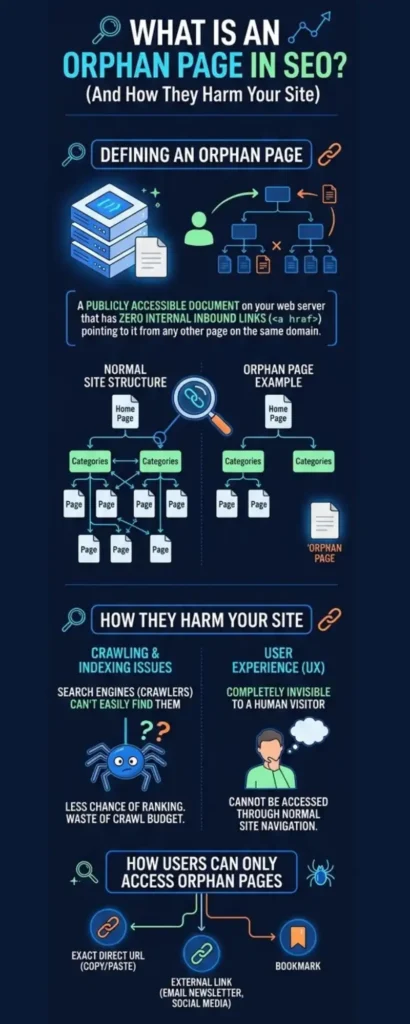
An orphan page is a publicly accessible document on your web server that has zero internal inbound links (<a href>) pointing to it from any other page on the same domain.
From a user’s perspective, an orphan URL is completely invisible during normal site navigation. A human visitor can only access an orphan page if they possess the exact direct URL, click an external link from an off-site source (such as an email newsletter or social media post), or follow a bookmark.
The Mechanics of Crawl Graph Isolation
Search engine crawlers (such as Googlebot) do not discover content by randomly scanning server IP addresses; they traverse the web by following hyperlinked nodes within a site’s document graph.
When a page exists without inbound links:
The Directed Graph Breakdown: In web graph theory, internal links act as directed edges between page nodes. An orphan page exists as a disconnected node with an in-degree of 0.
Loss of Discovery Vectors: Googlebot cannot discover the document during standard HTML document parsing. Discovery is forced to rely solely on secondary inputs like XML sitemaps or historical log requests.
The 4 Technical Penalties of Unlinked Content
Leaving orphan pages unaddressed triggers compounding technical degradation across your domain’s crawl performance and search visibility.
1. PageRank Starvation & Authority Isolation
Google’s foundational ranking algorithms evaluate document importance based on internal and external link equity (PageRank).
Internal links pass a fraction of the source page’s PageRank (
PR) to the target URL.An orphan page receives zero internal PageRank, leaving it structurally weak. Even if an orphan page contains exceptional content, it lacks the minimum internal equity required to rank for competitive primary search queries.
2. Discovery Stalls & Indexation Delays
While Googlebot can discover unlinked URLs if they exist in your sitemap.xml file, sitemap parsing occurs at a significantly lower frequency than regular HTML link crawling. Pages reliant purely on sitemaps experience severe delays in initial indexation and updates, often remaining stuck in Google Search Console’s “Discovered – currently not indexed” state.
3. Recrawl Frequency Suppression
Googlebot adjusts its recrawl frequency based on a URL’s internal link depth and authority. Pages deep in the architecture or isolated entirely receive minimal crawl attention. When you update content on an orphan page, search engines may take months to re-crawl the document and reflect those content changes in search results.
4. Dilution of Overall Domain Quality Signals
Accumulating large quantities of legacy, duplicate, or thin orphan pages inflates your site’s total document count without contributing value. During quality evaluations (such as Google’s Helpful Content System), a high proportion of stale, isolated URLs drags down the overall quality score of the entire domain.
Why Do Orphan Pages Form During Site Updates and Migrations?
Orphan pages are rarely created intentionally by developers or SEO teams. Instead, they accumulate as invisible structural debt during routine content updates, platform migrations, campaign launches, and automated CMS tasks.
1. Incomplete Site Migrations & Navigation Redesigns
During a CMS migration (e.g., moving from Magento to Shopify or upgrading custom framework routes), dev teams focus on migrating core landing pages and primary category structures.
Legacy Path Disconnects: Secondary blog posts, sub-categories, or old landing pages are migrated to the new web server and remain accessible with an
HTTP 200 OKstatus. However, if the new header navigation or footer menus omit links to these pages and no internal links exist within the body copy, the URLs instantly become orphaned.Missing 301 Redirect Mappings: If a legacy URL structure is changed but old internal links pointing to it are deleted rather than updated or redirected, the un-redirected target page sits isolated on the domain.
2. Discontinued E-Commerce Products & Orphaned Variants
E-commerce stores running on WooCommerce, Magento, or Shopify are particularly prone to generating thousands of orphaned product pages due to high inventory turnover.
Removing Products from Category Grids: When an item goes out of stock or is discontinued, store managers frequently uncheck the product’s “Category” association in the CMS. This removes the product card from the public category grid.
The Server-Side Leak: If the product URL itself remains published on the server (
200 OK) instead of returning a410 Goneor301 Redirect, the page becomes an orphan. It remains indexed in Google, accessible via direct link or XML sitemap, but disconnected from store navigation.
3. Isolated Campaign & PPC Landing Pages
Performance marketing teams frequently create dedicated landing pages for Google Ads, Meta campaigns, or email promotions.
Deliberate Navigation Omission: To maximize conversion rates and reduce user exit points, ad landing pages intentionally omit standard site headers, footers, and internal menus.
Accidental Indexation Exposure: Because these pages have 0 inbound internal links from the main site, they are architecturally orphaned. If the team forgets to add a
<meta name="robots" content="noindex">directive or leaves the page in the auto-generated XML sitemap, search crawlers discover and index the isolated landing page.
4. CMS Taxonomy Drops & Pagination Modifications
Publishing platforms like WordPress dynamically generate archive pages based on tags, authors, categories, and paginated series (e.g., /blog/page/15/).
Changing Pagination Limits: If you change your CMS setting from displaying 10 posts per page to 20 posts per page, the total number of paginated pages shrinks instantly.
Dangling Archive Strings: Deep paginated URLs (like
/page/15/) that previously contained links to older posts disappear from internal navigation. The old posts previously linked only on page 15 can suddenly lose their sole inbound link vector, turning them into orphan pages overnight.
Pinpointing the architectural flaws that generate isolated URLs sets the stage for detection; now let’s explore the exact diagnostic workflows to surface every orphan page across your domain.
How to Audit and Identify Orphan Pages?
Because search engine crawlers discover web pages by following hyperlinks, a standard website crawl cannot find orphan pages on its own. If a page has zero inbound links, a crawler following HTML navigation paths will simply pass over it.
To surface unlinked pages, audit tools must cross-reference a standard HTML Crawl against external lists of URLs on your domain such as XML Sitemaps, Google Search Console performance data, Google Analytics 4 traffic logs, and Server Access Logs.
The Audit Toolkit: Primary Software for Orphan Page Detection
SEO professionals use a mix of desktop crawlers, cloud auditing suites, and analytics APIs to detect orphan URLs.
| Tool | Usage Level | Primary Detection Mechanism | Best For |
| Screaming Frog SEO Spider | Industry Standard (Most Used) | Cross-references live HTML crawl against XML Sitemaps, GSC API, and GA4 API simultaneously. | Daily technical audits, mid-size sites, e-commerce stores up to 500k URLs. |
| Google Search Console & GA4 | Essential (Free) | Compares index/performance reports against crawlable site architecture. | Uncovering orphaned pages that still receive organic impressions or direct traffic. |
| Lumar (formerly Deepcrawl) | Enterprise Cloud | Cloud-based crawling with native log file integration and historical trend mapping. | Large-scale enterprise domains (1M+ URLs) with multi-regional setups. |
| Ahrefs / Semrush Site Audit | All-in-One Cloud | Compares cloud crawl data against submitted XML sitemaps inside project dashboards. | Quick automated site audits and agency client reporting. |
Workflow 1: Cross-Referencing XML Sitemaps in Screaming Frog (The Go-To Method)
The most efficient and widely used method for detecting orphan pages is pairing Screaming Frog with your site’s XML sitemap.
Step-by-Step Execution:
Configure Sitemap Fetching:
Open Screaming Frog and navigate to Configuration ➔ Spider ➔ Sitemaps.
Check Crawl Linked Sitemaps (or select Crawl These Sitemaps and paste your explicit
sitemap_index.xmlURL).
Execute the Standard Crawl:
Enter your domain URL in the top address bar and click Start.
Screaming Frog will crawl all discoverable HTML links while simultaneously parsing the URLs declared in your XML sitemaps.
Run Crawl Analysis:
Once the main crawl hits 100%, do not export immediately.
Navigate to the top menu, click Crawl Analysis ➔ Start. Screaming Frog will calculate internal link counts, PageRank iterations, and orphan designations across both dataset sources.
Isolate Orphan URLs:
Under the Sitemaps tab on the right menu, set the filter to Orphan URLs.
Alternatively, go to Reports ➔ Orphan Pages to export a clean CSV.
What to Look For: Any URL flagged as an orphan exists in your XML sitemap but returns an Inlinks count of 0 and a Crawl Depth = Null in the HTML link graph.
Workflow 2: Connecting GSC & GA4 APIs to Catch Unlinked Traffic Drivers
Sometimes orphan pages are missing from your XML sitemap as well. However, if they have historical organic rankings or direct traffic, Google Search Console and Google Analytics still hold their performance records.
Step-by-Step Execution:
Enable API Connections:
In Screaming Frog, go to Configuration ➔ API Access ➔ Google Search Console.
Connect your account, select the matching GSC property, and check Enable Search Analytics.
Repeat the step under Configuration ➔ API Access ➔ Google Analytics 4 to fetch landing page traffic data.
Run Crawl & Analysis:
Execute the crawl and run Crawl Analysis.
Filter Disconnected URLs:
Go to the Search Console tab and filter by Orphan URLs.
Inspect URLs showing Impressions > 0 or Clicks > 0 that have an Internal Inlinks count of 0.
This step uncovers unlinked legacy landing pages, old campaign assets, or deleted blog posts that search engines are still serving to users.
Workflow 3: Server Access Log Analysis (For Enterprise Sites)
For enterprise sites with hundreds of thousands of pages, search engine bots may visit legacy URLs directly via external backlinks, old cached paths, or bookmarks even if those URLs are missing from sitemaps and analytics.
Export Server Access Logs: Request raw Nginx or Apache access logs from your systems engineering team for a 30-day window.
Match Bot User-Agents: Filter log entries for requests made by
GooglebotorBingbot.Cross-Reference Against HTML Crawl: Upload log files into a tool like Screaming Frog Log File Analyser or Lumar.
Any URL receiving HTTP GET requests from Googlebot that does not exist in your live HTML crawl graph is a Log-Only Orphan Page.
Surfacing a comprehensive list of orphaned URLs completes the diagnostic phase; the next challenge is executing a strategic triage protocol to handle each unlinked document correctly.
Do You Need to Fix Each Orphan Page?
The Orphan Page Triage Framework: Link | Redirect | Noindex | Delete
A common mistake in technical SEO audits is assuming that every discovered orphan URL must be automatically re-linked into the site’s main navigation.
Indiscriminately adding internal links to every forgotten URL clutters your architecture, dilutes internal PageRank across low-value assets, and serves thin or outdated content to search engine crawlers.
The Triage Decision Tree: Evaluating URL Value
Before making code or navigational changes, pass every orphaned URL through a 4-path evaluation framework based on content quality, business utility, and existing backlink equity.
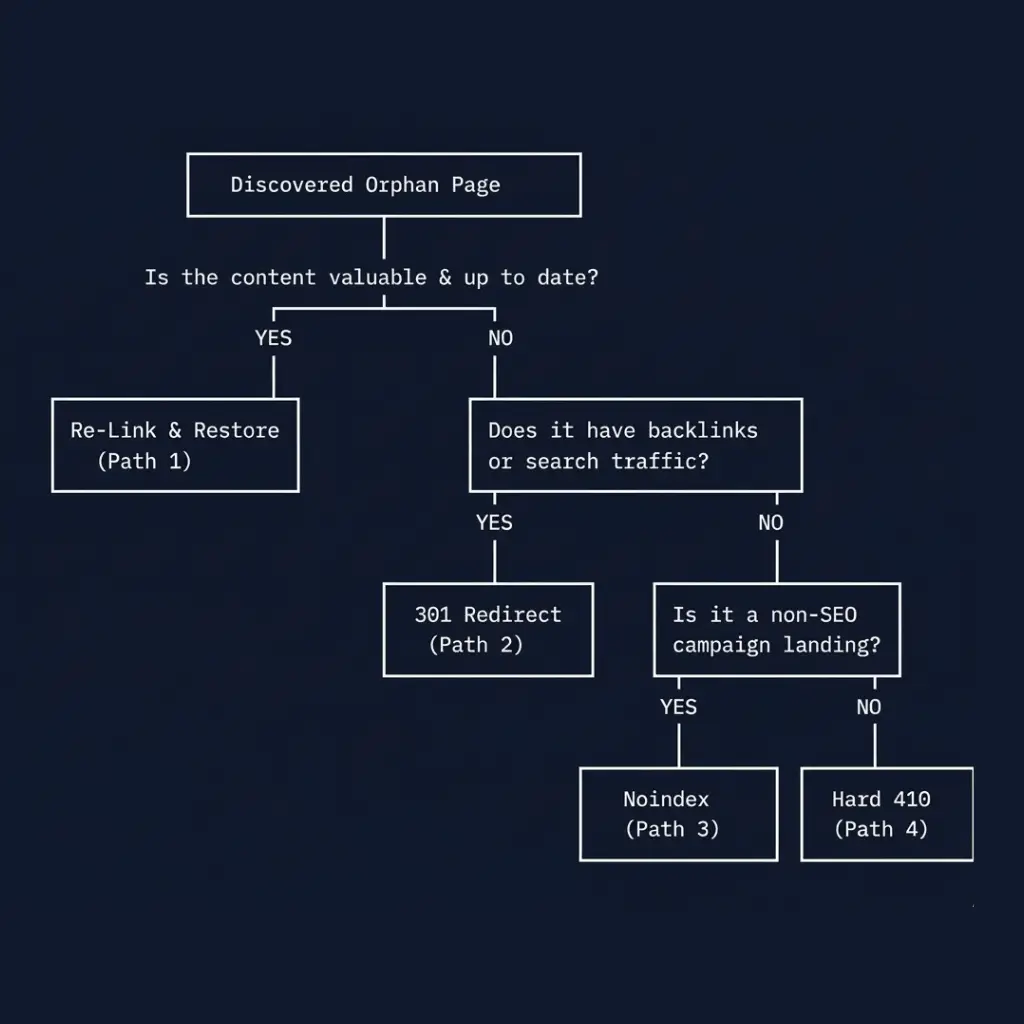
Path 1: Re-Link & Restore (High-Value / Modern Content)
Condition: The orphan page contains high-quality, up-to-date content that aligns with your current keyword strategy or business services, but was accidentally disconnected during a site overhaul or CMS edit.
SEO Objective: Re-introduce the page to the crawl graph and pass internal link equity.
Technical Protocol:
Identify 2–4 contextually relevant, indexed pages on your site that share topical authority with the orphan URL.
Insert natural body copy hyperlinks (
<a href="...">) using descriptive, target-keyword anchor text pointing to the orphan page.If the page represents a primary category or service, add a permanent link inside the secondary navigation or site footer.
Ensure the URL is declared in
sitemap.xmland returns anHTTP 200 OKstatus header.
Path 2: 301 Permanent Redirect (Outdated Content with Link Equity)
Condition: The page contains stale or duplicate content (e.g., an outdated 2022 service guide or a discontinued e-commerce product), but historical data shows it possesses valuable external backlinks or historical search traffic.
SEO Objective: Consolidate external link authority (PageRank) onto a live, highly relevant alternative page while removing the orphan URL from indexation.
Technical Protocol:
Identify a closely matching live target URL on your domain.
Implement a 301 server-side redirect rule:
# Nginx 301 redirect rule for retired orphan page
location = /old-discontinued-product/ {
    return 301 https://example.com/category/new-product-line/;
}
Remove the old URL from your XML sitemaps to prevent redirect chain bloat.
Path 3: Apply noindex Directive (PPC & Non-Search Assets)
Condition: The page is an active PPC landing page, gated lead magnet, or private internal resource. It must remain orphaned from site navigation to maximize conversion rates or restrict public browsing, but should not appear in Google search results.
SEO Objective: Allow human traffic via direct/paid channels while blocking search engines from indexing the document.
Technical Protocol:
Keep the page orphaned (0 internal inbound links).
Add an explicit robots meta tag in the document
<head>:
<meta name="robots" content="noindex, follow">
Critical: Remove the page from all
sitemap.xmlfiles. Leaving anoindexpage inside an XML sitemap creates a Search Console coverage error (“Indexed, though blocked by noindex”).
Path 4: Serve 410 Gone or 404 Not Found (Zero-Value / Junk Pages)
Condition: The URL is a leftover staging path, a auto-generated CMS tag archive, or a deleted product with 0 backlinks, 0 impressions, and zero business value.
SEO Objective: Explicitly tell search crawlers that the resource is permanently dead so they remove it from search indices and stop wasting host crawl budget.
Technical Protocol:
Purge the document from the server or CMS.
Configure the server to return an
HTTP 410 Goneheader (which tells search bots the deletion is permanent and speeds up index removal compared to a standard 404):
# Nginx 410 Gone rule for junk orphan URLs
location ~* ^/(staging-tests|old-unused-tags)/ {
    return 410;
}
Most guides emphasize that when you find orphan pages, you should link them to a relevant 200 OK page so that bots can discover and crawl them as well. However, not every orphan page is worth re-linking. Based on my experience, I’ve shared the four possible ways to handle and fix orphan pages.
Now, let’s move forward and explore how to configure prevention controls across WordPress, Shopify, and modern tech stacks to stop new linkless pages from forming.
How to Prevent Orphan Pages Across CMS Platforms & Tech Stacks
Preventing orphan pages requires setting up automated site maintenance workflows and configuring platform-specific CMS guardrails.
1. WordPress Site Architecture Guardrails
WordPress site owners often generate orphan pages through taxonomy shifts, draft pages, and media attachment defaults.
Disable Media Attachment Pages: Historically, uploading an image in WordPress created a standalone attachment URL (
/my-photo/) with zero body links. Ensure attachment pages are disabled or redirected to the parent post using Yoast SEO or Rank Math settings (“Redirect attachment URLs to the attachment itself ➔ Off”).Automate Related Post Networks: Install dynamic related-post modules or custom site block templates that pull topically relevant posts into post footers automatically, guaranteeing at least 2–3 internal inlinks for every newly published article.
Maintain Strict Tag Taxonomies: Avoid creating one-off tags or categories for single posts. If a category is deleted, audit the published posts inside it to verify they remain mapped to another active parent category.
2. E-Commerce Inventory Controls (Shopify & WooCommerce)
High-turnover online stores generate thousands of orphaned product URLs when items go out of stock or are removed from collection grids.
Automate Out-of-Stock Redirect Mappings: Instead of un-categorizing seasonal or out-of-stock items (which leaves the live product page orphaned on the server), use apps like Searchanise or custom theme liquid rules to move out-of-stock items to the bottom of the grid while maintaining their category links.
Clean Up Unused Variant Parameters: Ensure third-party collection filter apps clean up old URL parameter combinations when apps are uninstalled, preventing unlinked dynamic parameter routes from sticking in your XML sitemaps.
3. Modern JavaScript Stacks (Next.js & Headless CMS)
In decoupled architectures, static site generators (SSGs) and dynamic routing engines can create orphan URLs during build-time path generation.
Synchronize Dynamic Fallback Routes: When using
getStaticPathsin Next.js, ensure fallback paths generated at runtime append new URLs to your sitemap generation script dynamically.Audit Build Output Sitemaps: Run automated CI/CD pipeline checks comparing post-build HTML routes against generated
sitemap.xmlentries to catch disconnected build routes before deployment.
Frequently Asked Questions About Orphan Pages
1. Can Google index an orphan page if it is included in the XML sitemap?
Yes. Googlebot can discover, crawl, and index an orphan page through its declaration in an XML sitemap or via external backlinks.
However, because the page has zero internal inbound links, Google assigns it minimal internal PageRank. As a result, the URL will experience lower crawl frequency, delayed updates in Search Console, and significant ranking disadvantages against competitors with strong internal link paths.
2. What is the difference between an orphan page and a “zombie page”?
Orphan Page: Defined strictly by architecture. It is an isolated page with 0 inbound internal links, regardless of whether its content is high quality or thin.
Zombie Page: Defined by performance and quality. It is a page that receives zero traffic, zero impressions, and offers thin or non-performing value even if it is fully linked in your site navigation.
Note: An orphan page can become a zombie page over time if its lack of internal equity causes organic traffic to decay completely.
3. What is the difference between an orphan page and a dead-end page?
Orphan Page: Has no inbound links pointing to it from your domain (crawlers cannot reach it via normal site browsing).
Dead-End Page: Has inbound links pointing to it, but contains no outbound links on the page itself (crawlers reach it, but cannot traverse further without hitting a browser back button or header menu).
4. Is it ever acceptable to keep orphan pages intentionally?
Yes. Intentional orphan pages are common in digital marketing for:
Dedicated Google Ads or Meta PPC landing pages designed without navigation menus to reduce conversion exits.
Private gated assets, member-only download pages, or A/B testing variants.
The Rule: Intentional orphan pages must include a <meta name="robots" content="noindex, follow"> tag and be strictly excluded from your sitemap.xml file to prevent indexing bloat.
5. Will fixing orphan pages immediately boost site-wide rankings?
Fixing high-value orphan pages by adding contextual internal links restores PageRank flow and allows Googlebot to re-evaluate the content.
While fixing a single low-traffic orphan page won’t dramatically alter site metrics, purging or redirecting hundreds of legacy orphan URLs cleans up domain-level quality signals, optimizes crawl budget utilization, and improves the overall indexation efficiency of your core revenue pages.
Key Takeaways
Managing orphan pages is a foundational requirement for maintaining a clean internal link graph and maximizing crawl efficiency.
Audit Beyond Standard HTML: Standard crawlers cannot discover orphan pages. Always cross-reference your HTML crawl graph against XML Sitemaps, Search Console APIs, and Server Access Logs.
Follow the Triage Matrix: Avoid re-linking every unlinked URL blindly. Choose whether to Link, 301 Redirect, Noindex, or 410 Delete based on content utility and backlink equity.
Automate Prevention: Configure CMS settings to manage out-of-stock items, media attachments, and related-post footers to keep new URLs connected from day one.
Struggling with Isolated Pages & Crawl Depth Bottlenecks?
Orphaned URLs weaken your domain’s PageRank distribution and leave revenue-generating assets stuck in indexing limbo. I help sites and e-commerce stores clean up link graphs, fix migration leaks, and build scalable site architectures.
Explore my Technical SEO Services, Website SEO Audit Services OR Book a Free Technical SEO Audit Consultation
Explore Other Articles Under Technical SEO Side
Pillar Blogs
What is Technical SEO? (Parent Blog)
- Crawlability and Indexability in SEO (Child Blog)