

Have you ever built a beautifully designed website with high-quality content, only to watch Google ignore half of your pages?
Or perhaps you have noticed that while your homepage gets traffic, your key category pages or newly published articles are buried deep in search results, struggling to get indexed?
When a website fails to rank despite good content, site owners often blame backlinks or domain authority. But in reality, the root cause is frequently much simpler: a confusing, broken site architecture.
Think of your website like a physical supermarket:
If items are organized into clear aisles (Categories) with helpful signs (Breadcrumbs and Navigation), shoppers find what they need instantly.
But if products are dumped in random piles with no clear layout, shoppers get frustrated and leave.
Search engine crawlers (like Googlebot) act just like those shoppers. If your site structure is messy, crawlers waste time getting lost, miss your high-value pages, and fail to understand what your business actually does.
In this comprehensive guide, we will break down how to design a clean, scalable website structure from scratch, without unnecessary jargon or fluff.
What You Will Learn in This Guide:
The difference between user navigation and how Google actually crawls your site.
The Pyramid vs. Flat Architecture debate and how to combine both for maximum results.
Practical rules for setting up Category and Subcategory trees without confusing search engines.
How to design Header, Footer, and Breadcrumb navigation that search crawlers can easily follow.
Why Click Depth matters far more than URL slashes (and the 1–3 Click Rule).
How to connect informational content directly to your revenue-generating service or product pages.
Information Architecture (IA) vs. Physical Crawl Pathing
To build a search-friendly website, you first need to understand two distinct concepts that are often mixed up: Information Architecture (IA) and Crawl Pathing.
What is Information Architecture (IA)?
Information Architecture is simply how you organize and group content for human users.
When a human lands on your website, their brain relies on mental models to guess where things live. For example, if someone visits an e-commerce store looking for “Men’s Leather Jackets,” they expect a logical flow:
Home ➔ Clothing ➔ Men's Outerwear ➔ Leather Jackets
Good IA ensures your visitors never have to ask, “Where do I find this?”
What is Physical Crawl Pathing?
While humans look at visual designs, colors, and layouts, search engines like Google look purely at HTML links and pathways.
Crawl Pathing is the actual roadmap Googlebot takes to discover your pages by following clickable links (<a href>). If a page exists in your content management system (like WordPress or Shopify) but has no clickable links pointing to it, Googlebot cannot find it naturally.
In SEO terms, that page becomes an Orphan Page: completely invisible to crawlers, no matter how great its Information Architecture sounds on paper.
How AI & Modern Search Engines Read Your Site Structure
Modern search engines and AI engines do not just read words on a single page; they build a Topical Graph (a mental map) of your entire domain.
When your site structure is clear and logical, Google immediately understands entity relationships:
It knows that your “SEO Audit” page is a sub-topic of your main “Technical SEO” category.
It recognizes which page is the main authority hub and which pages are supporting articles.
If your structure is messy, search engines get confused about which page is the main authority, leading to Keyword Cannibalization (where your own pages compete against each other in search results).
The Real Cost of “Architectural Debt”
Just like building a house on a weak foundation leads to cracks in the walls later, building a site on poor architecture creates Technical Debt:
Indexing Lag: Google takes weeks or months to discover and index your new content because crawlers get stuck in messy pathways.
Wasted Crawl Budget: Search engines spend their limited daily crawl allowance wandering through useless or redundant archive pages instead of your important money pages.
Diluted Authority: Your homepage accumulates trust and backlinks, but that authority gets trapped at the top because there are no clear channels routing it down to deeper pages.
Core Taxonomy Models (Pyramid vs. Flat Site Architecture)
When designing a website structure, SEO professionals and web architects usually debate between two core layout models: the Pyramid Model and the Flat Architecture Model.
Many online guides treat these two structures as enemies, telling you to pick one over the other. In reality, modern search engines expect a hybrid approach that combines the strengths of both.

The Traditional Pyramid Model (Deep Hierarchical Structure)
The Pyramid Model structures content in a strict top-down hierarchy, moving from general broad topics down to specific granular pages:
Homepage → Parent Category → Subcategory →Child Asset
When to Use the Pyramid Model:
Large E-Commerce Stores: Websites selling thousands of products categorized by strict physical traits (e.g.,
Home ➔ Electronics ➔ Laptops ➔ Gaming Laptops ➔ Product).Massive Enterprise Publications: High-volume news or research portals that require clear physical archives for millions of documents.
The Downside of Pure Pyramid Structures:
Crawl Depth Decay: Important sub-pages often get pushed 4 to 6 clicks away from the homepage.
PageRank Attenuation: As link authority flows down through multiple directory layers, very little PageRank reaches the bottom product or blog pages, making them hard to rank without external backlinks.
The Flat Architecture Model (Shallow Click-Depth Structure)
The Flat Architecture model focuses on horizontal breadth rather than vertical depth. The goal is to keep every indexable page on your site reachable within 1 to 3 clicks from the homepage.
Why Search Engines Love Flat Architecture:
Maximized Link Equity: Authority from your homepage flows directly into deeper landing pages with minimal friction or loss.
Faster Discovery: Search engine crawlers can scan and index your entire website inventory rapidly without wasting crawl budget on deep directory chains.
The Risk of Over-Flattening Your Site:
Visual & Structural Noise: If you link every single product or blog post directly from your main menus or homepage, you create a massive “link soup.”
Loss of Entity Context: Without clear parent-child groupings, search engine AI parsers struggle to understand which page is the main topic authority and which are supporting sub-topics.
The Hybrid Model: Logical Flat Navigation + Physical Hierarchical Taxonomy
The solution to the “Pyramid vs. Flat” paradox used by top-performing enterprise websites is simple: Decouple your URL/Category Taxonomy from your Click Depth.
Keep Your Taxonomy Hierarchical (For Context): Group your content into logical parent-child categories so search engine entities remain organized (
/services/technical-seo/).Keep Your Navigation Flat (For Crawl Equity): Use strategic internal links, category hub cards, and contextual breadcrumbs to bring those deep pages within 2 to 3 clicks of the homepage.
Decision Matrix: Choosing the Right Architectural Depth for Your Site
Use this simple decision framework to determine how deep or flat your site structure should be based on your content volume and business model:
| Website Type | Recommended Click Depth | Primary Focus |
| Personal Brand / Portfolio / Local Service | 1 to 2 Clicks | Maximum flat layout. Connect core services directly to the homepage. |
| SaaS / B2B Corporate Site | 2 Clicks | Category hubs for core features, linking directly to supporting case studies and guides. |
| Niche Publishing / Affiliate Blog | 2 to 3 Clicks | Hub-and-spoke topical clusters connecting supporting posts to parent pillar guides. |
| Large E-Commerce / Enterprise Directory | 3 Clicks (Strict Max) | Category and subcategory hubs with faceted filtering controls to prevent deep crawl loops. |
Category & Subcategory Architecture (Parent-Child Relationships)
Category and subcategory pages act as the primary structural pillars of your website’s Information Architecture (IA). They group related products or articles together, creating clear topical nodes that search engines can easily understand.
However, poorly planned categories lead to ambiguous groupings, internal content competition (Keyword Cannibalization), and thin pages that waste search crawler resources.
1. Designing Broad, Non-Overlapping Category Nodes
The primary rule of category creation is Mutual Exclusivity. Every main category must represent a distinct entity or product class that does not overlap with another parent category.
Common Category Mistakes & Their SEO Impact:
Overlap Error: Creating a category for “Laptops” and another category for “Gaming Laptops” at the same top-level root.
The Problem: Search crawlers cannot determine whether a gaming laptop belongs in the main “Laptops” hub or the “Gaming Laptops” hub, splitting topical authority across two competing pages.
The Correct Entity Hierarchy: Keep broad concepts at the top, and move specific variations into subcategories:
Home → Laptops (Parent Category) → Gaming Laptops (Subcategory)
Parent-Child Mapping for E-Commerce Catalogs & Publishing Sites
Mapping parent-child relationships correctly ensures that search engines pass keyword relevance up and down your taxonomy tree naturally.
Parent-Child Rules for E-Commerce:
Parent Category: Represents broad intent and head search terms (e.g.,
/shoes/).Subcategory: Filters down to specific user intent attributes or sub-types (e.g.,
/shoes/running/or/shoes/leather/).Leaf Asset (Product): Sits cleanly at the end of the taxonomy branch without needing deep nested URL chains.
Parent-Child Rules for Content & Publishing Sites:
Parent Category: Represents broad topical entities (e.g.,
/technical-seo/).Subcategory (Optional): Only used if you have a massive content archive requiring sub-divisions (e.g.,
/technical-seo/site-speed/).Supporting Articles (Spokes): Individual guides that support the parent category hub with contextual link signals.
The Node Spawn Threshold Rule (Preventing Thin Category Archives)
A frequent issue found during technical site audits is Taxonomy Bloat: creating empty or thin category pages for every minor idea or product trait.
When search crawlers encounter category pages containing only 1 or 2 products or articles, they treat those pages as Thin Content, diluting the site’s overall quality score.
If Category Items < 5 → Do NOT spawn a new subcategory. Group items inside the parent category or use faceted filters.
If Category Items >= 5 → Spawn a dedicated subcategory node with a unique indexable URL.
The Golden Rules for Category Spawning:
The Minimum Inventory Threshold: Do not create a new indexable subcategory page unless you have at least 5 to 10 unique, active items or articles to populate it.
Search Volume Verification: Ensure the subcategory matches a real, verified search query (e.g., “Men’s Red Running Shoes” has explicit intent; “Red Shoes with Yellow Laces” does not).
Use Faceted Filters for Niche Attributes: If an attribute combination has low search volume or low inventory, handle it using temporary UI filters rather than creating a permanent indexable category page.
4. Taxonomy Pruning: Cleaning Up Legacy & Duplicate Categories
As a website grows over time, legacy categories accumulate, leading to abandoned archive pages and split signals.
Step-by-Step Category Pruning Protocol:
Audit Archive Inventory: Use Screaming Frog or your CMS export to identify category archive pages with zero or low traffic/inventory.
Consolidate Low-Value Categories: Merge thin subcategories back into the main parent category.
Execute 301 Redirects: Point legacy, deleted category URLs directly to their logical parent category hub (never mass-redirect deleted categories to the homepage).
Update Navigation Links: Remove deleted category links from primary headers, footers, and sidebars to eliminate broken redirect hops.
Navigational Architecture & Crawlable Paths
Navigation is the physical roadmap of your website. It guides both human users through your menu options and search engine crawlers through your HTML link graph.
However, many sites accidentally block search bots or leak valuable link equity because their navigation systems are poorly structured.
Primary Header Navigation & Mega-Menu Management
Your header menu is the most valuable real estate on your website. Every page on your site renders your header navigation, meaning link equity (PageRank) passes through these links on every single click.
Best Practices for Header Menus:
Keep It Concise: Limit your main header to core top-level category hubs and primary conversion pages (e.g., Home, Services/Products, Blog, About, Contact).
Avoid Mega-Menu Link Bloat: If a drop-down mega-menu contains 100+ links, every page on your site is forced to divide its outgoing authority among those 100 links, diluting the equity sent to your most important pages.
Prioritize Crawlable Anchor Text: Use clear, descriptive anchor text in your header links (e.g., “Technical SEO”) instead of vague labels.
Secondary & Utility Navigation
Websites often include secondary navigation bars at the very top or sides for utility pages (like customer login, currency selectors, search bars, or help centers).
How to Manage Utility Links:
Isolate Non-Essential Links: Ensure utility pages do not clutter your primary topical navigation.
Prevent Equity Leaks: While utility pages (like Login or Terms) are necessary for users, they do not need PageRank flow. However, avoid wasting precious header link space on them.
Footer Architecture: Managing Sitewide Boilerplates
The website footer is rendered at the bottom of every page, making it a massive repository of sitewide links.
[ HEADER NAVIGATION ]  ➔ High-value category hubs (High Authority Flow)
[ BODY CONTENT ]       ➔ Contextual deep links (Maximum Relevance)
[ FOOTER NAVIGATION ]  ➔ Legal, trust anchors, & secondary nodes (Low-weight)
How to Structure Your Footer Safely:
Trust & Legal Anchors: Use the footer for essential compliance links (Privacy Policy, Terms of Service, Contact, Copyright).
Secondary Taxonomies: You can list secondary category links in the footer, but recognize that Google’s algorithms treat footer links as “boilerplate” text meaning they carry significantly less ranking weight than in-body contextual links.
Avoid Keyword Stuffing in Footers: Do not dump a list of exact-match keyword links at the bottom of your footer to manipulate rankings; modern search engines routinely discount or ignore spammy footer blocks.
Engineering Crawlable Navigation (HTML Links vs. JavaScript Traps)
One of the most common technical failures in modern web development is building navigation using client-side JavaScript instead of raw HTML.
Search engine crawlers rely primarily on raw HTML parsing during their initial discovery passes. If your navigation menu relies on JavaScript event listeners (onclick) rather than standard <a href> tags, search bots will fail to extract those links.
The Wrong Way vs. The Right Way:
Catastrophic JavaScript Trap (Ignored by Crawlers):
<div class="nav-button" onclick="location.href='/seo-services/'">
  SEO Services
</div>
The Correct Search Engine-Friendly Syntax:
<a href="https://ahmadfrazseo.com/seo-services/">
  SEO Services
</a>
Rule for Developers:
Always ensure that every primary navigation item, category link, and menu button uses a standard, crawlable href attribute so search bots can traverse your site architecture effortlessly.
Breadcrumb Systems & Structural Traversal
Breadcrumbs are the clean horizontal navigation trails that appear near the top of a web page (for example: Home > Technical SEO > Site Architecture). While many site owners view breadcrumbs as a simple cosmetic feature, they play a critical technical role in both user experience and search engine crawl efficiency.
Location-Based vs. Attribute-Based Breadcrumbs
Depending on whether your website is a content publication, a SaaS platform, or an e-commerce catalog, your breadcrumb strategy will differ:
Location-Based Breadcrumbs (Fixed Hierarchy): These reflect the strict physical folder or category path of the page. This is the industry standard for blogs, corporate sites, and structured knowledge bases (
Home > Services > Technical Audit).Attribute-Based Breadcrumbs (Dynamic Pathing): Often used in large e-commerce stores where a product can be reached through multiple filters.
The SEO Rule: Avoid creating dynamic, user-session-based breadcrumb paths that generate endless unique URL parameter variations. Always default to a single, canonical location-based path for every product or article.
Crawl Depth Collapse & Upward Signal Passing
Breadcrumbs act as an architectural pressure valve for your website:
Short-Circuiting Click Depth: Without breadcrumbs, a deeply nested sub-article might require a user or crawler to click backward through three or four separate parent pages to return to the main hub. Breadcrumbs provide an instant 1-click escape hatch back to parent categories.
Passing Upward Topical Context: Search engine crawlers read breadcrumbs to immediately verify parent-child entity relationships, reinforcing the topical hierarchy without relying solely on the URL string.
The Structural Boundary: HTML Navigation vs. Schema Markup
When implementing breadcrumbs, it is vital to separate physical linking from structured data:
HTML Navigation (Covered Here): The actual, clickable anchor links rendered in the document DOM (
<nav aria-label="breadcrumb">) that crawlers and users traverse.JSON-LD Schema Markup (Deferred): The invisible structured data code (
BreadcrumbList) placed in the page header to help Google generate rich navigational snippets in search results.
Click Depth Optimization (The Click Distance Myth)
In web architecture, there is a common myth that every single page on a website must sit strictly within 3 clicks of the homepage or Google will refuse to index it.
While the “3-Click Rule” is a helpful usability guideline, search engine advocates have repeatedly clarified that Google has no rigid algorithmic limit on click count. However, click distance remains a critical structural metric for two practical reasons: Link Equity Decay and User Effort.
[ HOME PAGE ] (100% Equity)
      │
      ├── (Click 1) ➔ Category Hub (High Priority Discovery)
      │      │
      │      └── (Click 2) ➔ Subcategory / Product List (Good Context)
      │             │
      │             └── (Click 3) ➔ Target Asset (Standard Discovery Boundary)
      │                    │
      │                    └── (Click 4+) ➔ Deep Asset (Attenuated Equity & Slow Discovery)
Click Depth vs. Folder Depth (URL Slashes)
Many webmasters confuse Click Depth (how many links a crawler must follow from the homepage) with Folder Depth (how many slashes appear in the URL path).
Search engines evaluate document importance based on click distance from authority sources, not URL length:
Example A (Deep Slashes, Shallow Click Depth):
URL:
example.com/shop/v1/apparel/mens/running-shoesIf this page is linked directly from your primary header menu, its Click Depth is 1, regardless of the 5 slashes in the URL string.
Example B (Short URL, Deep Click Depth):
URL:
example.com/running-shoesIf this page has no direct menu links and is only reachable by clicking through 6 paginated archive pages, its Click Depth is 6.
Pruning Deep Paths Without Flattening Everything
You do not need to pull every minor tag, sub-article, or variant onto your homepage menu to achieve a “flat” site. Instead, focus on elevating high-value assets trapped beyond 4+ clicks:
Contextual Cross-Linking: Inject direct body links from popular high-traffic articles to related sub-pages to skip intermediate category hops.
Category Hub Cards: On parent category pages, display featured grid blocks or subcategory highlights instead of plain text lists.
Paginated Set Traversal: For large blog or product archives, avoid single “Next Page” pagination loops. Use numerical pagination blocks (e.g.,
1, 2, 3 ... 10, Next) or category sub-filters so crawlers can reach page 10 in 2 clicks instead of 10 clicks.
Topical Clustering & Conversion Pathways (TOFU to BOFU)
A well-designed website architecture does more than just organize categories and clear crawl paths. It establishes a direct bridge between your content marketing efforts and your primary business revenue.
When you structure your website using Topical Clusters, you create intuitive pathways that take a casual visitor reading an informational article and guide them naturally toward becoming a paying customer or client.
Hub-and-Spoke Alignment for Topical Authority
The foundation of modern content architecture is the Hub-and-Spoke Model (also known as Topical Siloing). Instead of publishing random, disconnected articles, you group your content into distinct structural clusters centered around a master topic.
The Pillar / Category Hub: A broad, exhaustive parent page targeting high-volume head keywords (e.g.,
/technical-seo/).The Cluster Spokes: In-depth, targeted sub-articles addressing specific long-tail sub-topics (e.g.,
/site-architecture-guide/,/canonical-tags-guide/).Bi-Directional Linking: Every spoke article contextually links upward to its parent hub, while the parent hub links downward to each supporting spoke. This isolated linking pattern signals to search crawlers that your domain possesses comprehensive authority over that entity cluster.
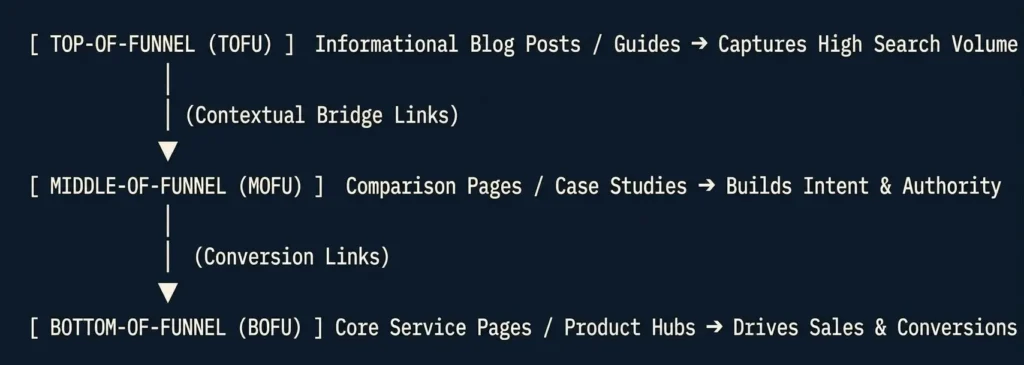
Structuring Funnel Pathways (Routing Traffic from TOFU to BOFU)
Informational articles naturally earn the majority of organic search impressions and external backlinks. However, informational pages rarely generate direct sales on their own.
Your site architecture must act as a natural funnel, routing search equity and user interest down to your primary revenue-generating assets (Money Pages):
The 3-Tier Conversion Routing Framework:
Top-of-Funnel (TOFU – Awareness): Informational blog posts answering basic user questions (e.g., “What is Website Architecture?”).
Middle-of-Funnel (MOFU – Consideration): Detailed guides, comparisons, or real-world case studies (e.g., “How Site Architecture Redesign Improved Crawl Efficiency: Case Study”).
Bottom-of-Funnel (BOFU – Action): High-intent commercial service or product pages (e.g., “Technical SEO Audit Services”).
Injecting Contextual Conversion Bridges:
Never rely strictly on passive header menus to move users from a blog post to a service page. Place contextual conversion bridges directly inside your content body where the reader’s intent peaks:
Bad Utility Anchor: “Click here to view our services.”
High-Intent Contextual Anchor: “If you are planning a platform migration and need custom architecture planning, explore our specialized Technical SEO Consulting Services.”
Future-Proofing Your Site Architecture for Growth
As your business grows, you will continuously publish new articles, launch new products, or expand into new service lines. If your underlying site architecture is rigid, expanding your website will cause structural mess and broken links.
Golden Rules for Scalable Architecture Expansion:
Never Build “Floating” Single-Page Categories: Before launching a brand-new top-level category on your menu, make sure you have a planned cluster of at least 3 to 5 supporting sub-articles or products ready to populate it.
Maintain Evergreen Category Slugs: Avoid embedding temporary marketing campaigns, years, or dates into your primary category folder paths (
/services/is evergreen;/2026-promo-services/creates technical debt).Decouple Physical CMS Locations from Navigation: Use clean, broad category structures so that updating or expanding an article’s scope does not require changing its core parent URL or setting up 301 redirects.
Conclusion
Building a crawler-friendly, user-focused site architecture is a foundational technical discipline. By maintaining a logical balance between hierarchical categories and flat click depth, keeping navigation menus uncluttered, and routing search authority from informational clusters down to core money pages, you ensure that search engines can effortlessly index, understand, and rank your entire website.
Need Help Audit-Proofing Your Website Architecture?
Building a scalable Information Architecture requires balancing user navigation with complex crawler dynamics. If you are planning a site migration, restructuring an expanding product catalog, or fixing deep-set indexing issues, a tailored architectural review can permanently eliminate crawl waste and protect domain authority.
Explore My Information Architecture & Internal Linking Services
Frequently Asked Questions (FAQs)
What is the difference between Site Architecture and Information Architecture (IA)?
While they are often used interchangeably, they serve distinct layers of your website:
Information Architecture (IA): Focuses on the human user experience. It deals with how content is organized, labeled, and structured based on human mental models so visitors can intuitively find what they need.
Site Architecture: Focuses on both human experience and technical search mechanics. It encompasses IA plus the underlying technical infrastructure including crawl paths, HTML link graphs (
<a href>), URL hierarchies, and internal link routing, that search engine crawlers use to discover and index your pages.
What is site architecture?
Site architecture refers to how a website’s pages, categories, and content are organized, structured, and linked together. It encompasses both Information Architecture (IA): how humans visually navigate and make sense of content and Crawl Pathing: the underlying HTML link graph (<a href>) that search engine crawlers (like Googlebot) follow to discover, index, and evaluate web documents.
How to design a website architecture?
Designing a search-friendly website architecture requires a step-by-step framework:
Define Broad Parent Categories: Establish 3 to 8 mutually exclusive primary categories based on core business offerings or topical entities.
Apply the Hybrid Taxonomy Model: Use a physical parent-child tree for logical organization (
/category/subcategory/) while keeping navigation flat to ensure pages are reachable within 1 to 3 clicks.Build Crawlable Navigation & Breadcrumbs: Use standard HTML anchor links (
<a href>) for header, footer, and location-based breadcrumbs, avoiding JavaScriptonclicktraps.Map Conversion Pathways: Interlink top-of-funnel (TOFU) informational blog posts contextually downward to middle- and bottom-of-funnel (BOFU) revenue pages.
Is a flat site structure always better than a deep hierarchical structure?
Not necessarily. While a flat structure ensures link equity flows rapidly from the homepage, massive e-commerce catalogs or enterprise publications require a hybrid approach: strict hierarchical parent-child categories for topical context, paired with flat navigational pathways (like hub links and breadcrumbs) to keep click depth minimal.
How many main categories should a website have?
There is no hard limit, but 3 to 8 broad parent categories are ideal for most sites. Follow the Node Spawn Threshold Rule: never create an indexable subcategory or category node unless you have at least 5 to 10 unique, active items or articles to populate it, preventing thin content pages.
Does changing my site architecture hurt my SEO rankings?
Restructuring can temporarily impact rankings if URLs, directory paths, or internal links are altered without preparation. To prevent traffic drops during architectural changes, maintain a clean 1:1 server-level 301 redirect map, update your internal linking anchors, and submit a fresh XML sitemap.
How does site architecture affect crawl budget?
Search engines allocate a limited daily crawl allowance to every domain. A messy or deep architecture causes crawlers to waste requests wandering through thin archives or orphan pages. A clean, shallow architecture ensures search bots rapidly discover and index your high-priority pages.