
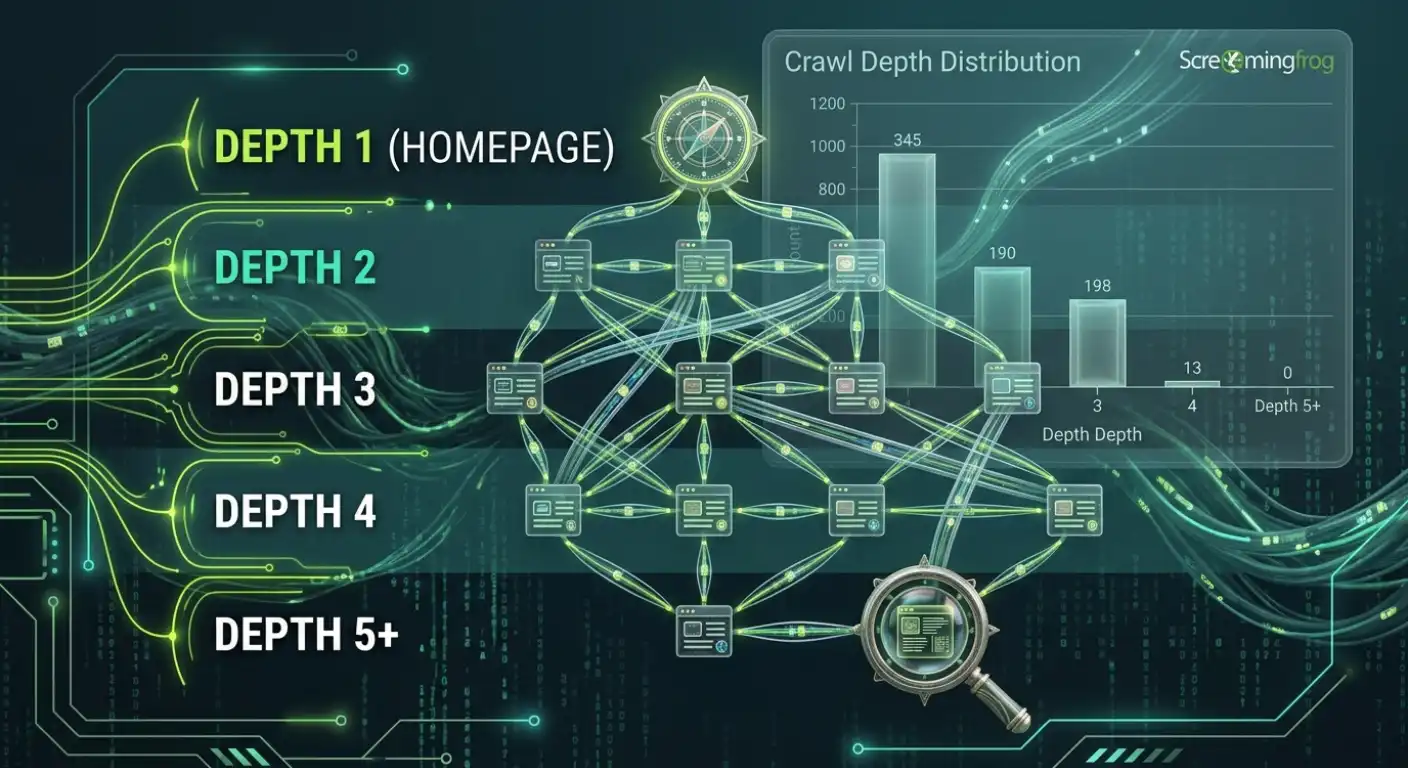
You publish a strong page: helpful content, solid design, targeting the right intent. But weeks go by, and it barely receives any search visibility.
Frustrating, right?
When an important page gets stuck without indexation, the issue often isn’t your content quality. It’s your site architecture. Before Google can rank a page, Googlebot has to discover and reach it efficiently. If a URL is buried four or five layers deep within your site, search engines may treat it as low priority.
That is the core of site crawlability, and crawl depth is one of the most critical structural factors that governs it.
We’ll cover in this guide:
- What crawl depth actually means (and how it differs from URL folder depth).
- Why structural distance directly impacts indexing speed and internal PageRank flow.
- The “3-Click Rule”: A useful practical heuristic vs. an official Google algorithm myth.
- How to measure crawl depth step-by-step using Ahrefs, SEMRush and Screaming Frog.
- Common architectural traps (orphan pages, pagination, and faceted navigation) that bury core URLs.
- Actionable, lightweight ways to flatten your site structure without ruining user experience.
Before we dive into measuring or fixing these structural gaps, we first need to clear up a common misunderstanding about what “depth” actually means on a website.
What Is Crawl Depth?
Crawl depth measures the exact number of clicks it takes for a search engine bot or a human visitor to reach a specific page starting from your homepage.
Think of your website like a multi-story building:
- Homepage = Ground Floor (Depth 0)
- Main Category / Services Page = 1st Floor (Depth 1)
- Sub-category / Specific Service = 2nd Floor (Depth 2)
- Individual Blog Post or Product Page = 3rd Floor or Basement (Depth 3+)
The more internal links a crawler has to click through to reach a destination, the deeper its crawl depth.
When a site’s structure becomes overly deep, search engines have to expend extra effort hopping through intermediate links just to discover the primary content sitting at the end of the chain.
Crawl Depth vs. URL Depth: Understanding the Difference
It is very common to confuse crawl depth with URL depth, but they measure two completely different things:
Metric | Measured By | Primary SEO Impact |
Crawl Depth | Number of internal link clicks from the homepage | Directly dictates bot discovery, crawl frequency, and link equity flow. |
URL Depth | Number of slash folders in the URL structure (/blog/seo/technical/page/) | Primarily used for site organization, analytics grouping, and user clarity. |
The Diagnostic Takeaway: A page can have a very long, multi-folder URL e.g.,
https://example.com/services/b2b/tech/seo/audit/
but still sit at Depth 1 if you link directly to it from your main header menu. Conversely, a clean URL like
https://example.com/audit/
can sit at Depth 5 if it is buried inside nested sub-menus and old pagination.
Googlebot follows internal links, not URL slashes.
Now that the difference between URL paths and internal link paths is clear, let’s look at why Googlebot actually cares about this structural distance in the first place.
Why Crawl Depth Matters for SEO
Search engines do not evaluate or crawl every page on your site with equal frequency. Structural distance directly impacts three core technical performance pillars:
- Faster Indexing and Discovery
- Internal Link Equity
- User Accessibility and Conversion Paths
Let’s discuss these three pillars in detail for better clarity.
Faster Indexing and Discovery
Googlebot operates on prioritizations. Pages sitting closer to your homepage (Depth 1 and Depth 2) are checked and re-crawled far more frequently than URLs buried deep in your architecture. When you publish a new strategic landing page at Depth 4 or 5, search engines can take weeks to discover and index it simply because it sits low in the crawl queue.
Internal Link Equity (PageRank Distribution)
Your homepage is almost always the strongest page on your domain in terms of backlinks and trust. As link equity passes down through each internal link layer, a portion of that authority naturally dilutes. If a conversion page sits four clicks away from your main authority hubs, it receives only a fraction of the structural authority it needs to compete for competitive terms.
User Accessibility and Conversion Paths
Crawl depth isn’t purely a search engine metric, it closely mirrors the human user journey. If a potential client has to click through four confusing menu levels to find a specific service, friction increases and conversion rates drop. A clean, shallow architecture benefits both search crawlers and real customers.
Understanding these impact areas usually leads to one famous question every SEO asks: So, how many clicks deep is actually “too deep”? Let’s break down the truth behind the 3-click rule.
The "3-Click Rule": Practical Heuristic vs. Google Algorithm Myth
For years, technical SEO audits have pushed a rigid guideline: “Every important page on your website must sit within 3 clicks of the homepage.”
While this sounds like a clean metric to aim for, it is important to separate practical site design from how search engine algorithms actually operate.
What the 3-Click Rule Gets Right
As a general rule of thumb, keeping key pages closer to the homepage prevents core content from getting lost. It forces a clean, logical navigation structure and ensures both users and bots can reach primary conversion assets with minimal friction.
Is Crawl depth an Official Google Ranking Rule? Honest Answer
Googlebot does not have a hard-coded algorithmic rule where Depth 3 is “good” and Depth 4 is “penalized.” Google’s official documentation clarifies that internal links help bots understand the relative importance of pages within a domain, but distance alone is not a direct ranking score.
If a supporting blog post or deeply nested sub-category naturally sits at Depth 4 because it fits a logical user path, that is not a site failure.
Recommended Crawl Depth Benchmarks
To keep your architecture organized without over-engineering your navigation, use these practical target thresholds:
Page Type | Recommended Depth | Practical Goal |
Homepage | Depth 0 | Primary authority hub. |
Main Category / Hub Pages | Depth 1 | Linked directly from global navigation or main header. |
Core Money / Service Pages | Depth 1–2 | Accessible within 1 or 2 clicks from main topic hubs. |
Supporting Content / Posts | Depth 2–3 | Linked via contextual content and parent category hubs. |
Deep Archives / Old Pages | Depth 4+ | Needs review if these are critical landing pages. |
Having these benchmark targets in mind is a great start, but you can’t improve what you haven’t mapped yet. Let’s look at how to pull this exact crawl depth data from your site using standard audit tools.
How to Measure Crawl Depth (With a Beginner Touch)
Here is a common frustration every SEO faces: You log into Search Console, see an important page sitting unindexed for weeks, and have no idea where in your site structure the bottleneck actually is.
You know the page exists, but you don’t know how hard Googlebot has to work to find it.
To uncover these structural blind spots, you need to audit your click paths. While there are several crawlers on the market, ranging from Sitebulb to Deepcrawl. But most technical audits rely on three industry standards: Screaming Frog, Ahrefs, and SEMrush.
Whether you are running a quick free check or diving into full enterprise data, here is how to measure crawl depth using each tool.
1. Screaming Frog (Best for Beginners & Technical Deep Dives)
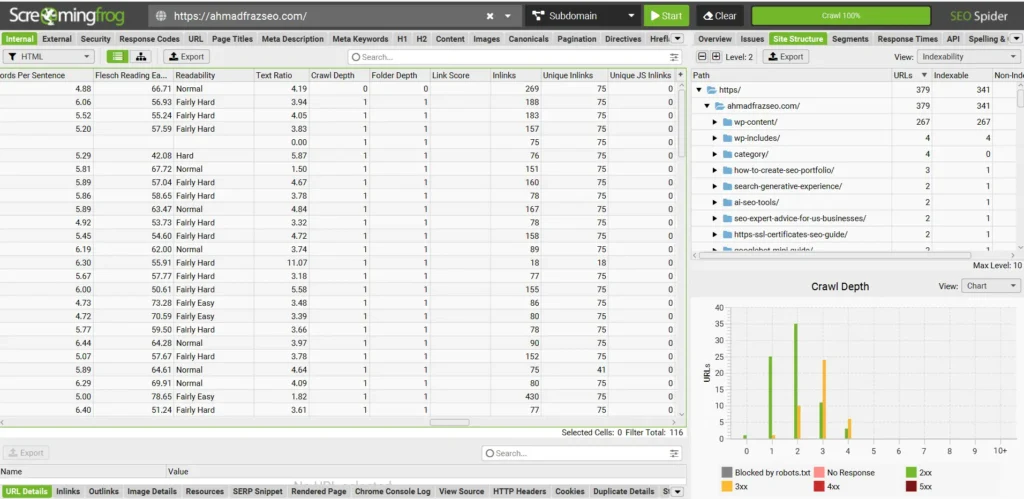
Screaming Frog is the absolute gold standard for technical site audits because it runs locally on your machine, giving you raw, real-time crawler data without cloud sampling limits. It is ideal when you want immediate, granular control over a domain.
How to check crawl depth:
- Enter your root URL and hit Start.
- Once finished, click the Site Structure tab in the top panel to see an instant visual distribution chart of your site’s click depth (Depth 1 through 5+).
- Jump to the main Internal tab, filter by HTML, and sort the Crawl Depth column to instantly reveal your deepest URLs.
Ahrefs Site Audit (Best for Ongoing Cloud Monitoring & Backlink Context)
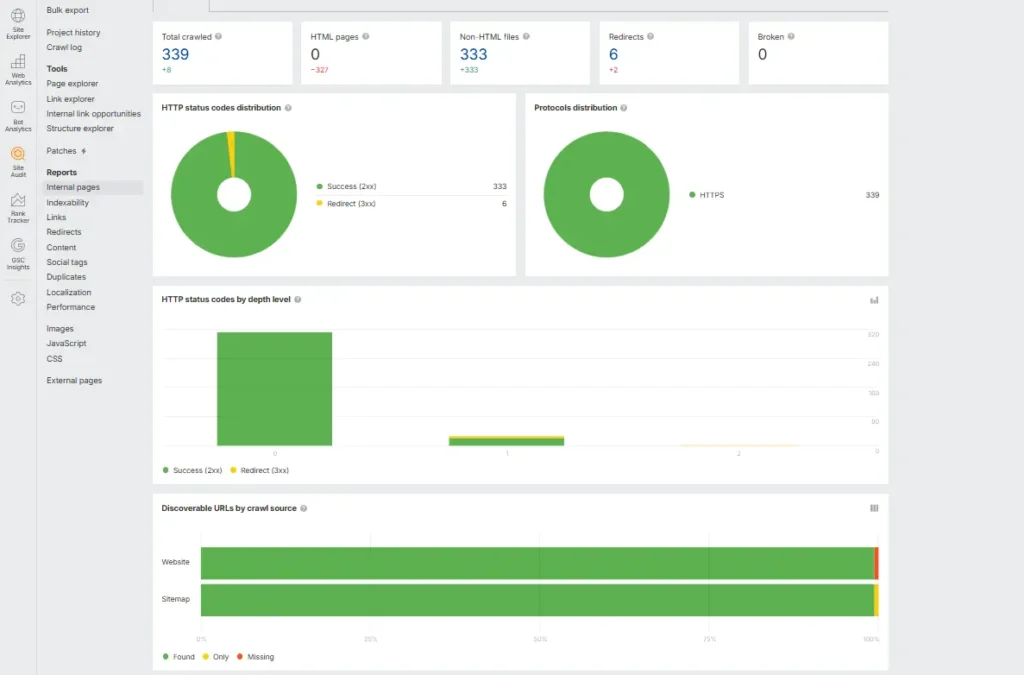
Ahrefs shines if you want automated, scheduled cloud audits that combine technical health with backlink metrics. It is perfect for tracking architectural changes over time without heating up your computer’s RAM.
How to check crawl depth:
- Open Site Audit and select your project.
- Navigate to the Internal Pages report.
- Click Add Filter, set Crawl Depth > 3, and cross-reference those buried URLs with organic traffic metrics.
SEMrush Site Audit (Best for Quick Diagnostic Scores & Client Reporting)
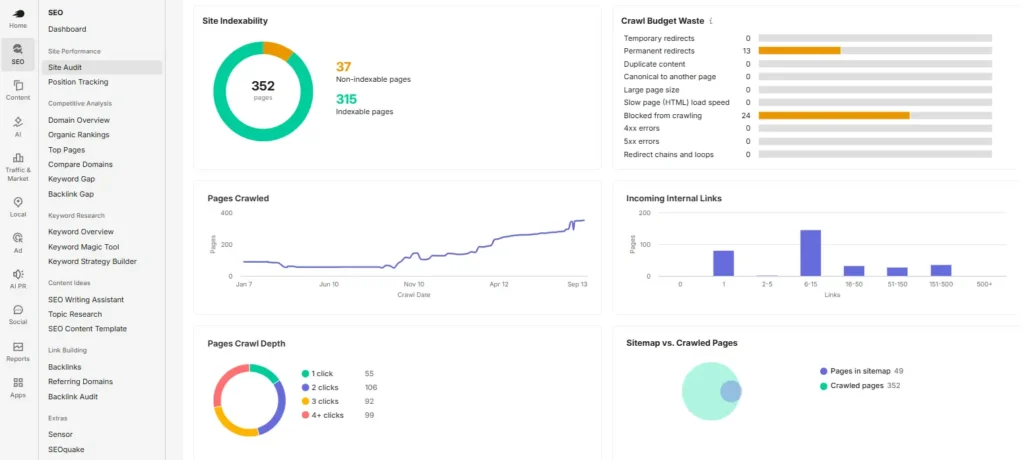
SEMrush is widely popular for client-facing audits because of its clean visual dashboards and overall “Crawlability Score.” It helps you quickly explain structural issues to non-technical stakeholders without overwhelming them.
How to check crawl depth:
- Run a Site Audit campaign for your domain.
- Click into the Crawlability thematic report from the main dashboard.
- Look at the Crawl Depth breakdown chart to see exact page counts per click layer, and export the URLs sitting at 4+ clicks for a quick review.
Diagnostic Field Note: During site audits, you may occasionally notice an isolated page with zero homepage links displaying a crawl depth of 1 in audit tools. This usually happens when an XML Sitemap feeds the crawler directly or a redirect chain bypasses standard navigation. Always double-check true click pathways through manual link audits.
Once you’ve pulled your crawl depth report from any of these tools, the next natural question is: Why did these pages end up so deep in the first place? Let’s look at the common architectural traps that accidentally bury core content.
Common Architectural Traps That Bury Pages
Most website owners don’t intentionally hide their best content five clicks deep. It usually happens gradually as a domain grows. You add new product lines, launch blog categories, or update site layouts, and before you know it, critical landing pages get pushed into the background.
When a site audit reveals a cluster of high-depth URLs, one of these four common structural traps is almost always the root cause:
1. Orphan Pages
An orphan page is a URL that exists on your server but has zero internal links pointing to it from anywhere else on the site. Because crawlers rely on links to navigate, they can usually only find orphan pages through XML sitemaps. Search engines treat these disconnected pages as low priority, making regular discovery and indexation extremely difficult.
2. Pagination Traps
On blogs, news sites, and e-commerce stores, older content naturally gets pushed further down as new items publish. If a user or bot has to click through
Page 1 → Page 2 → Page 3 … → Page 15
to reach an older article, that content ends up sitting at Depth 15. Without alternative internal paths, valuable historical content loses structural authority over time.
3. E-commerce Faceted Navigation & Filters
Faceted search allows users to filter products by color, size, brand, or price. However, if your development setup creates a unique URL for every possible filter combination e.g.,
/category/shoes?color=blue&size=10&sort=price
you create a massive web of deeply nested, parameter-heavy URLs. Crawlers get trapped navigating endless filter variations instead of indexing core product pages.
4. Over-Nested Navigation Menus
It is tempting to put every sub-topic into a drop-down menu, but over-complicating your main navigation often backfires. Forcing visitors and search bots to pass through multiple unnecessary sub-categories just to reach a main service page creates high structural depth and dilutes link equity right from the start.
Spotting these traps in your architecture is half the battle. Now, let’s look at practical, lightweight ways to fix high crawl depth without breaking your site design.
How to Flatten Your Site Architecture (Quick Fix Checklist)
Fixing crawl depth does not mean you have to redesign your entire website or flatten your entire URL structure. In fact, changing your URL paths without a proper redirect strategy can cause more harm than good.
Instead, the goal is to create smarter internal linking pathways that bring important pages closer to your authority hubs. Here are five practical ways to flatten your site architecture:
1. Add Contextual Links Inside High-Authority Content
One of the easiest ways to pull a deep page closer to the homepage is by placing a direct, contextual link inside a high-traffic, high-authority blog post or main service page. This creates a shortcut for both users and search bots, instantly bringing a Depth 4 page up to Depth 2.
2. Strengthen Parent Category and Hub Pages
Implement a logical “Hub-and-Spoke” model. Your main category page (the Hub) should directly link down to its core sub-topics (the Spokes), and those sub-topics should link back to the parent hub. This keeps related pages cleanly grouped within 2 to 3 clicks of your main navigation.
3. Implement Schema-Marked Breadcrumbs
Breadcrumb navigation provides a clean, automated internal link trail on every page e.g.,
Home > SEO Services > Technical SEO > Audit
Not only do breadcrumbs help users retrace their steps, but they also give search engines a consistent hierarchical path back up to your higher-level hubs.
4. Build a Dedicated HTML Sitemap
Unlike XML sitemaps built purely for bots, a well-structured HTML sitemap sits on a public page (often linked in the site footer). It acts as a clean directory of your domain’s core structural pages, ensuring every key hub is accessible within 1 or 2 clicks from anywhere on the site.
5. Audit and Connect Orphan URLs
Regularly run a site crawl to cross-reference your XML sitemap with your internal link structure. When you identify orphan pages or URLs with only one incoming link, find relevant parent categories or articles to link to them naturally.
Wait... What About Crawl Budget?
A common technical question that arises when analyzing page depth is: Does having deep pages automatically waste my website’s crawl budget?
While crawl depth measures structural click distance, crawl budget focuses on bot bandwidth. How many pages Googlebot can and actually wants to crawl on your server.
Having pages sitting at Depth 4 or 5 can lead to crawling inefficiencies, but a deep page doesn’t automatically mean your budget is being wasted. The relationship between click distance, server logs, crawl capacity, and crawl demand depends heavily on your site’s size and architecture.
If you want to understand how page depth directly influences Googlebot fetching behavior, server load limits, and when you actually need to worry about budget optimization, read my diagnostic breakdown: Crawl Depth vs. Crawl Budget
FAQ - Googlebot & View Page as Googlebot
Is crawl depth a direct Google ranking factor?
No. Crawl depth itself is not a direct algorithm ranking score. However, it heavily influences discoverability, crawling frequency, and internal authority distribution. All of which directly impact how well a page performs in search results.
What crawl depth is considered too deep for SEO?
Generally, any core commercial page, primary category, or key landing page sitting beyond 3 to 4 clicks from the homepage is considered too deep. If a critical URL requires 5+ clicks to reach, it should be reviewed for better internal linking pathways.
Does an XML sitemap reduce crawl depth?
No. An XML sitemap helps Googlebot discover URLs faster, but it does not change a page’s structural crawl depth or internal link hierarchy. True crawl depth is calculated based on internal link paths, not sitemap submissions.
How is crawl depth different from URL folder depth?
Crawl depth measures the number of clicks required to reach a page from the homepage. URL depth simply counts the sub-folders (slashes /) in a web address. A page with a long URL path can still sit at Depth 1 if it is linked directly from your main header menu.
Does adding a link in the site footer reduce crawl depth?
Yes. Because global footer links appear across almost every template on your domain (including the homepage), adding a link to the footer brings its structural crawl depth down to Depth 1 site-wide. However, footer links should be used strategically for essential pages rather than dumping dozens of URLs there.
How often should I audit crawl depth?
For small-to-medium websites, auditing crawl depth once every quarter or after a major site redesign is usually sufficient. For large e-commerce platforms or news sites with frequent content additions, monthly automated crawls help spot pagination or filtering issues early.
Final Takeaway
Fixing crawl depth isn’t about hitting an arbitrary number in a site audit tool just to get a clean report. It is about clear communication with search engines and real users.
When you bring an important landing page closer to your homepage through logical, contextual internal links, you send an unmistakable signal to Googlebot: “This content matters to my business.”
Audit your core templates, flatten unnecessary navigation layers, and ensure your most valuable assets are never buried more than a few clear clicks away.
Explore Other Articles Under Technical SEO Side
Pillar Blogs
What is Technical SEO? (Parent Blog)
- Crawlability and Indexability in SEO (Child Blog)