Last reviewed: September 2026
You’ve probably heard this classic piece of technical SEO advice:
“Keep every important page within three clicks of your homepage.”
It sounds clean, simple, and logical. It also sounds like one of those universal rules you are supposed to follow without questioning.
But as your site grows, reality hits. Core landing pages end up four or five clicks deep, and audit tools start firing warnings. This leads to a critical question every senior strategist eventually faces:
Does a deep page actually waste your crawl budget, or are you chasing a metric Googlebot doesn’t care about?
If you treat “5 clicks deep = bad SEO” as a rigid law, you risk wasting engineering resources fixing numbers that don’t impact your bottom line.
We’ll cover in this guide:
- The truth behind the “3-click rule” and how Googlebot actually processes click distance.
- Real-world audit data: How I analyzed 92 deep pages on my own website.
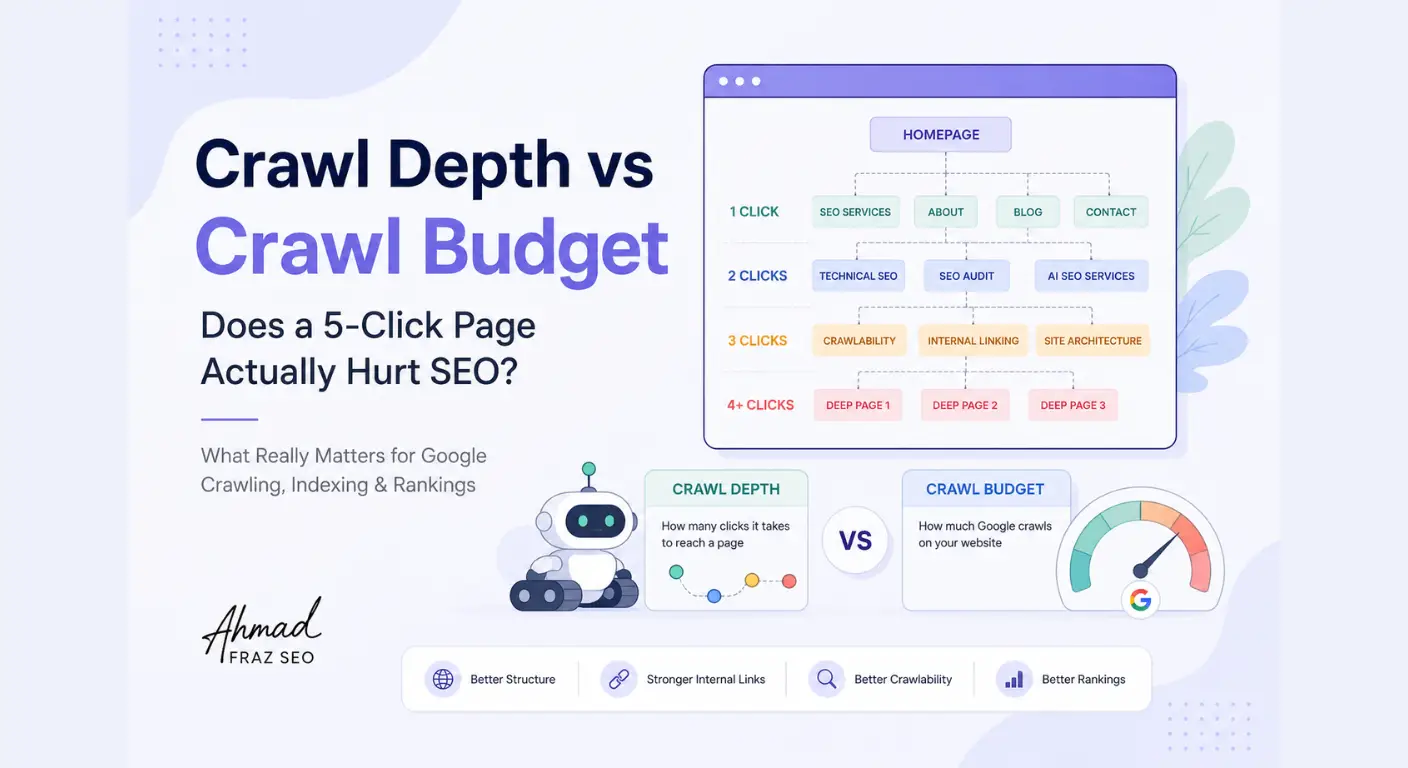
- The critical difference between Crawl Depth, Crawlability, and Crawl Budget.
- Google’s official thresholds: Crawl Capacity vs. Crawl Demand explained simply.
- The “Page Priority” framework: How to decide which deep URLs actually matter.
- A practical 8-step decision tree for auditing deep URLs during site reviews.
Is the "3-Click Rule" Actually a Google Ranking Rule?
Let’s clear this up right from the start.
You will find dozens of guides telling you that any page sitting beyond three clicks from the homepage is invisible to search engines.
While three clicks is a useful practical benchmark for site architecture, it is not a rigid Google ranking algorithm rule.
Google does not operate on a binary formula where:
- 3 clicks = Good
- 4 clicks = Penalized
What Google does explain in its developer documentation is that it uses internal link connections to understand a site’s structure and relative page importance. A page sitting closer to main navigation hubs often receives more internal authority, but click distance alone does not trigger a direct crawl penalty.
In short: Three clicks is a sensible architecture heuristic, not an algorithmic law.
Now that we’ve separated practical benchmarks from algorithm myths, let’s look at how this plays out in a real site audit.
Case Study: Auditing Crawl Depth on My Own Site
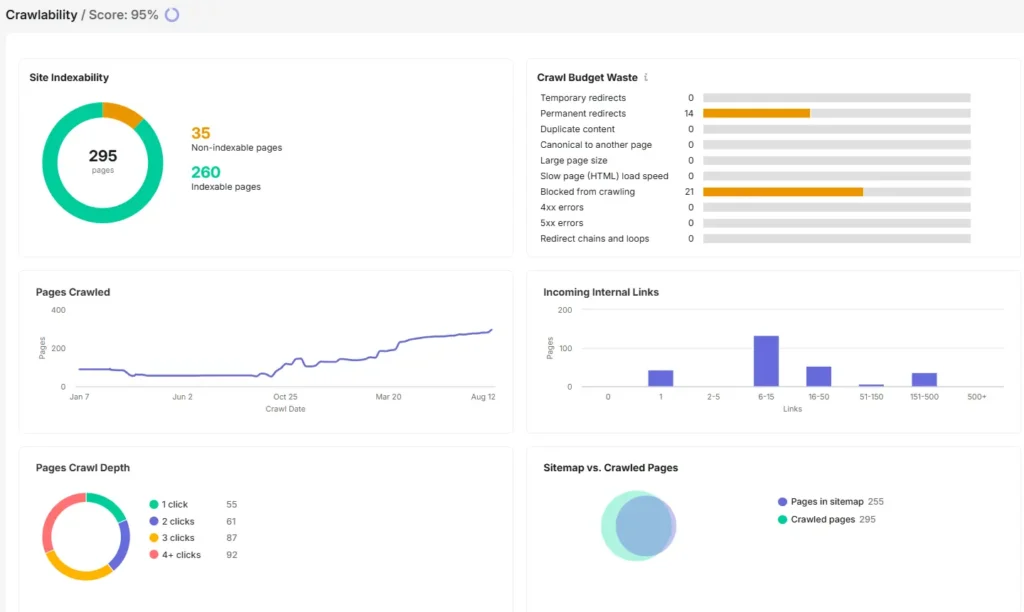
Semrush Site Audit crawlability report from my website, showing crawl depth, internal links and crawl-budget-related metrics.
This topic actually started with something I noticed while running a technical audit on my own domain.
My site audit tool reported an overall Crawlability Score of 95%, a strong result on paper. But when I clicked into the detailed breakdown to see what was behind that score, the internal link distribution caught my attention.
Out of 295 crawled pages, the click depth distribution looked like this:
- 55 pages at 1 click
- 61 pages at 2 clicks
- 87 pages at 3 clicks
- 92 pages at 4+ clicks
That last number stood out: 92 pages sitting at 4 or more clicks deep.
If I followed standard SEO advice blindly, my immediate reaction would be to create emergency tickets to flatten all 92 URLs. But before jumping to conclusions, I had to ask a few diagnostic questions:
- Are these 92 deep URLs actually core commercial pages, or are they old supporting blog posts and tag archives?
- Is Googlebot struggling to discover them, or are they being indexed normally?
- Does having pages this deep mean I am actively wasting my site’s crawl budget?
This is where the line between tool metrics and real search engine behavior becomes critical. Looking at a crawler report without context makes it easy to assume every deep page is a site failure. In reality, you need to understand how click distance actually interacts with bot bandwidth.
The audit score flagged a structural pattern, not an active site failure. Seeing this data on a clean, functioning site highlighted a common industry problem: SEOs often treat crawl depth, crawlability, and crawl budget as the exact same issue when they are fundamentally different mechanics.
Dissecting the Terminology: Crawl Depth vs Crawlability vs Crawl Budget
To make strategic decisions during site audits, you have to separate how a crawler reaches a page from whether it has the capacity to process it.
Mixing up these terms usually leads to over-engineering site structures for problems that don’t exist.
1. Crawl Depth
- What it measures: The minimum number of internal link clicks required to reach a specific URL starting from the homepage.
- The mechanism: It is purely a metric of site architecture and link topology.
- The diagnostic focus: “How many steps does a user or bot take to get here?”
2. Crawlability
- What it measures: Whether a search engine bot is legally and technically allowed to access and parse a URL.
- The mechanism: It is governed by technical directives like robots.txt disallows, server response codes (200 vs 404/500), canonical tags, and JavaScript rendering constraints.
- The diagnostic focus: “Is the door open for Googlebot to read this page?”
3. Crawl Budget
- What it measures: The total number of URLs Googlebot can and wants to crawl on your domain within a given timeframe.
- The mechanism: It is determined by server performance (Crawl Capacity) and content demand/popularity (Crawl Demand).
- The diagnostic focus: “Does Googlebot have the bandwidth to crawl my entire site efficiently?”
Once you separate these three metrics, the big question becomes: When does crawl depth actually cross the line and start impacting your crawl budget? Let’s look at Google’s official stance on bot mechanics.
Does a 5-Click Page Automatically Waste Crawl Budget?
The short answer is: No, not automatically.
A page sitting at 5 clicks deep does not instantly burn through server capacity or trigger a penalization from Googlebot. Whether page depth creates an actual crawl budget problem comes down to one fundamental factor: your website’s size and total scale.
To determine if deep URLs are hurting your crawl efficiency, apply these scale thresholds during your technical audit:
Small-to-Medium Sites (<10,000 URLs)
If your site contains under 10,000 total URLs, which includes most B2B service websites, agency portals, and local businesses, crawl budget is almost never a limiting factor.
Googlebot has more than enough bandwidth to process every page on your domain. If a page sitting at Depth 5 on a 500-page site is not getting indexed, the issue is almost certainly a lack of internal link authority or poor content quality, not server crawl budget depletion.
Enterprise & Large-Scale Sites (100,000 to 1M+ URLs)
On massive e-commerce platforms, job boards, or dynamic directories with hundreds of thousands of pages, crawl budget becomes a real constraint.
When millions of URLs sit 5+ clicks deep due to faceted navigation, aggressive filtering, or endless pagination loops, Googlebot spends time fetching redundant parameter variations instead of discovery paths. At this enterprise scale, deep architecture directly leads to crawl inefficiencies and delayed indexation for core revenue pages.
The Threshold Summary
Site Scale | URL Count | Crawl Budget Risk Level | Primary Risk of Deep Pages |
Small Business / SaaS | 1–1,000 URLs | Very Low | Loss of PageRank & slow discovery. |
Medium Content / Blog | 1,000–10,000 URLs | Low | Internal authority dilution. |
Large E-Commerce / News | 10,000–100,000 URLs | Moderate | Delayed indexation for new product additions. |
Enterprise / Programmatic | 100,000–1M+ URLs | High | Wasted bot bandwidth & crawl wastage. |
Google's Stance: Crawl Capacity vs Crawl Demand
To understand whether deep pages actually drain your crawl budget, you have to look at how Google officially defines bot allocation.
According to Google’s technical documentation, crawl budget is not a static limit assigned to a domain. Instead, it is the result of two dynamic factors working together: Crawl Capacity and Crawl Demand.
1. Crawl Capacity Limit (Server Health & Responsiveness)
Crawl capacity is driven by your server’s ability to handle bot requests without crashing or slowing down for real users.
- How it works: Googlebot monitors your host response time. If your server responds quickly with healthy 200 OK status codes, your crawl rate limit increases. If your server starts lagging, throwing 503 Service Unavailable errors, or taking seconds to load, Googlebot immediately slows down to protect user experience.
- The structural impact: If your server is fast, Googlebot can easily crawl thousands of pages per day, regardless of whether some sit at Depth 3 or Depth 5.
2. Crawl Demand (Content Value & Popularity)
Crawl demand is driven by how valuable and popular your content is to Google’s indexing system.
- How it works: Even if your server has unlimited crawl capacity, Googlebot won’t crawl every page daily unless there is demand for it. Demand is determined by URL freshness, search popularity, and site-wide re-indexing signals.
- The structural impact: A popular, high-authority product page sitting at Depth 4 will still be crawled frequently because demand is high. Conversely, an outdated tag page sitting at Depth 2 might be skipped because demand is low.
The Real Verdict on Crawl Budget
For most small-to-medium websites (under 10,000 to 50,000 URLs), crawl budget is rarely a bottleneck. Googlebot has more than enough capacity to crawl your entire site.
Knowing that server bandwidth isn’t an issue for most sites brings us to the real strategic problem: If deep pages aren’t always destroying your crawl budget, how do you decide which ones actually need fixing? Let’s break down the Page Priority Framework.
The Page Priority Framework: Which Deep URLs Actually Matter?
When a site audit flags dozens or hundreds of URLs sitting at 4+ clicks deep, the worst thing you can do is start moving pages around indiscriminately.
Not every deep page is a problem that needs solving.
To prevent unnecessary engineering work, evaluate your high-depth URLs through this simple three-tier priority framework:
Priority 1: High Commercial Value & Core Conversion Pages (Fix Immediately)
These are your primary revenue drivers. Core service offerings, primary category hubs, high-converting product pages, or key bottom-of-funnel (BOFU) landing pages.
- The Diagnostic Rule: If a page directly generates leads, sales, or primary business revenue, sitting at Depth 4 or 5 is a critical structural issue.
- The Action: Bring these pages up to Depth 1 or Depth 2 immediately by adding direct links from your global navigation, main category pages, or homepage feature blocks.
Priority 2: Middle-of-Funnel Supporting Content & Core Guides (Optimize Contextually)
These are informative pillar articles, comprehensive guides, or key sub-category pages that build topical authority and drive organic traffic.
- The Diagnostic Rule: Sitting at Depth 3 or Depth 4 is acceptable for supporting content, provided it is properly linked within a logical topic cluster.
- The Action: If a strong supporting post is struggling with indexation or rankings, add contextual internal links from higher-ranking parent pages to lift its structural authority without altering your main menu.
Priority 3: Low-Value Archives, Old Pagination & Utility Pages (Leave Alone or Prune)
These are paginated blog archives (/blog/page/12/), legal disclaimers, tag archives, or deeply nested historical posts that exist purely for structural completeness.
- The Diagnostic Rule: Having low-value utility URLs at Depth 4+ is completely natural and expected. Moving them closer to the homepage actually wastes internal PageRank.
- The Action: Leave them alone. If they create massive indexation bloat, consider applying noindex or canonicalizing them rather than restructuring your site navigation.
Now that you can categorize your deep URLs by priority, let’s put this into an actionable 8-step decision tree you can run during your next technical audit.
Diagnostic Audit Checklist for Deep URLs (8-Step Decision Tree)
When your site audit tool flags a list of URLs sitting at 4+ clicks deep, follow this sequential decision tree before making any code or navigation changes:
- Step 1: Is the deep URL indexable? Check for noindex tags, canonical tags pointing elsewhere, or robots.txt disallows. If the page isn’t meant to be in Google’s index, leave its depth alone.
- Step 2: Is it a high-intent or revenue-generating page? Identify if it is a main service page, high-converting product, or key landing page. If yes, proceed to fix its depth immediately (Target: Depth 1–2).
- Step 3: Is it an organic traffic or lead driver? Cross-reference the URL with Search Console or Google Analytics. If it receives regular organic traffic, bringing it closer to authority hubs will boost its performance.
- Step 4: Does it sit naturally inside a structured topic cluster? If it is a supporting blog article or deep sub-topic, check if its parent category hub links to it. If the cluster path is clear, Depth 3 or 4 is acceptable.
- Step 5: Is the URL orphaned or lacking internal links? Check internal link count. If the URL has fewer than 2–3 incoming internal links, add contextual links from higher-level articles rather than altering your main navigation.
- Step 6: Is the depth caused by pagination or dynamic facets? If the page is buried at Depth 8 due to /page/8/ or color/size filters, evaluate canonical strategy or load-more/view-all alternatives rather than manually linking to deep pages.
- Step 7: Is the page outdated, thin, or low value? If the deep URL is an obsolete blog post, thin tag page, or old promo, do not waste internal links on it. Evaluate whether to prune (410/301) or keep as-is.
- Step 8: Implement lightweight structural fixes. For high-priority deep pages, apply non-disruptive fixes: contextual inline links, breadcrumbs, or HTML sitemap inclusion instead of rebuilding your entire site architecture.
Following this decision tree keeps your audit focused on real business impact rather than vanity tool scores. Let’s finish up with the most common questions around crawl depth vs crawl budget and a clear strategic verdict.
Strategic Fixes & Busting the "Robots.txt Budget Reallocation" Myth
When technical teams realize that deep URLs are causing crawl inefficiencies, the default reaction is often to start blocking deep paths in robots.txt.
The logic seems sound on the surface: If I disallow Googlebot from crawling low-value deep directories, the bot will redirect that saved bandwidth to my high-priority pages.
Unfortunately, that is not how Googlebot operates.
The Robots.txt Myth Busted
Blocking a URL path via robots.txt does not automatically reallocate crawl budget to other parts of your site.
When you block a path:
- Googlebot simply stops fetching those specific URLs. It does not transfer that “saved capacity” as a bonus allocation to your money pages.
- If those blocked deep URLs already have external backlinks or strong internal signals, Google can still index the URLs without crawling their content (resulting in “Indexed without content” search snippets).
- You risk cutting off PageRank flow to pages lower down the chain that actually needed internal link equity.
Instead of relying on crude robots.txt disallows, use these targeted, strategic architectural fixes:
1. Smart Internal Linking & Contextual Shortcuts
If a valuable page sits at Depth 5, don’t change its URL structure. Simply add a direct contextual link to it from a high-authority Depth 1 or Depth 2 page (such as your homepage, main service hub, or top-performing blog post). This immediately creates a shortcut, dropping its effective crawl depth to Depth 2.
2. Strategic Breadcrumbs with Schema
Implementing hierarchical breadcrumb navigation (using BreadcrumbList schema) ensures that every deeply nested page automatically maintains clear, crawlable pathways back to parent categories.
3. Smart Pagination & “View All” Hubs
Instead of forcing crawlers through long pagination chains (1 → 2 → 3 … → 20), use canonicalized pagination structures, numeric page groups, or optimized “View All” sub-hubs so bots can reach deep content in fewer hops.
Frequently Asked Questions
Is a 5-click page bad for SEO?
Not automatically. If a 5-click page is a supporting article or an archive, sitting at Depth 5 is completely natural. However, if a core commercial landing page or primary product requires 5 clicks to reach, it suffers from reduced internal link equity and should be pulled closer to your main navigation.
Does crawl depth directly affect crawl budget?
On small to medium sites (<10,000 URLs), no. Googlebot has ample bandwidth to crawl deep pages. On large enterprise sites (100,000+ URLs), having hundreds of thousands of deeply nested URLs or faceted filters can cause crawl inefficiencies and waste server resources.
What is the ideal crawl depth for important pages?
Your core revenue pages, primary categories, and top-converting content should sit within 1 to 3 clicks from the homepage. Supporting cluster content and deep archives can safely sit at Depth 3 or 4 without causing structural issues.
Does blocking deep pages in robots.txt save crawl budget?
No. Disallowing a deep URL path prevents Googlebot from fetching those specific pages, but it does not automatically reallocate that saved capacity to other URLs. If blocked pages have incoming links, Google may still index them without content.
How can I reduce crawl depth without changing URL structures?
You do not need to change page URLs. Simply place direct, contextual internal links from high-authority Depth 1 or 2 pages (like top-performing blog posts or hub pages) pointing directly to deep target pages. Implementing breadcrumbs and an HTML sitemap also flattens click pathways site-wide.
Conclusion
Optimizing your site structure isn’t about blindly forcing every single page into a strict 3-click limit just to clear audit tool warnings.
For small to medium websites, deep pages are usually an authority distribution issue—not a crawl budget emergency. Focus your resources on your core money pages: ensure high-priority landing pages sit within 2 to 3 clicks, use contextual links to bridge structural gaps, and leave low-value utility archives alone.
Audit with context, prioritize by commercial impact, and build internal link paths that serve real users first.
Need Help Uncovering Architectural Bottlenecks?
If you are dealing with a complex domain, unindexed landing pages, or an enterprise site where internal link equity isn’t reaching core commercial hubs, a automated audit score won’t show you the full picture.
I help growing brands and enterprises diagnose deep structural issues, optimize crawl efficiency, and design logical link topologies that drive organic growth.
Book a Technical SEO Audit or Explore my technical SEO Services to turn architectural bottlenecks into search visibility.
Explore Other Articles Under Technical SEO Side
Pillar Blogs
What is Technical SEO? (Parent Blog)
- Crawlability and Indexability in SEO (Child Blog)