

Ever published a high-quality article or service page, optimized all on-page elements, built a few external backlinks, and watched it get stuck on page 3 of Google search results?
Or perhaps you have noticed that while your blog posts receive steady organic impressions, your core revenue-generating money pages remain virtually invisible?
When pages struggle to rank despite strong content quality, the root cause is rarely a lack of external backlink authority or content length. In over 80% of site audits, the true culprit is a broken internal linking architecture.
While external backlinks generate raw authority for your domain, your internal link structure controls how that authority is distributed, how search engines evaluate topical hierarchy, and whether crawlers can efficiently index your site. Without a logical internal network, high-value pages become isolated, link equity leaks into low-priority assets, and search crawlers struggle to understand which pages represent your primary business entities.
Think of your website as a complex city infrastructure:
The Homepage: The central transportation hub receiving the highest volume of external traffic and authority.
Category & Pillar Pages: Main highways routing signals into core topical districts.
Individual Blog Posts & Sub-pages: Local streets and destinations.
If you fail to build direct, logical highways between your central hub and key destinations, search engines cannot navigate your site efficiently. No matter how impressive your individual pages are.
In this guide, you will learn:
The Mechanics of Internal PageRank: How link equity actually moves through web architectures, calculated via damping factors and link distance.
Internal Links vs. External Backlinks: The technical distinction between equity generation and internal equity distribution.
Architectural Siloing Models: How to structure Hub-and-Spoke and Silo frameworks to pass maximum authority to conversion assets without breaking topical relevance.
Live Case Study Proof: How re-architecting internal links on
ahmadfrazseo.comtransformed flat service pages into authoritative topical hubs.Search Engine Extraction Rules: How Google evaluates anchor text diversity and handles multiple links to the same destination via the First Link Priority rule.
Technical Audit & Resolution Workflows: Step-by-step protocols using Screaming Frog and Google Search Console to detect orphan pages, eliminate crawl traps, and fix JavaScript link extraction failures.
What Is Internal Linking & The Mechanics of Link Equity Flow
At its core, internal linking refers to any hyperlink that targets another URL residing on the same root domain.
<!-- Standard HTML Contextual Internal Link -->
<a href="https://ahmadfrazseo.com/technical-seo-audit">technical SEO audit guide</a>
While simple in code, the algorithmic impact of an internal link extends far beyond user navigation. Internal links serve as the primary routing mechanism for search engine crawlers (Googlebot) to discover new assets, map relationships between documents, and calculate relative document authority.
Internal Links vs. External Backlinks: Generation vs. Distribution
To understand why internal links drive ranking movements, you must separate equity generation from equity distribution:
External Backlinks (Generation): Act as external votes of confidence, injecting new PageRank equity into specific landing pages (typically your homepage or high-value linkable assets).
Internal Links (Distribution): Act as internal pipes. You cannot control which third-party sites choose to link to your domain, but you have 100% control over how you route that external authority from your strong pages down to your deep, high-converting service or product pages.
How Internal PageRank Actually Works
Google’s original foundation, the PageRank Algorithm, evaluates web documents as nodes connected by directed edges (links). While search algorithms have evolved to include machine learning models (RankBrain, MUM), internal PageRank remains a primary foundational metric for document importance.
INTERNAL PAGERANK DISTRIBUTION PIPELINE
- Step 1: External Backlink hits Homepage (PageRank = 10.0)
- Step 2: Damping Factor Applied (0.85 multiplier)
- Step 3: Remaining Equity Divided Equally among Outbound Internal Links
- Step 4: Equity Passed to Target Page (Minus Link Distance Decay)
When PageRank flows from Page A to Page B through an internal link, the passed equity is governed by two mathematical principles:
1. The Damping Factor (d = 0.85)
Not all authority on a source page transfers to the target page. Search engines apply an algorithmic damping factor typically modeled at 0.85. This represents the probability that a user (or crawler) will continue clicking links rather than starting a new session. Consequently, roughly 15% of link equity dissipates at every navigational hop.
2. Outbound Link Division
The PageRank passed by a source page is divided equally among all valid outgoing links rendered on that page:
Passed Equity = Source Page Equity x 0.85 / Total OutBound Links
Key Takeaway: If a high-authority page contains 200 outbound navigation links (header menus, footer links, tag archives), the PageRank transferred to any single target page is heavily diluted. Reducing unnecessary structural links on high-authority pages increases the equity delivered to your core target pages.
3. Link Distance Decay (Crawl Depth)
The farther a page sits from your primary authority source (usually the homepage), the less PageRank it receives due to cumulative damping. Pages positioned at a crawl depth of 4 or 5 hops receive a fraction of the domain’s baseline authority compared to pages accessible within 2 or 3 hops.
Core Types of Internal Links & Their Algorithmic Weighting
Not all internal links are created equal in the eyes of search engines. A link placed inside the core editorial body of an article carries significantly higher ranking weight than a link sitting in a site-wide footer or navigation sub-menu.
Google evaluates link equity transfer using the Reasonable Surfer Model (US Patent 8,103,678). Unlike the original Random Surfer Model which assumed users click every link on a page with equal probability. The Reasonable Surfer Model predicts the likelihood of a real human user clicking a specific link based on its DOM position, visual prominence, surrounding text, and layout context.
REASONABLE SURFER WEIGHTING TIER | |
Link Placement Location | Relative Algorithmic Weight |
Contextual Body Links | High (100% Full Equity Flow) |
Primary Navigation / Header | Moderate (High Discovery, Diluted PR) |
Contextual Sidebar Widgets | Low to Moderate |
Footer / Boilerplate Links | Minimal (Heavily Discounted) |
Contextual Body Links vs. Structural Links (Header, Footer, Sidebar)
Understanding the functional distinction between contextual and structural links allows you to manipulate PageRank flow with pinpoint accuracy.
1. Contextual Body Links (The Primary Authority Drivers)
A contextual link is embedded directly within the unique HTML body content of a page, surrounded by relevant editorial text.
Contextual Body Link Example:
HTML Implementation:
<p>Before publishing new content, make sure your domain crawlability is verified using my <a href="https://ahmadfrazseo.com/technical-seo-audit/">technical SEO audit checklist</a> to prevent indexation blocks.</p>Algorithmic Weight: Highest. Google treats contextual links as explicit, intentional editorial votes.
Why They Rank Pages: Because the link resides within a unique paragraph, search engines leverage the surrounding text (co-occurrence and NLP entity context) to pass rich topical relevance alongside PageRank.
Best Practice: Place high-value contextual internal links naturally near the beginning of your content when relevant to the reader’s needs. Google’s Reasonable Surfer patent describes how link position, prominence, anchor text, and context can influence estimated click probability. (Google Patents — US 7,716,225 B1)
2. Structural Links (Header, Footer & Sidebar)
Structural links are repetitive, template-level navigational elements rendered across hundreds or thousands of pages simultaneously.
Structural Link Examples:
1. Primary Header Navigation Link:
<nav class="main-menu">
  <a href="https://ahmadfrazseo.com/seo-services/">SEO Services</a>
</nav>
2. Footer Boilerplate Link:
<footer class="site-footer">
  <a href="https://ahmadfrazseo.com/privacy-policy/">Privacy Policy</a>
</footer>
Header / Primary Navigation: Crucial for initial page discovery and establishing site hierarchy. However, because navigation menus are appended site-wide, adding dozens of links to a mega-menu splits your source PageRank across many targets.
Footer & Boilerplate Links: Links placed in website footers (e.g., “Privacy Policy”, “Terms of Service”, or low-priority site categories) are discounted heavily by Google algorithms. Search engines recognize footer blocks as boilerplate text and ignore repetitive footer links aimed at manipulating rankings.
Sidebar Links: Useful for regional navigation within a category, but carry significantly less weight than contextual body links due to lower visual prominence on mobile viewport screens.
Breadcrumbs, Sub-menus, and Related Post Engines
To complement editorial contextual links, modern site architectures utilize automated structural link systems to manage crawl depth and user journeys.
1. Breadcrumb Link Networks
Breadcrumbs render a structured horizontal text path (e.g., Home > Technical SEO > Canonical Tags) usually placed at the top of a document.
SEO Impact: Critical. Breadcrumbs pass structured parent-child relationship signals directly to Google. They allow search crawlers to traverse upward through your taxonomy tree with minimal click depth.
Schema Integration: Always pair HTML breadcrumbs with
BreadcrumbListJSON-LD structured data to trigger rich snippet navigational paths directly in Google SERPs.
2. Sub-menus & Mega-Menus
While mega-menus improve user navigation on large sites, unmanaged mega-menus create severe PageRank leakage.
The Problem: If every page on your site renders a mega-menu containing 150 links, every page is forced to divide its outgoing PageRank by 150.
The Solution: Keep primary navigation clean. Limit header links to core top-level category hubs and primary conversion paths, deferring deep sub-category navigation to on-page hub links.
3. Related Post & Contextual Recommendation Engines
Automated “Related Articles” or “Recommended Services” widgets appended at the end of blog posts help distribute link equity dynamically to deeper archive pages.
Optimization Rule: Avoid generic algorithmic recommendations based strictly on publish date. Enforce category-level or tag-level related post filters so that blog posts only link to relevant, topically aligned articles.
Strategic Architecture: Hub-and-Spoke, Siloing, & Topical Clusters
A website without a defined internal link architecture becomes an unstructured maze to search engine crawlers. Even if you publish hundreds of high-quality articles, failing to connect them within logical topical boundaries leads to keyword cannibalization, crawl inefficiency, and diluted domain authority.
To build maximum topical authority, modern technical SEO relies on three structural models:
The Pillar/Hub Page: The broad, highly authoritative master document targeting high-volume head terms (e.g.,
/technical-seo/).Cluster Spokes: In-depth, targeted sub-articles addressing specific long-tail sub-topics (e.g.,
/canonical-tags-guide/,/crawl-budget-optimization/).Hyperdirectional Linking: Spokes link upward to the Pillar Hub, and the Pillar Hub links downward to every Spoke, creating an isolated, highly relevant topical entity.
Strict Siloing vs. Cross-Cluster Link Mesh
When building topical clusters, technical SEOs must decide how strictly to enforce boundaries between different categories on the website.
1. Strict Siloing (Directory-Based Isolation)
Under a strict siloing model, pages inside Category A (/technical-seo/) are forbidden from linking to pages inside Category B (/content-marketing/).
The Pro: Maintains absolute, unadulterated topical purity within directory structures.
The Con: Creates artificial navigational barriers for users and prevents valid, highly relevant context from passing between adjacent topics.
2. Cross-Cluster Link Mesh (The Modern Topical Mesh)
In modern search architectures, strict isolation is often too rigid. Instead, we deploy a Topical Mesh.
How It Works: You allow cross-linking between different category silos only when a strong semantic entity relationship exists between the two documents.
Real Example from
ahmadfrazseo.com:Silo A (Technical SEO): Article on Canonical Tags.
Silo B (E-Commerce SEO): Article on Shopify Faceted Navigation.
The Mesh Link: The Shopify Faceted Navigation article contextually links to the Canonical Tags guide because dynamic filter parameters directly cause canonical issues.
Rule of Thumb: Never cross-link between unrelated silos just to pass PageRank (e.g., linking a Local SEO Checklist to an E-Commerce Payment Gateway Guide). Only cross-link when the target document directly resolves a sub-entity mentioned in the source text.
Important Page Prioritization (Funneling Equity to Revenue Pages)
The ultimate goal of internal link architecture is not just indexing blog posts, it is funneling raw link equity from high-authority informational assets into core money pages (Services & Products).
Informational blog posts naturally attract the vast majority of external backlinks and social shares. Conversion/Service pages rarely earn natural backlinks. Strategic internal linking bridges this gap.
Execution Framework for Money Page Prioritization:
Map Your Authority Conductors: Use Ahrefs (Best by Links) or Google Search Console to identify your top 10% highest-authority blog articles.
Inject Contextual Conversion Bridges: From these high-authority informational posts, add contextual body links pointing directly to your primary service or product landing pages using descriptive, high-intent anchor text.
Bad Anchor: “Check out my technical SEO services here.”
High-Intent Anchor: “If you require custom technical implementation, explore our specialized technical SEO services.”
Eliminate Equity Leaks: Audit your high-authority blog posts and remove low-value outbound links pointing to dead tags, author archives, or low-priority utility pages.
Case Study: Re-architecting Internal Linking on AhmadFrazSEO
Theoretical framework and SEO guidelines are valuable, but real-world execution is where architectural strategies prove their worth.
When my personal consulting domain (ahmadfrazseo.com) was initially delivered by the development team, it looked clean and professional on the surface: well-written technical articles, distinct service offerings, and modern UI design. However, an architectural audit revealed a critical underlying issue common to many client sites: a poorly executed, non-strategic internal link structure.
The Challenge & Baseline Structural Errors
Despite having high-quality content targeting competitive search queries, the site’s structural signals were fragmented. Search crawlers struggled to pass authority from high-traffic blog posts down to conversion-focused service pages.
Key Baseline Errors Identified During Audit:
Disconnected Blog Content: High-intent informational blog articles were published as isolated content islands, lacking contextual body links back to related service hubs.
Authority Bottlenecks: External link equity arriving at the Homepage was not flowing efficiently into deeper technical service pages.
Flat, Non-Hierarchical Architecture: Internal links existed organically, but they lacked structured siloing, treating high-priority service offerings and minor informational blog posts with equal visual weight.
Keyword & Entity Confusion: Because blog posts failed to reinforce core service categories, Google struggled to determine whether
ahmadfrazseo.comwas primarily an informational blog or a technical SEO consulting agency.
The 3-Layer Structural Framework
To solve these signal conflicts and optimize PageRank flow, I designed and deployed a strict 3-Layer Internal Linking Framework:
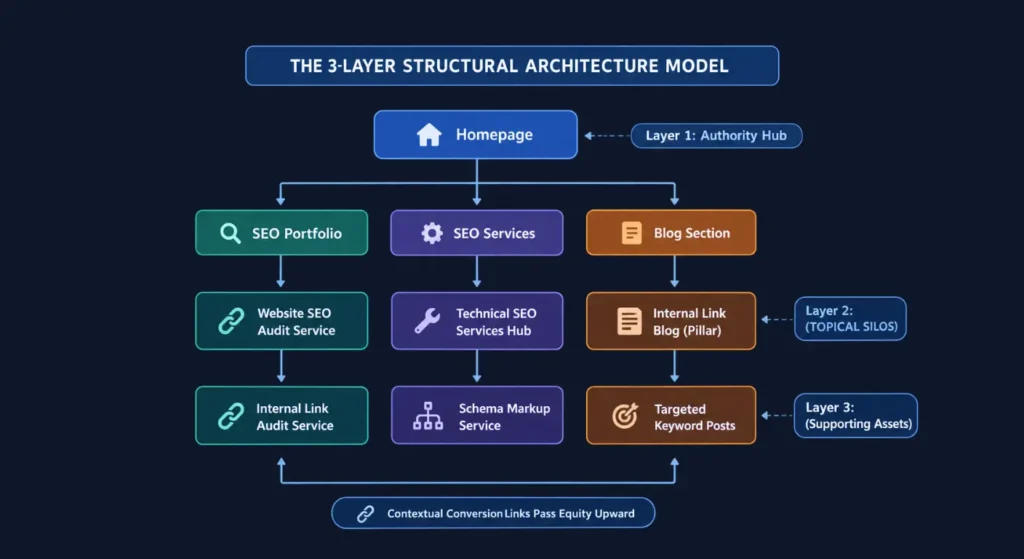
Layer 1: The Homepage (The Central Authority Hub)
Function: Serves as the primary entry point receiving the bulk of direct domain authority and external backlinks.
Execution: Direct, uninhibited navigational paths were built linking the Homepage to the top three primary category hubs: SEO Services, SEO Portfolio, and the Blog Section.
Layer 2: Service Pages (Topical Parent Silos)
Function: Houses core commercial landing pages (e.g., Website SEO Audit Service, Technical SEO Services, Internal Linking Service).
Execution: Implemented tight vertical interlinking between related services. Parent service hubs link downward to specialized sub-services, establishing clear entity relationships.
Layer 3: Supporting Blog Content (The Authority Conductors)
Function: Captures long-tail informational search volume and acts as PageRank conductors.
Execution: Every published article is strictly mapped to a parent service silo. A blog post covering Internal Linking Audits contextually links directly upward to the Internal Linking & IA Audit Service page using descriptive, high-intent anchor text.
Structural Improvements & Results
By transforming a flat, disconnected site into a structured 3-layer topical mesh, I achieved immediate improvements across both technical crawl metrics and ranking authority.
| Performance Metric | Pre-Optimization State | Post-Optimization State |
| Internal Link Logic | Random, non-strategic contextual links | Structured, 3-layer topical silos |
| Money Page Depth | 4 to 5 clicks from Homepage | 2 to 3 clicks maximum sitewide |
| Blog-to-Service Integration | Isolated informational articles | 100% of blogs contextually support services |
| PageRank Distribution | Trapped on Homepage & early archives | Strategic flow directly to high-converting service pages |
| Crawl Efficiency | Frequent orphan/shallow page alerts | Zero orphan pages detected in technical audits |
Core Takeaways:
Crawl Budget Optimization: Search engine bots now navigate from general high-level concepts down to specific technical service offerings without hitting dead ends.
Topical Signal Consolidation: Google’s document understanding algorithms now clearly identify service pages as authoritative entity hubs backed by relevant informational blog clusters.
Equity Re-alignment: Service pages achieved noticeable ranking gains without acquiring new external backlinks, purely by capturing redistributed internal PageRank from existing blog assets.
Anchor Text Optimization & Search Engine Extraction Rules
Anchor text: the visible, clickable text bounded within an HTML hyperlink (<a href="..."> anchor), serves as one of the most explicit contextual signals you can pass to search engine algorithms.
<a href="https://ahmadfrazseo.com/technical-seo-audit/">technical SEO audit guide</a>
When Googlebot extracts a link from a document, it evaluates the anchor text to determine the core entity, intent, and primary topic of the target landing page. However, over-optimizing internal anchor text or misinterpreting how Google processes multiple links on a single page can lead to algorithmic dampening.
The Anchor Text Spectrum (Exact, Partial, Entity, & Generic)
To build a natural, highly effective internal linking profile, you must maintain a diverse distribution of anchor text types. Unlike external backlinks where exact-match anchor text can trigger aggressive manual or algorithmic penalties (Penguin filters), internal anchor text allows for greater exact-match usage, but over-optimization must still be avoided.
ANCHOR TEXT SPECTRUM MATRIX | ||
Anchor Type | Example Text Target | Strategic Weight |
Exact-Match | “internal linking audit” | High Relevance |
Partial-Match | “complete guide to internal SEO” | High Context |
Entity-Based | “Ahmad Fraz SEO” | High Trust |
LSI / Semantic | “site crawl depth and hierarchy” | High Breadth |
Generic | “click here” or “learn more” | Zero SEO Weight |
1. Exact-Match Anchors
Definition: Uses the exact target keyword string of the destination page.
Strategic Role: Directly reinforces primary target queries.
Best Practice: Safe for internal links, but repeating the exact same phrase 100 times across all blog posts sends unnatural signals to Google’s NLP models. Use exact match primarily from your top 2–3 supporting contextual blog posts.
2. Partial-Match & LSI Anchors
Definition: Integrates the primary keyword naturally into a broader descriptive sentence fragment (e.g., “learning how to perform an internal link audit step-by-step”).
Strategic Role: The Gold Standard for Internal Linking. Provides rich surrounding context for search engine Natural Language Processing (NLP) models without triggering keyword-stuffing flags.
3. Entity-Based & Brand Anchors
Definition: References brand names, author entities, or proprietary service names (e.g., “Ahmad Fraz SEO consulting Services”).
Strategic Role: Establishes clear entity associations in Google’s Knowledge Graph, connecting service offerings directly to the core brand entity.
4. Generic Anchors (The Equity Drain)
Definition: Non-descriptive phrases such as “click here”, “read more”, “this article”, or bare naked URLs.
Strategic Role: Destructive to SEO. Generic anchors pass PageRank equity but fail to transfer topical context. They waste a high-value contextual link placement on meaningless terms.
Google’s “First Link Priority” Rule Explained
A common architectural dilemma occurs when a single document links to the exact same destination URL multiple times (for example, once in the site-wide primary navigation header and a second time within the main body content).
When search engine crawlers encounter multiple internal links targeting the same URL on a single page, how do they parse the anchor text?
Core Mechanics of First Link Priority:
DOM Order Rule: Google evaluates HTML code sequentially from top to bottom. The first instance of an internal link in the raw DOM source code establishes the anchor text context for that link relationship.
Anchor Text Nullification: If your site-wide header navigation links to
/seo-services/with the anchor text"Services", and you later add a rich contextual body link pointing to/seo-services/with the descriptive anchor text"Technical SEO Audit Services", Google will ignore the descriptive body anchor text for contextual evaluation because the header link was parsed first in the DOM!Link Equity Flow: While contextual anchor text is governed by the first link encountered, both links still count toward the total outbound link count on the page, dividing the source PageRank accordingly.
Technical Workarounds for First Link Priority:
Anchor Hash Targets (
#): Append a unique fragment identifier to the second body link URL (<a href="/service/#audit">). Search crawlers parse URL fragments as distinct link instances while browsers resolve them to the same master landing page.Clean Navigation Architecture: Keep primary header navigation concise. Avoid putting deep sub-services in site-wide header mega-menus so that unique contextual body links remain the first and only link instance on body pages.
How to Perform a Technical Internal Link Audit at Scale
Theoretical understanding and architectural models mean nothing if your live web implementation is riddled with broken links, crawl traps, or unindexed orphan assets.
To audit internal linking at scale whether managing a 50-page niche blog or a 500,000-page enterprise e-commerce platform, you must move beyond basic automated site audit summaries. You need a reproducible, data-backed audit pipeline.
THE TECHNICAL AUDIT PIPELINE
- Phase 1: Full DOM Extraction via Screaming Frog SEO Spider
- Phase 2: Internal Link API Data Pairing via Google Search Console
- Phase 3: DOM vs. JS Link Extraction Parsing (Detecting onclick Traps)
- Phase 4: Orphan Page Matrix Identification & Crawl Depth Mapping
Live DOM Auditing with Screaming Frog & Custom Extraction
A standard crawl often misses subtle internal link defects. To perform a true architectural audit using Screaming Frog SEO Spider, configure your crawler settings to capture actual link mechanics.
Step-by-Step Screaming Frog Audit Workflow:
Configure Crawl Representation: Navigate to
Configuration > Spider > Crawl. Ensure that Crawl Near Duplicates, Crawl Fragment Identifiers, and Extract Images/Scripts are mapped according to your site size.Execute Full Site Crawl: Enter your root URL
https://example.com/and allow the crawl to reach 100%.Filter for Inlink Distribution:
Go to the Internal tab.
Filter by
HTML.Sort by the Unique Inlinks column ascending.
Critical Threshold: Any indexable, non-canonical HTML page returning fewer than 3 unique internal inlinks is an immediate candidate for structural optimization or content consolidation.
Export Inlink Visualizations:
Go to
Visualisations > Force-Directed Crawl Diagram.Examine the visual node clusters. Isolated nodes hanging at the extreme periphery represent deep, weak internal pages receiving minimal link equity.
Pairing Google Search Console Data with Crawler Exports
A crawler only discovers pages that are reachable through existing links. If a page has zero internal links, a standard crawler will never find it. To detect true orphan pages, you must cross-reference your crawler export with Google’s actual indexation data.
The Data Pairing Protocol:
Export GSC Internal Link Data: In Google Search Console, navigate to
Links > Internal Links > Export More Sample Links. Download the full CSV dataset.Export Live XML Sitemap URLs: Extract all clean URLs currently submitted inside your production XML sitemaps.
Combine Data in Spreadsheets (VLOOKUP / XLOOKUP):
Create a master sheet with three main columns:
Sitemap URL,Screaming Frog Unique Inlinks, andGSC Reported Inlinks.Apply an
XLOOKUPorVLOOKUPformula matchingSitemap URLagainst the Screaming Frog crawl export.
Identify Signal Mismatches:
State A (True Orphan): Page exists in XML Sitemap + GSC, but Screaming Frog shows 0 Inlinks. Fix: Inject contextual internal links immediately.
State B (Phantom Asset): Page receives 500+ internal links in GSC, but 95% originate from site-wide tag archives or footers rather than contextual body text. Fix: Prune low-value boilerplate links.
Detecting JavaScript Navigation Traps (onclick vs <a href>)
Modern web frameworks (React, Next.js, Vue, Angular) often rely on client-side JavaScript execution to handle page transitions. However, if your development team builds navigation using non-standard JavaScript event listeners, search engine crawlers will fail to extract those internal links entirely.
<!-- CATASTROPHIC JS NAVIGATION TRAP (Googlebot Ignores): -->
<div class="nav-button" onclick="location.href='/seo-services/'">
  SEO Services
</div>

<!-- ANOTHER CATASTROPHIC TRAP (No Valid Href Attribute): -->
<a class="link" onclick="navigate('/technical-seo/')">
  Technical SEO
</a>

<!-- THE ONLY VALID SEARCH ENGINE LINK SYNTAX: -->
<a href="https://ahmadfrazseo.com/seo-services/">
  SEO Services
</a>
How to Detect JavaScript Navigation Traps:
Run a Dual-Render Crawl in Screaming Frog:
First, perform a crawl with
Configuration > Spider > Renderingset to Text Only. Save the crawl output asCrawl-Text.Second, perform a crawl with Rendering set to JavaScript (Allowing Chrome DOM rendering). Save the crawl output as
Crawl-JS.
Compare Unique Link Extraction Counts:
Compare
Unique InlinksbetweenCrawl-TextandCrawl-JS.If
Crawl-JSshows 5,000 internal links whileCrawl-Textshows only 1,200, your site relies heavily on client-side JS rendering for navigation.Pages hidden behind JS
onclickevents will suffer delayed indexation and zero PageRank transfer during initial HTML-first crawling passes.
How to Fix Broken Internal Link Architectures & Scale Internal Links
Identifying architectural defects through site audits is only half the battle. The true technical challenge lies in remedial execution. Resolving orphan pages without creating anchor text clutter, flattening deep crawl paths, and managing dynamic link equity across thousands of programmatic or e-commerce URLs.
Once your audit pinpoints structural bottlenecks, deploy these standardized resolution protocols to restore PageRank flow and optimize sitewide indexation.
Resolution Protocols for Orphan Pages & Deep Crawl Pages
When your audit flags orphan pages (0 internal inlinks) or deep crawl pages (click depth > 4), you must systematically triage and resolve them based on page value.
Step-by-Step Resolution Workflows:
1. Contextual Re-integration (For High-Value Assets)
Never fix an orphan page by dumping its link into a site-wide footer or random tag page.
Protocol: Identify your top 3 highest-authority blog posts within the same topical cluster using Search Console data. Inject a unique paragraph in one of those posts that naturally introduces the target entity and contextually links down to the orphaned asset.
2. Flattening Deep Crawl Paths (Click Depth > 4)
When high-priority product or service pages are hidden 5 clicks deep, crawlers visit them infrequently and pass minimal PageRank equity.
Protocol: Implement HTML Breadcrumb Trails with
BreadcrumbListSchema and convert flat paginated category lists into Contextual Hub Cards. Ensure all core sub-categories are accessible within a maximum of 3 clicks from the homepage.
Scaling E-Commerce & Programmatic Internal Linking
Large-scale platforms such as Shopify, Magento, or custom programmatic SaaS directories face unique internal link distribution challenges. Unmanaged dynamic links can quickly dilute PageRank across millions of parameter variations.
1. Managing Faceted Navigation Traps
Faceted search filters (Color, Size, Price range) generate thousands of thin, dynamic parameter URLs (e.g., ?color=blue&size=xl).
The Fix: Do not rely solely on canonical tags for faceted navigation. Implement JavaScript AJAX filters that dynamically render filtered product grids without generating unique HTML
<a href>links for non-search-worthy attribute combinations.SEO Rule: Only expose clean, indexable HTML links for high-search-volume attribute combinations (e.g.,
/mens-running-shoes/black/).
2. Automated Related Product & Cross-Sell Logic
E-commerce cross-sell widgets (“Customers also bought”) often link randomly across unrelated product categories, breaking topical siloing.
The Fix: Enforce Silo-Restricted Related Product Rules. Ensure related product recommendation engines only fetch products from within the same parent category tree.
The “Nofollow & Robots.txt Trap” on Internal Links
Two of the most dangerous, self-inflicted internal linking mistakes stem from misunderstanding how Google handles rel="nofollow" attributes and robots.txt disallow rules.
1. The Internal rel="nofollow" Trap
In 2009, Google changed how PageRank sculpting works. Marking an internal link with rel="nofollow" does not preserve PageRank to be redistributed among the remaining links. Instead, the PageRank assigned to that nofollow link is permanently evaporated.
Rule: Never use
rel="nofollow"on internal links (e.g., login buttons, search pages, utility links). If a page shouldn’t pass ranking weight, handle it via client-side UI actions or proper indexation directives (noindex), never internal nofollow attributes.
2. The robots.txt Disallow Trap
Blocking a duplicate or low-value internal URL in robots.txt (Disallow: /internal-folder/) prevents search crawlers from fetching that URL’s HTML.
The Trap: Because Googlebot is blocked from crawling the page, it can never parse the
<link rel="canonical">or metadata directives on that page. Any internal link equity pointing to that blocked URL becomes trapped behind the disallow rule, unable to flow back into your site architecture.
FAQ - Internal Linking in SEO
What is internal linking in SEO
Internal linking in SEO is the strategic practice of hyperlinking one page on a website to another page on the same root domain. Unlike user-interface navigation links, strategic internal links serve three core algorithmic functions:
PageRank Distribution: Passing link equity from high-authority landing pages down to deep revenue/conversion assets.
Topical Relationship Mapping: Helping Google’s Natural Language Processing (NLP) models organize pages into structured topical clusters (Hub-and-Spoke models).
Crawl Efficiency: Providing clear HTML navigational paths for Googlebot to discover, crawl, and index deep site architectures without hitting dead ends or orphan pages.
How does internal linking help SEO?
Internal linking directly accelerates organic search performance through four primary mechanisms:
- Consolidates Signal Equity: It funnels scattered domain authority directly into money/service pages that naturally struggle to earn direct external backlinks.
- Optimizes Crawl Budget: Reduces click depth (keeping key pages within $\le 3$ clicks from the homepage) so search engine crawlers index new or updated content significantly faster.
- Eliminates Keyword Cannibalization: Uses targeted anchor text to establish a clear content hierarchy, signaling to Google exactly which URL represents the canonical master page for a specific topic.
- Passes Entity Context: Rich contextual anchor text transfers semantic context between related documents, boosting sitewide topical authority.
How many internal links should a page have?
There is no fixed algorithmic limit (Google retired the old 100-link recommendation years ago). However, every outbound link divides and dilutes the source page’s internal PageRank. For optimal crawl efficiency and link equity concentration, limit total outbound links (including header/footer navigation) to under 100–150 links per page, prioritizing 3–5 high-value contextual body links.
Do internal links pass PageRank (SEO authority)?
Yes. Internal links serve as the primary internal distribution network for PageRank equity. While external backlinks inject new authority into a domain, internal links route and distribute that equity from high-authority landing pages down to deep service, product, or category pages.
Can internal links hurt your SEO or cause penalties?
Internal links do not trigger manual spam penalties like unnatural external backlinks. However, poor internal linking can cause severe algorithmic ranking suppression through:
Excessive exact-match anchor text over-optimization (confusing Google’s NLP entity extraction).
Deep crawl paths (click depth > 4), causing target pages to suffer from severe PageRank damping.
Linking to
noindex, 404, or redirected URLs, which wastes crawl budget and leaks link equity.
Should internal links open in a new tab (target="_blank")?
No, standard internal links should open in the same tab. Opening internal links in a new tab disrupts user experience, creates browser tab clutter, and fragments session metrics. Reserve target="_blank" exclusively for external links pointing to third-party domains or downloadable assets (e.g., PDFs). If used, always include rel="noopener" for security.
Should I use rel="nofollow" on internal links to sculpt PageRank?
Never. Under Google’s modern PageRank model (post-2009), marking an internal link as rel="nofollow" does not preserve equity for remaining dofollow links. Instead, the PageRank assigned to that nofollow link is permanently evaporated/discarded into an algorithmic void. If a page should not pass signals, handle it via proper URL architecture or indexation directives (noindex), never internal nofollow attributes.
What happens if I link to the same page twice on one document?
Under Google’s First Link Priority rule, when a single HTML document contains multiple links targeting the exact same URL, Google passes PageRank through both links, but evaluates only the anchor text of the FIRST link encountered in the DOM source code for topical context. Anchor text on subsequent links to that same URL is ignored.
How do I fix orphan pages without creating link clutter?
Identify the top 2–3 highest-authority pages within the same topical silo using Google Search Console internal link exports. Inject a natural, unique paragraph into one of those high-authority posts that contextually references the orphaned asset’s core entity, linking directly to it. Never fix orphans by dumping bulk links into site-wide footers or tag pages.
How to do internal and external linking in HTML?
Both internal and external links are created using the standard HTML anchor tag (<a href="...">), but they differ in URL structure and security/rel attributes:
Internal Link Syntax: Uses a relative or absolute URL targeting the same domain.
External Link Syntax: Uses a full absolute URL targeting a third-party domain. Always pair external links with rel="noopener noreferrer" for security and performance when opening in new tabs.
Final Thought
Internal linking is not merely an afterthought for site navigation. It is the foundational routing architecture of domain authority and topical relevance. While external backlinks generate raw link equity, your internal link network controls how that equity is distributed across your site. By enforcing a structured 3-Layer Cluster Architecture, optimizing contextual anchor text under Google’s Reasonable Surfer rules, and routinely resolving orphan pages through live DOM audits, you gain total control over how search engines crawl, understand, and rank your digital assets.
Stop letting your highest-value money pages sit isolated without authority
If your site suffers from deep crawl paths, orphan blog posts, or stagnant rankings despite great content, an architectural internal link alignment can unlock your hidden ranking potential.
Explore my internal linking services OR Book a Strategic Technical SEO Audit today to eliminate crawl bottlenecks, optimize PageRank distribution, and scale your domain’s organic traffic.
Explore Other Articles Under Technical SEO Side
Pillar Blogs
What is Technical SEO? (Parent Blog)
- Website Architecture (Child Blog)