

Choosing how your website renders JavaScript is one of the most consequential architectural decisions your engineering team will make. It dictates not only how fast your pages load for real human users, but also how efficiently search engine crawlers can discover, evaluate, and index your content.
In modern web development, “rendering” simply means translating raw code: HTML templates, CSS stylesheets, and JavaScript logic into an interactive visual layout on a browser screen. How and where that translation happens directly impacts your organic search visibility.
In the last article we discovered fundamentals of Javascript SEO, But this guide is one step advance. In this guide we’ll learn about major javascript rendering techniques and their impact on SEO. Also we’ll cover:
- How client-side, server-side, static, and hybrid rendering strategies process web pages.
- The direct impact of rendering choices on Googlebot’s crawl budget and Core Web Vitals (INP, LCP, TTFB).
- How hydration works under the hood and why hydration mismatches cause silent SEO bugs.
- Step-by-step optimization for Next.js, Nuxt.js, and React SPA rendering architectures.
- Practical framework selection frameworks and developer handoff guidelines for enterprise setups.
What Is Web Rendering and Why Does Your Choice Matter for SEO?
When a browser or search engine crawler requests a web page, it receives raw files over an HTTP connection. The rendering method you choose determines which device does the heavy computational lifting to turn those raw files into a fully visible web page.
Where Does Your Code Run? Understanding Client-Side vs. Server-Side Execution
The foundational split in modern web rendering boils down to execution location:
- Client-Side Execution (The Browser): The origin server sends a minimal, near-empty HTML shell alongside a bundle of JavaScript files. The user’s web browser (or Googlebot’s rendering service) downloads those scripts, executes them locally, queries APIs for database content, and builds the visual page inside the browser memory.
- Server-Side Execution (The Origin / Edge Server): The web server (or edge compute node) fetches the necessary database content, executes the JavaScript templates on the server side, compiles the final HTML markup, and sends a complete, fully populated HTML document directly to the requesting browser or crawler.
Client Side VS Server Side Execution | |
Client-Side Rendering (CSR) | Server-Side Rendering (SSR) |
Server sends empty HTML shell | Server fetches DB & compiles HTML |
Browser/WRS downloads JS | Complete HTML sent in 1st payload |
JS executes on user device | Browser renders visible DOM instantly |
Higher risk for Googlebot delays | Highly reliable for search crawlers |
Search engines like Google are fully capable of executing client-side JavaScript, but doing so requires significantly more time and computing power than reading pre-rendered server HTML.
The Rendering Trade-off: Balancing Speed, Server Costs, and Search Indexation
Every web rendering architecture comes with engineering and operational trade-offs. No single rendering method is globally superior for every scenario; the optimal choice depends on your application’s core purpose.
| Rendering Consideration | Client-Side Rendering (CSR) | Server-Side Rendering (SSR) | Static Site Generation (SSG) |
| Server Cost & Infrastructure | Extremely Low (Static hosting) | Higher (Requires Node.js runtime) | Low (Pre-built static CDN files) |
| Search Engine Reliability | Risky (Requires rendering pass) | Excellent (Instant HTML parsing) | Flawless (Static HTML ready) |
| Initial Page Load (TTFB) | Fast TTFB / Slow Content Render | Moderate TTFB / Fast Content Render | Ultra-Fast TTFB & Fast Content |
| Build & Deployment Time | Instant deployment | Instant deployment | Slow for 100k+ dynamic pages |
- If you choose pure Client-Side Rendering: You save on backend hosting infrastructure costs, but you shift computational debt onto your users and search crawlers, creating potential indexation queues.
- If you choose Server-Side Rendering: You gain instant indexation and fast initial content paint, but your engineering team must maintain active server environments (like Node.js runtimes) capable of handling concurrent traffic bursts.
- If you choose Static Generation: You get the best of both worlds in performance and security, but building millions of dynamic pages can cause deployment bottlenecks.
How Rendering Methods Impact Crawl Budget and Core Web Vitals
Your chosen rendering architecture directly dictates your site’s operational metrics across search engines and user experience benchmarks.
Direct Impact on Crawl Budget Efficiency
Googlebot does not have infinite time or compute resources to dedicate to a single domain. When Googlebot encounters a website built on client-side rendering, it must place those URLs into a rendering queue until headless Chrome resources become available to execute the script bundles.
- Pre-Rendered HTML (SSR / SSG): Googlebot fetches the initial HTTP payload, parses text and internal
<a href>links in milliseconds, and moves on to the next URL. Crawl budget efficiency is maximized. - Un-Rendered JavaScript Shells (CSR): Googlebot must fetch the initial shell, queue the URL, download multiple
.jsscript bundles, run execution, and then re-parse the DOM. This multi-pass workflow drastically reduces how many pages Googlebot can process per day.
Direct Impact on Core Web Vitals
Google evaluates user experience using three core metrics: LCP (Largest Contentful Paint), INP (Interaction to Next Paint), and CLS (Cumulative Layout Shift).
- Time to First Byte (TTFB) & LCP: Server-Side and Static architectures deliver main content blocks (like hero images and heading text) in the initial HTML stream, allowing the browser to achieve an optimal LCP score. Client-side apps must wait for script downloading and API execution before main visual elements paint, degrading LCP.
- INP & Main-Thread Blocking: Heavily client-rendered sites run large JavaScript bundles on the browser’s main thread. If a user tries to click a menu while a massive script bundle is executing, the browser freezes, triggering poor INP scores.
In this section, we established how your choice of rendering execution directly impacts search engine crawling queues, server costs, and Core Web Vitals. Now, let’s unpack the mechanics, pros, and hidden SEO risks of the four main rendering methods: CSR, SSR, SSG, and ISR, so you can evaluate which architecture fits your website.
Comparison Between The Four Main Rendering Methods (CSR, SSR, SSG, ISR)
Understanding the technical differences between modern rendering strategies allows you to make informed decisions before deploying code to production. Each method shifts computational workloads differently between the server, the CDN edge, and the client browser.
Client-Side Rendering (CSR)
Client-Side Rendering (CSR) became popular with single-page application (SPA) frameworks like basic React, Vue.js, and Angular setups. In a CSR architecture, the origin server acts primarily as a static file storage unit that serves bare-bones HTML files alongside JavaScript assets.
How CSR Works: Serving Empty HTML Shells to Search Crawlers
When a user or search bot requests a CSR page, the server responds instantly with a minimal HTTP 200 payload that contains almost no visible text or structural content.
<!-- Typical CSR Raw Initial Server Response -->
<!DOCTYPE html>
<html lang="en">
<head>
  <title>My Application</title>
  <script src="/static/js/main.a8d9f2.js" defer></script>
</head>
<body>
  <div id="root"></div> <!-- Empty Container Shell -->
</body>
</html>
Once Googlebot receives this raw response, it sees an empty <div id="root"></div>. To render the page, Googlebot must download main.a8d9f2.js, execute the application logic, initiate API requests to fetch dynamic database content, and manually inject HTML nodes into the DOM tree.
The Hidden Costs of CSR: Render Delays, Timeouts, and Blank Page Indexing
While CSR offers smooth page transitions for human users after the initial bundle loads, it presents serious indexing vulnerabilities for organic search:
- The Rendering Delay Queue: Googlebot does not execute client-side JavaScript immediately upon crawling. Crawled URLs sit in a rendering queue until headless browser computing resources free up. This delay can range from hours to several days.
- Execution Timeouts: Googlebot’s Web Rendering Service (WRS) caps script execution time. If your JavaScript bundle is bloated or API endpoints respond slowly, Googlebot captures a snapshot before rendering finishes, indexing a blank screen or loading spinner.
- Loss of Crawl Depth: Because internal link elements (
<a href>) are often injected into the DOM only after API calls resolve, crawlers visiting the raw HTML miss deep site paths entirely during the first crawl pass.
Server-Side Rendering (SSR)
To eliminate the indexation delays of client-side apps, developers use Server-Side Rendering (SSR). Frameworks like Next.js (Node.js runtime) and Nuxt.js dynamically render full HTML pages on the server for every incoming user or crawler request.
How SSR Works: Generating Fresh Pages on the Server for Every Visit
When a request hits an SSR web application:
- The server catches the incoming URL route.
- The server queries backend databases or microservice APIs for relevant content.
- The server executes React or Vue templates, assembling a fully populated HTML document.
- The server streams the complete HTML back to the browser or search crawler in the very first payload.
The SEO Advantage of SSR and the Risk of High Server Response Times (TTFB)
- The Massive SEO Advantage: Search engine crawlers get instant access to paragraph text, heading structures, internal links, canonical tags, and structured JSON-LD schema without waiting for a rendering queue pass.
- The Infrastructure Risk (High TTFB): Because the server must assemble HTML dynamically for every single incoming request, high traffic surges or unoptimized database queries directly increase Time to First Byte (TTFB). If your server takes 1.5 seconds to compute the HTML, your Largest Contentful Paint (LCP) score will suffer, damaging user experience signals.
Static Site Generation (SSG) and Incremental Static Regeneration (ISR)
For websites where content does not change second-by-second, pre-rendering strategies offer maximum speed and security without server-side processing overhead.
SSG (Pre-rendering): Building Super Fast Pages at Build Time
Static Site Generation (SSG) compiles every page into a static HTML file during the deployment/build process, long before any user or crawler visits the site.
- How It Works: During build execution (
npm run build), your framework queries your CMS database, fetches all published posts, generates individual static HTML files, and deploys them directly to global Content Delivery Networks (CDNs) like Vercel, Cloudflare, or AWS CloudFront. - SEO & Performance Impact: SSG delivers near-zero TTFB, instant LCP scores, and flawless indexation. Crawlers fetch pure static HTML from edge locations worldwide.
- The Trade-off: If your site has 100,000 pages, rebuilding the entire static site for a small typo fix can take 45+ minutes in build deployment pipelines.
ISR: Updating Individual Static Pages Without Rebuilding the Entire Site
To solve the build-time limitations of SSG, modern frameworks (pioneered by Next.js) introduced Incremental Static Regeneration (ISR).
ISR allows engineering teams to keep the ultra-fast benefits of static HTML while dynamically regenerating specific stale pages in the background.
How ISR Balances Scale & Speed:
- You set a revalidation timer on your routes (e.g.,
revalidate: 60seconds). - Users and search crawlers receive the pre-built static HTML instantly from the CDN.
- When a request comes in after the 60-second window, the CDN serves the cached static page while triggering a background regeneration task on the server.
- Once the server updates the HTML, subsequent visitors receive the newly updated static page without ever forcing a full site build.
In this section, we broke down how CSR, SSR, SSG, and ISR manage raw data and server compute workloads. But when your server delivers pre-rendered HTML to a browser or mobile device, a secondary process must occur before the page becomes interactive. That is called Hydration.
In the next section, we will examine how hydration works, why mismatches destroy mobile rankings, and how heavy client scripts ruin your Core Web Vitals.
What is Hydration in Javascript Rendering, And it Processes
When you use a modern server-rendered framework like Next.js or Nuxt.js, the server does not just send static web pages, it sends an active JavaScript application skeleton packaged inside the HTML.
To turn a static, read-only HTML document into a fully clickable, interactive application, the browser performs a crucial synchronization process known as Hydration.
What Is React Hydration and How Can It Hurt Your Mobile Rankings?
Hydration is the mechanism where JavaScript frameworks “attach” event listeners (like click handlers, state management, and animations) to the pre-rendered HTML DOM nodes delivered by the server.
Think of pre-rendered server HTML as a frozen, static sculpture. Hydration is the process of pumping life into it so it can move and respond to user touches.
The Hydration Step Explained: How Static HTML Turns Interactive
- The Server Response: The browser receives fully cooked HTML and displays it instantly (delivering an optimal First Contentful Paint / LCP).
- The JS Download: The browser downloads the heavy JavaScript component bundles in the background.
- The Hydration Phase: React executes over the existing DOM tree, matches server-generated elements with client components, and binds JavaScript event listeners to buttons, links, and forms.
Once hydration finishes, the page is fully interactive. However, if this delicate synchronization breaks, both users and search engines suffer severe penalties.
Hydration Mismatches: What Happens When Server Code Doesn’t Match Browser Code
A Hydration Mismatch occurs when the HTML markup generated by your server differs from the initial HTML markup generated on the client browser during hydration.
Common Causes of Hydration Mismatches
- Dynamic Time or Date Rendering: The server generates a post timestamp in UTC time (
2026-11-11 18:00), but when the client browser runs the script, it evaluates the user’s local timezone, outputting a different string. - Browser-Only APIs: Using code that checks
window.innerWidthorlocalStoragedirectly inside the initial component render. Becausewindowdoes not exist on the server (Node.js runtime), the server renders a default fallback, while the client renders device-specific markup. - Conditional User States: Rendering “Logged In” vs. “Logged Out” UI states differently between server-side cookies and client-side storage state.
The SEO Impact of Hydration Mismatches
When React detects a mismatch between server HTML and client render, it logs warning errors to the console and forces an emergency client-side DOM re-render to fix the UI.
For search crawlers like Googlebot, this unexpected DOM reflow wastes CPU cycles, disrupts script execution stability, and can cause search snippets or dynamic content blocks to flash, disappear, or fail verification during the rendering pass.
How Heavy Hydration Causes Layout Shifts (CLS) and High Touch Delays (INP)
Hydration is notoriously resource-heavy on the CPU, particularly on mobile devices where computing power and memory are constrained. A bloated JavaScript bundle during hydration directly damages your mobile Core Web Vitals:
Cumulative Layout Shifts (CLS) During Hydration
If your components rely on client-side state to resize, inject ads, or shift typography during the hydration phase, the visible elements on the user’s screen will suddenly jump around.
- A user or mobile crawler loading a product page sees a CTA button, attempts to tap it, but mid-hydration, a script executes, shifting the button down.
- This unexpected movement triggers severe CLS penalties in Google’s CrUX (Chrome User Experience Report) database, directly hurting your mobile rankings.
Interaction to Next Paint (INP) & Main-Thread Blocking
During the hydration of a massive React component tree, the browser’s main thread is locked 100%.
- If a mobile user taps a navigation menu or scrolls down the page while hydration is locking the main thread, the browser cannot respond.
- The interaction freezes, creating massive visual lag and driving up your INP (Interaction to Next Paint) score into failing thresholds. Google explicitly uses INP as a core ranking signal for user experience.
Developer Rule: To protect your mobile SEO and Core Web Vitals, practice aggressive code-splitting. Never hydrate off-screen or below-the-fold components until the user actually scrolls near them.
In this section, we examined how hydration execution delays and DOM mismatches harm mobile Core Web Vitals (INP and CLS). But what if your underlying codebase is locked into a client-side architecture and you need to serve pre-rendered HTML to search crawlers right now?
In the next section, we will examine the decline of legacy Dynamic Rendering workarounds and why modern Edge Rendering has taken its place.
Dynamic Rendering & Modern Edge Alternatives
As single-page applications expanded over the past decade, web engineering teams struggled to balance rich client-side interactivity with search engine crawlability. To bridge this gap without rebuilding entire codebases from scratch, many organizations adopted a temporary patch known as Dynamic Rendering.
However, search engine capabilities and cloud infrastructure have evolved rapidly, transforming how search bots and users receive rendered pages.
Google’s Shift Away from Dynamic Rendering
Dynamic Rendering was introduced as an emergency workaround for websites built on pure Client-Side Rendering (CSR) frameworks that could not naturally execute server-side rendering.
What Was Dynamic Rendering? (Using Prerender.io or Rendertron for Bots)
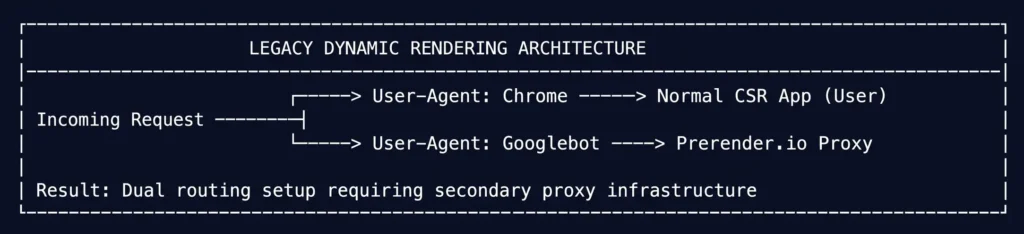
In a legacy Dynamic Rendering architecture, your web server acts as a traffic router. It inspects the incoming request’s User-Agent header to determine whether the visitor is a human user or a search engine bot:
- Human Users: The server routes real users to the normal Client-Side Rendered (CSR) app. The user’s browser downloads raw script bundles and executes them locally.
- Search Bots (Googlebot, Bingbot): The server intercepts the request and routes it to an intermediary third-party rendering service (such as Prerender.io, Rendertron, or a headless Chrome cluster). This service executes the JavaScript on its own server, captures a flat HTML snapshot of the DOM, and returns that static snapshot to the crawler.
Why Google Views Dynamic Rendering as a Workaround, Not a Long-Term Solution
While Dynamic Rendering solved the immediate issue of indexation for pure CSR sites, Google explicitly updated its technical documentation to categorize Dynamic Rendering as a temporary workaround, not a long-term architectural best practice.
The Core Problems with Dynamic Rendering:
- High Infrastructure Maintenance & Costs: Running a secondary headless Chrome cluster or paying third-party SaaS proxy services adds continuous financial cost and operational risk. If your prerendering service goes down or times out, crawlers receive 500-level server errors across your domain.
- Accidental Cloaking Risks: If your prerendered server output serving Googlebot differs significantly in content or internal links from the client-side app served to users, search engines may flag your site for cloaking violations, resulting in severe algorithmic or manual penalties.
- Zero Core Web Vitals Improvement for Real Users: Dynamic Rendering only serves pre-rendered HTML to crawlers. Real human users still experience slow client-side bundle downloads, high TTFB, and poor mobile LCP/INP scores.
Modern Edge Rendering: Serving Fast HTML from Global Cloud Networks
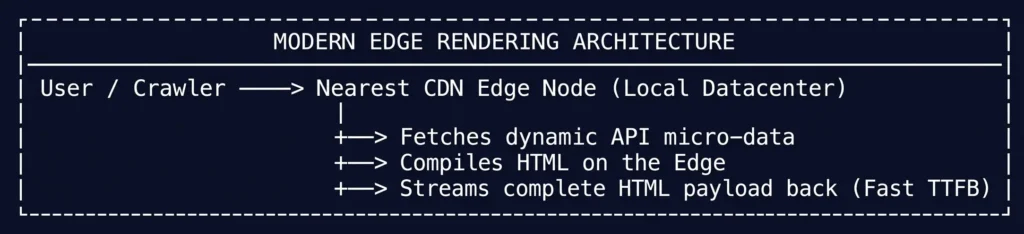
Rather than maintaining dual code paths for bots vs. users, modern web development relies on Edge Rendering (Edge Computing).
Platforms like Cloudflare Workers, Vercel Edge Network, AWS CloudFront Functions, and Netlify Edge Functions allow you to run light JavaScript/SSR execution at edge data centers distributed globally, inches away from the requesting user or crawler.
Why Edge Rendering Is Superior for Modern SEO:
- Unified Single Code Path: Edge Rendering serves the exact same server-compiled HTML payload to both human visitors and Googlebot, eliminating all cloaking risks.
- Ultra-Low Time to First Byte (TTFB): Because the rendering code runs on edge servers located physically close to the requester rather than a centralized origin server, page compilation and stream delivery happen in milliseconds.
- Partial Prerendering (PPR): Frameworks like Next.js utilize Edge networks to combine static HTML shell streaming (SSG speed) with dynamic edge data fetching (SSR accuracy) on the exact same page, maximizing both user performance and crawler indexation efficiency.
Now that we’ve examined why legacy bot-proxy workarounds are giving way to global Edge rendering. Now, let’s translate these architectural principles into framework-specific execution. In the next section, I’ll share actionable SEO frameworks for Next.js, pure React Single-Page Applications, Nuxt.js, and Angular.
Actionable SEO Frameworks for Next, React, Nuxt & Angular JS Platforms
Every modern JavaScript framework approaches rendering, routing, and head data binding differently. Understanding your specific stack’s native capabilities allows you to configure codebases for seamless search indexation.
Fixing SEO Issues in Popular JavaScript Frameworks
Whether you are auditing a legacy React SPA or configuring an enterprise Next.js deployment, enforce these non-negotiable optimization patterns.
Next.js SEO Rules: App Router Metadata, Server Components, and Dynamic Imports
Next.js is currently the gold standard for JavaScript SEO, but misconfiguring its newer App Router architecture can break server rendering if component boundaries are confused.
Utilize the Native Metadata API
In the Next.js App Router (versions 13+ and 14+), never manually inject raw HTML <head> tags inside your JSX templates. Use the built-in static or dynamic Metadata export API to guarantee tags are rendered on the server before streaming:
// Static Metadata Export (app/about/page.tsx)
import type { Metadata } from 'next';

export const metadata: Metadata = {
  title: 'Enterprise Technical SEO Services | Ahmad Fraz',
  description: 'Scale organic search visibility with data-driven technical SEO audits.',
  alternates: {
    canonical: 'https://ahmadfrazseo.com/services/technical-seo',
  },
};
For dynamic routes (such as ecommerce product pages or blog posts), export the generateMetadata function to fetch database details asynchronously on the server side:
// Dynamic Metadata Export (app/blog/[slug]/page.tsx)
export async function generateMetadata({ params }: Props): Promise<Metadata> {
  const post = await fetchPostFromAPI(params.slug);
  return {
    title: post.title,
    description: post.excerpt,
    openGraph: { images: [post.featuredImage] },
  };
}
Keep Components as Server Components by Default
By default, all components inside the Next.js App Router are React Server Components (RSC). They render strictly on the server and send zero client-side JavaScript to the browser.
- The Rule: Only add the
'use client'directive at the top of small leaf components that strictly require browser interactive states (such as form inputs, dropdown toggles, or click handlers). - The SEO Benefit: Keeping main layout containers and text blocks as Server Components eliminates hydration overhead and guarantees 100% server HTML parity for crawlers.
Use Dynamic Imports for Heavy Below-the-Fold Libraries
To prevent client component bundles from delaying initial page paint, dynamically import heavy third-party scripts (like interactive charts, video players, or modal calculators) with SSR disabled:
import dynamic from 'next/dynamic';

// Load non-critical interactive component strictly on the client side
const DynamicChart = dynamic(() => import('@/components/InteractiveChart'), {
  ssr: false,
  loading: () => <p>Loading visual data...</p>,
});
Fixing Pure React Apps: Adding React Helmet, Pre-renderers, or Moving to SSR
Standard Single Page Applications (SPAs) built with create-react-app or Vite render client-side by default, outputting an empty <div id="root"></div>. If your organization cannot immediately migrate to Next.js, implement these remediation steps:
- Implement
react-helmet-asyncfor Head Management: If your React SPA must change titles and canonical URLs dynamically based on page routes, usereact-helmet-asyncto manipulate the document head as component state updates. - Configure Static Pre-rendering for High-Value Routes: Use build-time plugins like
vite-plugin-prerenderorreact-snap. These build plugins launch a headless browser duringnpm run build, capture rendered HTML snapshots for specified static routes, and save pre-compiled.htmlfiles directly into your build distribution folder. - Plan the Framework Migration: Treat client-side React apps as a temporary phase for public-facing search pages. Transition landing pages, blogs, and catalog routes to a server-rendered environment (Next.js or Remix) while keeping private user dashboards on pure client-side React.
Nuxt (Vue) and Angular Universal: Ensuring HTML Parity for Single Page Apps
Vue.js and Angular apps face identical client-side indexation hurdles when deployed in default single-page configurations.
Nuxt.js (Vue Ecosystem) Optimization
Nuxt automates universal SSR for Vue applications. Ensure your route configurations enforce universal execution:
- Enable Universal SSR Mode: Verify
ssr: trueis set in yournuxt.config.tsfile. Avoid settingssr: false, which degrades the application to pure client-side execution. - Use
useSeoMetafor Head Management: Nuxt provides native composables to handle title tags, open-graph parameters, and canonical links on the server level:
// Vue Component Script (Nuxt 3)
useSeoMeta({
  title: 'JavaScript Rendering Strategies Guide',
  ogTitle: 'JavaScript Rendering Strategies Guide',
  description: 'Deep technical analysis of CSR, SSR, SSG, and ISR rendering performance.',
  ogImage: 'https://ahmadfrazseo.com/images/rendering-guide.jpg',
});
Angular Universal (SSR / Hydration)
Standard Angular apps run inside an app-root client shell. To make Angular SEO-friendly:
- Deploy Angular SSR (@angular/ssr): Enable Angular Universal server-side execution so the Node.js server generates fully formed DOM markup for crawlers.
- Enable Non-Destructive Hydration: In modern Angular releases, configure non-destructive event hydration (
provideClientHydration()). This prevents Angular from destroying and re-creating server-rendered DOM nodes on the client, eliminating layout shifts (CLS) and reducing main-thread locking.
Now that we’ve detailed framework-specific implementation blueprints across Next.js, React, Nuxt, and Angular. Now, let’s translate those code requirements into a repeatable diagnostic process. In the next section, we will walk through step-by-step testing workflows to audit your site’s rendering pipeline and catch hidden execution failures before they impact search rankings.
How to Test, Debug, and Audit Javascript Rendering (Advance Level)
Auditing rendering architectures (SSR, ISR, and Edge execution) requires a different set of diagnostic steps than standard on-page debugging. Instead of simply checking if content renders, you must verify where and when the rendering process takes place, isolating backend latency from client-side execution bottlenecks.
By analyzing server headers, inspecting hydration warnings in runtime consoles, and profiling network waterfall timelines, you can catch architectural rendering flaws before they harm user experience and organic crawl queues.
How to Audit Architecture-Specific Rendering Issues
Focus your technical audits on three specific failure points common to modern JavaScript rendering frameworks.
Detecting Server vs. Client Hydration Mismatches
Hydration mismatches create invisible performance debt by forcing the browser to destroy server-rendered DOM nodes and rebuild them on the client. Catching these errors requires auditing client runtime environments.
How to Audit Hydration Errors:
- Open your server-rendered URL (Next.js or Nuxt) in Google Chrome.
- Open Chrome DevTools (
F12) and navigate to the Console tab. - Filter console logs by typing
HydrationorText content does not match. - Inspect React/Vue hydration warning logs
Warning: Text content did not match. Server: "Post Date: 2026-11-11" Client: "Post Date: 11/11/2026"
  at p
  at div
  at ArticleComponent
The Fix:
When DevTools flags a hydration error, inspect the named component (ArticleComponent). Ensure that dynamic variables such as timestamps, window dimension checks, or local storage tokens are wrapped inside client-only execution hooks (like React’s useEffect) rather than evaluating during the initial server render.
Inspecting Server Response Headers for Edge & ISR Caching State
When using Incremental Static Regeneration (ISR) or Edge Rendering, verifying that search crawlers receive fresh static HTML rather than slow, un-cached dynamic renders is critical.
How to Audit CDN & Edge Cache States:
Use terminal commands to inspect response headers sent by your edge CDN (Vercel, Cloudflare, or AWS CloudFront):
curl -I -A "Googlebot" https://ahmadfrazseo.com/blog/rendering-strategies
Key Response Headers to Verify:
x-vercel-cacheorcf-cache-status: Look forHITorSTALE. A status ofHITconfirms the edge CDN served a pre-rendered static HTML file in milliseconds. A status ofMISSindicates the server was forced to perform full, expensive SSR execution.Cache-ControlDirectives: Ensure headers output explicit revalidation instructions (e.g.,s-maxage=60, stale-while-revalidate). This guarantees search bots receive cached static payloads while background regeneration updates stale routes.X-Nextjs-Cache: Verify whether Next.js served the request from its internalISRcache (HIT) or triggered an asynchronous background revalidation (REVALIDATED).
Profiling Performance Timelines: Separating TTFB from Hydration Lag
Standard page speed tests often blur the line between server delay and client script execution. To optimize Core Web Vitals (LCP and INP), you must profile exact performance timelines using WebPageTest or Chrome DevTools.
Step-by-Step Profiling Protocol:
- Open Chrome DevTools and navigate to the Performance panel.
- Check the Web Vitals checkbox and start a recording while reloading the page.
- Analyze the timing waterfall across three critical phases
Diagnostic Checklist:
- If TTFB is long (> 800ms): The delay originates on your Node.js origin server or database microservices during SSR execution. Optimize API database queries or implement ISR edge caching.
- If LCP occurs long after FCP: The initial server HTML was sent quickly, but main visual components (like hero images or dynamic layout grids) were deferred to client-side script execution. Shift those main component blocks back to Server Components.
- If Long Tasks (> 50ms) cluster during Phase 3: The client-side hydration bundle is too heavy, locking the browser’s main thread and hurting mobile INP (Interaction to Next Paint). Split component bundles and defer below-the-fold hydration.
Now that we’ve covered specialized diagnostic testing protocols for inspecting hydration errors, edge cache headers, and performance timelines. Now, we must define how to translate those architectural findings into clear engineering handoffs. In the next section, we detail the Team Responsibilities and Ownership Matrix to streamline coordination between SEO leads, front-end engineers, and DevOps teams.
The SEO vs. Developer Boundary (Rendering Architecture Ownership)
Optimizing modern rendering architectures requires clear operational ownership between organic search leads, front-end developers, and release engineers. Because rendering issues involve server runtimes (Node.js), CDN edge networks, and complex framework states, SEO leads must refrain from prescribing generic advice and instead provide precise architectural diagnostic tickets.
Establishing a clear division of responsibility prevents workflow friction and ensures high-impact rendering optimizations move smoothly through sprint pipelines.
What the SEO Specialist Validates and Monitors
As an SEO lead, your primary responsibility is auditing the indexation impact of your site’s rendering setup and verifying that rendered outputs align with search engine guidelines.
Core SEO Validation Tasks:
- HTML & DOM Parity Auditing: Comparing cURL server responses against final rendered DOM outputs to catch missing metadata, stripped schema, or broken heading hierarchies caused by hydration failures.
- Edge Cache Verification: Monitoring HTTP response headers (
cf-cache-status,x-vercel-cache) to ensure high-priority landing pages hit static CDN edge caches rather than triggering expensive origin server renders. - Indexation & Rendering Health Monitoring: Tracking Google Search Console live test snapshots to ensure dynamic layout grids and paragraph content render completely within Googlebot’s execution window.
- Prioritizing Architectural Remediation: Categorizing rendering bugs by organic revenue impact. For example, prioritizing a failing server-side metadata API over a minor client-side animation bug.
Passing Engineering-Ready Diagnostic Tickets
When isolating rendering bottlenecks, translate your diagnostic findings into precise technical tickets tailored to specific engineering roles.
Hydration Mismatches & Component State (Pass to Front-End Engineers)
- The Symptom: Chrome DevTools console logs hydration warning exceptions (
Text content did not match), causing React to trigger client-side DOM re-renders that damage mobile CLS and INP scores. - The Engineering Ticket: “Resolve hydration mismatches inside
ProductHeader.tsx. Wrap browser-dependent APIs (localStorage, local timezone formatters) insideuseEffecthooks or client-only wrappers to ensure initial server-rendered HTML matches client hydration markup.”
Server Components & Dynamic Metadata (Pass to Framework / Lead Developers)
- The Symptom: Dynamic open-graph tags and canonical URLs are inserted via client-side scripts, causing search crawlers to index generic fallback titles during early crawl passes.
- The Engineering Ticket: “Migrate head tag generation in Next.js App Router (
app/catalog/[category]/page.tsx) to the native asyncgenerateMetadataAPI. Ensure canonical directives and titles resolve dynamically on the server before streaming initial HTML.”
ISR Revalidation & Edge Cache Configuration (Pass to DevOps / Infrastructure Engineers)
- The Symptom: High-volume e-commerce routes trigger full origin Node.js server builds on every user visit, leading to elevated TTFB (> 1.2s) and degraded LCP scores.
- The Engineering Ticket: “Configure Incremental Static Regeneration (ISR) with
stale-while-revalidatedirectives on all/blog/*and/catalog/*routes. Set static CDN edge revalidation to 300 seconds to serve instant cached HTML while background jobs handle data updates.”
Error Boundary Handling & Soft 404 Prevention (Pass to Full-Stack Engineers)
- The Symptom: When backend CMS microservices fail, client-side applications render an empty layout shell while still returning a
200 OKHTTP status code, triggering Soft 404 flags in Google Search Console. - The Engineering Ticket: “Implement server-side error boundaries within
getServerSideProps/ async Server Components. If the underlying API fails or returns empty data, force the server route to throw an explicitnotFound: true(HTTP 404) or HTTP 503 response code.”
Task Scope | Primary Owner |
DOM Parity & Header Audit | Technical SEO Lead |
Hydration Mismatch Fix | Front-End Developer |
ISR & CDN Cache Setup | DevOps / Infrastructure |
Server Metadata API | Lead Framework Engineer |
Conclusion
Choosing the right rendering strategy is an operational trade-off between infrastructure cost, user experience, and search engine reliability. By understanding how CSR, SSR, SSG, and ISR execute code across origin servers, global CDNs, and client browsers, you can build modern applications that rank effortlessly.
Is Your Framework Migration Hiding Content from Google?
Transitioning your codebase to Next.js, Nuxt, or a headless architecture shouldn’t come at the expense of your organic search traffic. A single unhandled hydration mismatch, missing server metadata hook, or misconfigured CDN cache policy can quietly drop your high-value dynamic pages out of Google’s index.
If your website recently migrated to a modern JavaScript framework, or if Google Search Console is reporting rendering, TTFB, or indexation anomalies, don’t leave your organic revenue on a chance. Contact me directly for a comprehensive JavaScript & Rendering Audit or explore my Website Migration Services, Technical SEO Services & Website SEO Audit Services.
Frequently Asked Questions About JavaScript Rendering SEO
What is JavaScript Rendering in SEO?
JavaScript rendering in SEO is the technical process where a web browser or a search engine crawler (like Googlebot) executes JavaScript code to translate raw data, APIs, and framework components into a visible, fully interactive HTML webpage. The location where this code execution takes place, whether on the origin server, at the global CDN edge, or inside the client’s browser determines how fast search engine bots can discover, parse, and index your content.
What are the main JavaScript rendering techniques?
CSR, SSR, SSG, and ISR are the four primary rendering strategies used in modern web engineering to construct web pages:
- Client-Side Rendering (CSR): The browser downloads an empty HTML container shell and heavy JavaScript bundles, building the DOM locally on the user’s or crawler’s device.
- Server-Side Rendering (SSR): The origin server compiles full HTML with fresh database content on every incoming request, delivering ready-to-read text in the initial HTTP payload.
- Static Site Generation (SSG): Pages are compiled into static HTML files ahead of time during code deployment (
build time) and served instantly from global CDN edge networks. - Incremental Static Regeneration (ISR): A hybrid approach that serves static CDN pages instantly while updating individual cached HTML pages asynchronously in the background without requiring a full site rebuild.
How does JavaScript rendering affect SEO?
JavaScript rendering directly impacts two critical organic growth factors: Crawl Budget Efficiency and Core Web Vitals.
- If a site relies heavily on client-side execution (CSR), search crawlers must place URLs into a resource-intensive rendering queue, leading to delayed indexation, missing dynamic metadata, or partial content indexing.
- Conversely, pre-rendered architectures (SSR, SSG, ISR) deliver complete HTML in the first byte, ensuring immediate link discovery, low Time to First Byte (TTFB), faster Largest Contentful Paint (LCP), and 100% indexing reliability.
How does Googlebot render JavaScript content?
Googlebot processes web pages using a two-wave indexing architecture via its Web Rendering Service (WRS):
- Wave 1 (Crawl & Parse Raw HTML): Googlebot fetches the URL over HTTP and parses the raw initial HTML response. If the page is pre-rendered (SSR/SSG), it indexes text and links immediately.
- Wave 2 (The Rendering Queue): If the initial HTML contains empty client-side containers, Googlebot queues the URL until headless Chrome compute resources become available. WRS then downloads JavaScript assets, executes client scripts, fetches API payloads, builds the final rendered DOM snapshot, and indexes the resulting page.
Does Googlebot penalize websites that experience React hydration mismatches?
Indirectly, yes. While Googlebot does not issue a manual penalty specifically for hydration warnings, hydration mismatches force React to discard the initial server-rendered HTML and execute a full client-side re-render. This emergency re-render locks the browser’s main thread, increases Interaction to Next Paint (INP) delays, triggers layout shifts (CLS), and causes transient DOM flashing, which can cause Googlebot’s Web Rendering Service (WRS) to capture incomplete page snapshots during fast crawl passes.
Is Server-Side Rendering (SSR) strictly required for high SEO rankings?
A pure CSR single-page application (SPA) can technically rank if Googlebot successfully executes its JavaScript bundle and discovers all internal content. However, CSR places your URLs into Google’s rendering queue, delaying indexation from hours to days and burning crawl budget. For competitive enterprise niches, SSR or SSG is practically required because it delivers instant, fully rendered HTML in the initial HTTP payload eliminating rendering queue delays and ensuring immediate indexation.
Should we still use Dynamic Rendering for our client-side single-page app?
Google considers Dynamic Rendering a temporary stopgap, not a long-term solution. Maintaining separate code paths (pre-rendered HTML for bots via Prerender.io and raw JS for users) introduces operational risks, high SaaS proxy costs, potential 500-error single points of failure, and accidental cloaking risks if bot HTML differs from user JS. Modern engineering teams should migrate to global Edge Rendering (Vercel Edge Network, Cloudflare Workers) or native framework SSR (Next.js/Nuxt) to serve a single, fast HTML stream to both users and search bots.
How do I prevent high Server-Side Rendering (SSR) response times (TTFB) from destroying my Largest Contentful Paint (LCP)?
Because SSR generates fresh HTML on the origin server for every request, slow database microservices or unoptimized API queries directly increase Time to First Byte (TTFB). To prevent high TTFB from hurting your LCP score:
- Implement Edge Caching: Cache rendered HTML pages at CDN edge nodes with appropriate
Cache-Control: s-maxagedirectives. - Use Incremental Static Regeneration (ISR): Serve pre-rendered static HTML from the CDN instantly while background jobs revalidate stale routes asynchronously.
- Adopt React Server Components (RSC): Stream critical layout shell and text components first, deferring non-essential interactive components.
Explore Other Articles Under Technical SEO Side
Pillar Blogs
What is Technical SEO? (Parent Blog)
Other Related Articles
- How Googlebot Crawls and Understands Your Website
- Crawlability vs. Indexability in SEO
- What Are Core Web Vitals? Understanding LCP, INP & CLS
- TTFB (Time to First Byte): Understanding Server Response Time
- Page Speed Optimization: A Complete Technical SEO Guide
- Mobile-First Indexing: How Google Evaluates Mobile Websites