
Ever wondered why some websites have that little padlock in the browser URL, while others show “Not Secure”? Or why Google seems to favor some sites over others in search results? That padlock isn’t just for show, it’s HTTPS in action, powered by SSL certificates, and it has a real impact on your SEO, user trust, and conversions.
Unlike other guides, this blog not only explains HTTPS and SSL for SEO but also gives a real case study, step-by-step setup instructions, common pitfalls, and all the FAQs readers actually search for… Everything in one place!
So, in this mini guide, we’ll cover everything a website owner or SEO professional needs to know from what SSL certificates are, to how HTTPS affects SEO, to step-by-step guidance on getting your SSL setup right. By the end, you’ll not only understand HTTPS, you’ll know how to use it to rank better and build trust.
What is HTTPS and Why it Matters for SEO
HTTPS (HyperText Transfer Protocol Secure) is the secure version of HTTP, it encrypts data between a user’s browser and your server. Encryption protects passwords, payment info, and sensitive data from hackers.
But here’s the SEO twist: Google considers HTTPS a lightweight ranking factor, meaning secure websites get a small boost in search results. Beyond rankings, HTTPS affects user trust, engagement, and click-through rates.
Question for you: Have you ever clicked back from a site that showed “Not Secure”? That’s a real behavior Google notices.
Now that we know why HTTPS matters, let’s see exactly how it boosts SEO.
How HTTPS & SSL Certificates Help Your Rankings
Many guides stop at “HTTPS helps rankings,” but here’s the complete picture:
Ranking Boost: Sites with HTTPS often outrank similar HTTP sites in competitive niches.
Referral Data Preservation: Traffic from other sites is tracked correctly in Google Analytics — HTTP → HTTPS misconfigurations can break referrals.
Page Experience Signals: HTTPS is part of Google’s page experience update; sites with HTTPS are seen as more trustworthy.
Click-through Rate (CTR): Users are more likely to click results marked secure, higher CTR can indirectly improve rankings.
Even if your site isn’t eCommerce, losing trust due to HTTP can hurt your blog or service page performance.
Now let’s look inside the different SSL certificates and how they work.
Understanding SSL Certificates & the SSL Chain
An SSL certificate is like a digital ID card for your website, it proves your site is legitimate and encrypts data. But have you heard of an SSL certificate chain? Many blogs skip this:
Root Certificate: Issued by a trusted Certificate Authority (CA).
Intermediate Certificate: Bridges root certificate and your site certificate.
Server Certificate (Leaf): Installed on your website, this is what your visitors see as the padlock.
Think of it as a trust ladder: root → intermediate → server. If any link is broken, browsers warn users your site isn’t secure.
Tip from Experts: Always check your SSL chain after installation using free tools like SSL Labs or WhyNoPadlock.
Case Study: Does HTTPS Really Boost Organic Traffic?
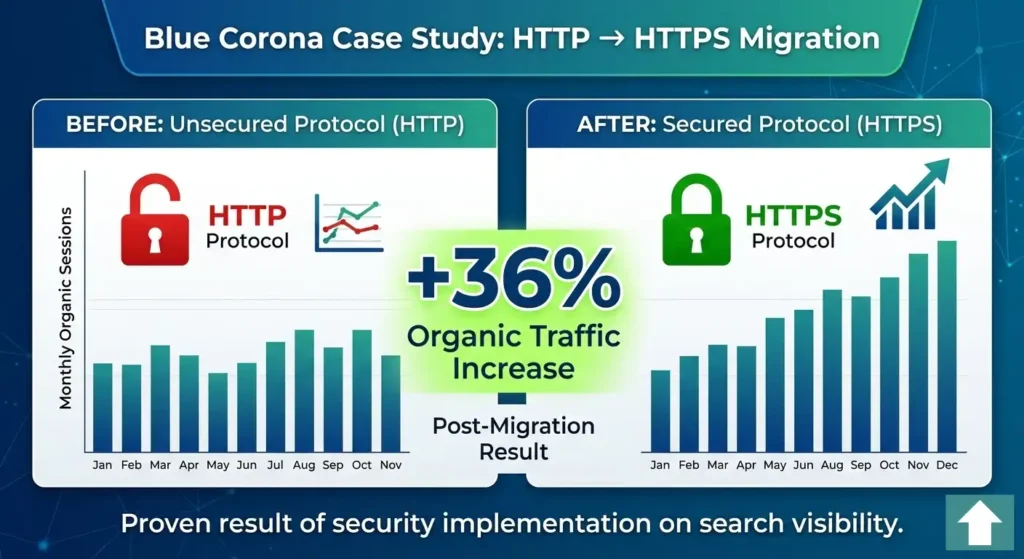
One of the most frequently cited SEO case studies around HTTPS was conducted by Blue Corona a well‑known digital marketing and analytics company. They specifically looked at whether migrating to HTTPS would help increase organic search traffic.
Here’s what they found:
Key Results After Migrating to HTTPS
After moving the entire site from HTTP to HTTPS, the website saw a 36% increase in organic traffic over the following months.
This boost came not only from improved search rankings but also from higher click‑through rates, as users were more likely to click on “secure” results in Google.
Why This Matters
Before this case study, many webmasters were skeptical about HTTPS; worried it might hurt their rankings because URLs change. But in Blue Corona’s real‑world test:
✔ The site didn’t lose visibility it gained it.
✔ Users trusted secure listings more.
✔ Google rewarded the secure version with better visibility in search.
This result suggests that implementing HTTPS correctly is not just a security best practice, it can meaningfully improve organic performance when done alongside proper technical SEO (like redirects and updated sitemaps).
Anyhow, now that we know the types and chain, let’s talk about the practical side; getting SSL certificates.
How to Get an SSL Certificate for Websites?
You might be thinking: “Sounds great, but how do I actually get one?” Here’s the simple answer:
Choose your SSL type:
Domain Validation (DV): Free or cheap, basic encryption.
Organization Validation (OV): Shows company info, good for local businesses.
Extended Validation (EV): Highest trust, green bar in some browsers, ideal for eCommerce.
Select a provider:
Free: Let’s Encrypt (fully automated, trusted)
Paid: DigiCert, GlobalSign, Cloudflare SSL
Install the certificate:
Follow your hosting provider instructions.
Check the SSL chain.
Set up 301 redirects from HTTP → HTTPS.
Leran everything about redirections in SEO here!
Expert tip for developers: Always update your sitemap, canonical tags, and internal links to HTTPS.
Avoid mistakes that can hurt SEO even with HTTPS.
What are the Common HTTPS & SSL SEO Mistakes?
By now, you understand how HTTPS and SSL certificates support SEO. But here’s something most guides don’t emphasize enough, implementation mistakes can cancel out the benefits.
Simply installing an SSL certificate isn’t enough. If configured incorrectly, it can create indexing issues, trust warnings, or even traffic drops.
Before you assume HTTPS alone will fix your SEO, take a look at the most common SSL-related mistakes that silently hurt rankings and how to fix them properly:
HTTPS & SSL SEO Mistakes Overview
| HTTPS & SSL SEO Factor | Common Mistakes | Solutions / Best Practices |
|---|---|---|
| HTTPS Implementation | Migrating without 301 redirects → old HTTP pages still indexed | Implement 301 redirects from all HTTP URLs to HTTPS; update sitemap & canonical tags |
| SSL Certificate Chain | Broken or incomplete chain → browsers show warnings | Ensure complete chain (Root → Intermediate → Server); test using SSL Labs |
| Mixed Content | Images, scripts, or CSS still load via HTTP | Update all resources to HTTPS; fix mixed content via browser inspection tools |
| SSL Validity | Expired certificate → “Not Secure” errors | Enable auto-renewal or set renewal reminders |
| Analytics Tracking | Not updating URLs → referral traffic misattribution | Update Google Analytics, Search Console & tracking URLs to HTTPS |
| Internal Linking | Internal links still pointing to HTTP | Replace with HTTPS links; verify redirects are working properly |
Pro Tip: After migration, test your site with Google Search Console, crawl tools, and SSL checkers to confirm that redirects, certificate chains, and indexing are functioning correctly.
Now that you know what can go wrong, the next step is to implement HTTPS the right way so let’s move into the best practices that make your setup truly SEO-perfect.
Best Practices for HTTPS & SSL in SEO
Always use 301 redirects for HTTP → HTTPS.
Update canonical tags and sitemaps to HTTPS URLs.
Enable HSTS (optional) to force browsers to use HTTPS.
Check mixed content and fix any insecure elements.
Monitor SSL expiration and renew on time.
By following these, you not only secure your site, but also maximize SEO benefits and maintain visitor trust.
Have you audited your HTTPS setup recently? If not, now is the time.
Frequently Asked Questions About Google’s Search Generative Experience (SGE)
HTTPS is a lightweight ranking factor meaning Google may favor secure sites in search results and users are more likely to click them, which indirectly helps SEO.
Not strictly required for indexing, but essential for trust, security, and avoiding “Not Secure” warnings that can increase bounce rates.
SSL (Secure Sockets Layer) is the certificate technology; HTTPS (HTTP Secure) is the encrypted protocol your site uses once the certificate is installed. Together they secure data between server and browser.
You can get SSL certificates from:
Let’s Encrypt; free, automated SSL provider used by millions of sites.
Paid CAs like DigiCert, Sectigo, GlobalSign (for OV/EV certificates).
Install via your host control panel or Certbot for servers.
Yes! Free SSL certificates (e.g., Let’s Encrypt) provide the same encryption benefits as paid ones and are enough for SEO. Users and Google see HTTPS either way.
It’s the trust path that links your certificate to a trusted authority, typically consisting of:
Root certificate
Intermediate certificate(s)
Your site certificate
This chain builds browser trust and avoids warnings.
If done correctly with 301 redirects and sitemap updates, switching should not harm your traffic and can improve long‑term performance.
Yes! Browsers still show “Not Secure” on HTTP pages, which impacts user trust and engagement. HTTPS is now near‑universal.
Because your site is using HTTP without encryption. Modern browsers (like Chrome) label all non‑HTTPS sites as insecure to protect users.
Expired certificates trigger browser warnings, loss of trust, and potential SEO drops until it’s renewed.
Final Perspective
Switching to HTTPS and getting a proper SSL certificate isn’t just about encryption, it’s about trust, user engagement, and SEO. Most guides leave gaps but we’ve covered everything: ranking impact, SSL chains, practical steps, mistakes to avoid, and best practices.
Your step: Make sure your website is fully HTTPS-ready. If you need help, my SEO Audit Service can check your SSL setup, fix SEO issues, and help your site climb Google rankings safely.
Ahmad Fraz is a seasoned SEO strategist and digital marketing expert with over 9 years of experience helping brands like Dyson, 3M, Marriott, and CureMD achieve measurable growth. Specializing in technical SEO, content strategy, and data-driven optimization, at Ahmad Fraz SEO, he empowers businesses of all sizes to improve visibility, drive qualified traffic, and achieve long-term digital success. His insights and actionable strategies are backed by years of hands-on experience and proven results.