
Introduction: Why Are Your Published Pages Not Getting Crawled?
You spent days optimizing a key page, hit publish, and expected search engine crawlers to pick it up quickly. But days pass, and nothing happens.
When organic performance stalls, most site owners immediately blame content quality, keyword targeting, or backlinks. But after auditing hundreds of websites, I often see the real issue happening much earlier in the process: search engine crawlers simply aren’t reaching or prioritizing those pages.
There is a big misconception in technical SEO that crawlability just means keeping your site accessible so crawlers can visit every page. In reality, search engines don’t have unlimited resources to crawl every single URL on your server, especially if your site has thousands of parameter URLs, broken links, or heavy scripts slowing things down.
True crawlability isn’t about letting bots crawl everything. It’s about making sure search engine crawlers can discover and access your most important, revenue-driving pages efficiently, without getting stuck in crawl traps or dead ends.
In this guide, we’ll look at how crawlers actually navigate complex websites, the hidden technical barriers that slow down discovery, and a simple diagnostic framework to keep crawlers focused on the pages that actually matter.
To build a site that search engines can crawl effortlessly, we first need to look past basic status codes and understand what advanced crawlability really means in practice.
What Does Advanced Crawlability Actually Mean for Your Site?
At its simplest level, crawlability is binary: can a search engine crawler request a URL and get a 200 OK server response? If yes, the page is technically crawlable.
However, as your website grows, whether you are expanding an e-commerce catalog, scaling a SaaS content hub, or managing a large B2B platform, that simple definition quickly falls short. Basic crawlability gets your foot in the door, but advanced crawlability is about efficiency, discovery rate, and priority routing.
To see where crawling actually breaks down on a complex site, it helps to stop looking at it as a single event and instead break it into three distinct phases:
- Discovery: How crawlers first learn a URL exists (through internal links, XML sitemaps, or redirects).
- Accessibility: Whether your server allows the crawler to fetch that page without running into 5xx errors, rate limits, or rendering bottlenecks.
- Crawl Priority: How frequently and deeply crawlers choose to return to your URLs based on your site architecture and server responsiveness.
Discovery vs. Accessibility vs. Priority: Breakdown
The reason this distinction matters is that many site owners mistakenly treat discovery and accessibility as the same thing and that leads to wrong diagnoses.
For instance, a key landing page might be perfectly accessible on your server, but if it sits buried six clicks deep in your navigation with zero internal links pointing to it, crawlers simply won’t discover it often enough. On the flip side, you might feed thousands of URLs directly to a crawler via an XML sitemap, but if your server throws a 503 limit error every time the bot visits, accessibility breaks down immediately.
And this brings us to the core challenge big websites face: crawler limitations.
Let’s understand the difference with a quick comparison.
Crawling Phase | Primary Focus | Typical Failure / Bottleneck | Strategic Fix |
Discovery | How search engines find that a URL exists | Deep click depth (4+ clicks), missing sitemaps, orphan URLs | Tighten internal link hierarchy and follow the 3-click rule from the homepage |
Accessibility | Whether the crawler can successfully fetch the page | 5xx server errors, 429 rate limits, JavaScript timeouts | Scale server hosting capacity, clear robots.txt blocks, and optimize JS execution |
Crawl Priority | How frequently and deeply crawlers return to your URLs | Dynamic URL bloat, duplicate filter parameters, crawl traps | Disallow or canonicalize unnecessary parameters and eliminate crawl traps |
Why Do Search Engine Crawlers Struggle as Your Website Grows?
Search engine crawlers process billions of URLs every day, but their infrastructure doesn’t have infinite capacity for every single site. To stay efficient, they constantly evaluate how much effort to spend on your server based on response times, site size, and structural quality signals.
This is precisely why crawlers don’t just “figure it out” when a site generates thousands of unmanaged parameter URLs, dynamic filters, or duplicate paths. Instead of sifting through the clutter, they slow down, reduce crawl frequency, or stop fetching deeper pages altogether.
Advanced crawlability solves this exact problem. It strips away technical noise and sets up clean structural pathways, ensuring search engines spend their processing time on pages that actually drive business value.
I know this blog may also reach readers who aren’t very technical, so some of the concepts might feel a little overwhelming at first. If you’re a beginner or new to technical SEO, I’ve written a beginner-friendly guide to crawlability and indexability that explains what these concepts actually mean in simple terms. You can start here to get a basic understanding before diving deeper into this topic.
5 Technical Barriers That Block Search Engine Crawlers
Once you understand that search engines operate on finite resources, the next logical question is: what actually stops them from crawling your best pages?
In most site audits, crawling breakdowns rarely happen because a search engine simply “forgot” a URL exists. Instead, crawlers run into invisible technical walls that slow down request speeds, consume server capacity, or block crawler access altogether.
Here are the five most common technical barriers that prevent search engine crawlers from reaching your valuable content.
- Server Rate Limits and 5xx Response Errors
- Redirect Chains and Broken Loop Traps
- Heavy JavaScript and Unrendered Content
- Orphan Pages Buried in Site Architecture
- Misconfigured Directives and Robots.txt Overrides
Let’s take a closer look at each of these barriers and understand them one by one.
1. Server Rate Limits and 5xx Response Errors
Before a crawler can parse a single line of HTML, your server has to respond. If your host is slow, unstable, or improperly configured, crawling suffers immediately.
When a search engine crawler encounters 500 (Internal Server Error) or 503 (Service Unavailable) responses, it slows down its crawl rate to protect your server from crashing. Worse, if your server returns 429 (Too Many Requests) response codes because security filters treat web crawlers like malicious traffic, crawlers back off significantly.
If your server consistently struggles under crawler demand, search engines automatically drop crawl frequency, leaving your newer pages undiscovered for longer periods.
2. Redirect Chains and Broken Loop Traps
Redirects in SEO are a normal part of web maintenance, but when they are configured poorly, they turn into silent crawlability killers.
When a crawler hits a 301 or 302 redirect, it has to make an extra request to fetch the target destination. If URL A redirects to URL B, which then redirects to URL C, the crawler wastes multiple HTTP requests just to get to one piece of content.
If a chain forms a closed loop (URL A ➔ URL B ➔ URL A), search engine crawlers abandon the path entirely after a few attempts. Redirect chains drain processing energy quickly, causing crawlers to stop short before reaching deeper, valuable URLs.
3. Unchecked JavaScript and Heavy Resource Rendering
Modern web applications rely heavily on JavaScript frameworks like React, Vue, or Angular. While client-side rendering creates dynamic user experiences, it introduces a two-step processing model for search engine crawlers: fetching the raw HTML, and rendering the JavaScript.
If your critical content or internal links are embedded inside complex JavaScript execution routines that time out or throw script errors, crawlers may only see a blank shell during the initial fetch phase.
If a crawler cannot execute the scripts efficiently or if rendering consumes too much server overhead, those script-dependent links never get followed, effectively isolating parts of your site.
4. Orphan Pages and Hidden Architecture
Even if your server responds instantly and has zero script errors, a page can still be completely invisible to crawlers if it lacks structural connections. These are known as orphan pages, URLs that exist on your server but have no internal links pointing to them from anywhere on your website.
Search engine crawlers discover new URLs primarily by following links from known pages. If a page is absent from your site’s navigation, contextual content, and internal link structure, crawlers won’t find it naturally through routine crawling.
While including orphan pages in an XML sitemap provides a discovery signal, relying solely on sitemaps without internal link support signals low structural importance to search engine bots.
5. Misconfigured Directives and Disallow Overrides
Sometimes, the barrier stopping crawlers isn’t a server failure or a bad link. It’s a self-inflicted directive rule.
A classic mistake occurs when site owners use a Disallow rule in robots.txt to block a section of pages, assuming it will prevent search engine indexing. In reality, blocking crawler access via robots.txt prevents crawlers from reading on-page directives like noindex or canonical tags.
If crawlers are physically blocked from fetching a page, they cannot evaluate its technical tags, which often leads to indexation anomalies or orphaned parameter URLs circulating across search databases.
Crawl Traps & Uncontrolled URL Generation
Understanding technical barriers like server errors or broken links is straightforward. They usually surface quickly in standard diagnostic checks. However, a much more dangerous threat to your site’s crawlability is uncontrolled URL generation.
A crawl trap occurs when your site dynamically generates an infinite or massive number of unique URLs that lead to duplicate, near-identical, or empty pages. Search engine crawlers get stuck requesting thousands of these low-value paths, consuming processing power while your core pages sit queued in line.
Here is how uncontrolled URL generation happens and how to keep crawlers out of these traps.
How Do Faceted Filters & Session IDs Create Infinite URL Traps?
E-commerce stores and large directory sites rely heavily on faceted search allowing users to filter products by size, color, price, material, and sorting order. While this creates a great user experience, it is a technical nightmare for web crawlers if left unmanaged.
When every filter combination generates a distinct, indexable URL parameter (e.g., ?category=shoes&color=red&size=10&sort=price_asc), a single product category with 20 products can suddenly explode into tens of thousands of unique URL variations.
Similarly, legacy session IDs appended to URLs (?sessionid=xyz) create infinite unique paths for the exact same page content. Without strict parameter handling or URL fragment rules, crawlers spend days fetching filter permutations that offer zero unique search value.
Dynamic Pagination Causing Crawlers to Run in Loops
Modern web design frequently replaces traditional page numbers with dynamic loading or infinite scrolling. When implemented purely through client-side scripts without clean canonical pagination fallback, crawlers can get trapped in repetitive request sequences.
If your pagination logic dynamically appends infinite parameters (e.g., ?page=1, ?page=2… ?page=9999) without a clear boundary or proper link attributes, crawlers may continuously fetch empty or low-value paginated sets.
To keep pagination crawl-friendly, your structural links should point to clear, discrete page URLs, ensuring crawlers reach deep catalog items without running in infinite loops.
How Internal Linking and Site Structure Control Crawler Movement
Even if your server responds instantly and you have zero crawl traps, a search engine crawler can still struggle to find your content if your site’s internal map is broken.
Crawlers navigate the web primarily by following links. If your site architecture isolates important pages or buries them under unnecessary navigational layers, your overall crawl efficiency drops significantly.
Here is how site structure directly controls crawler movement.
Click Depth Too Deep for Important Landing Pages
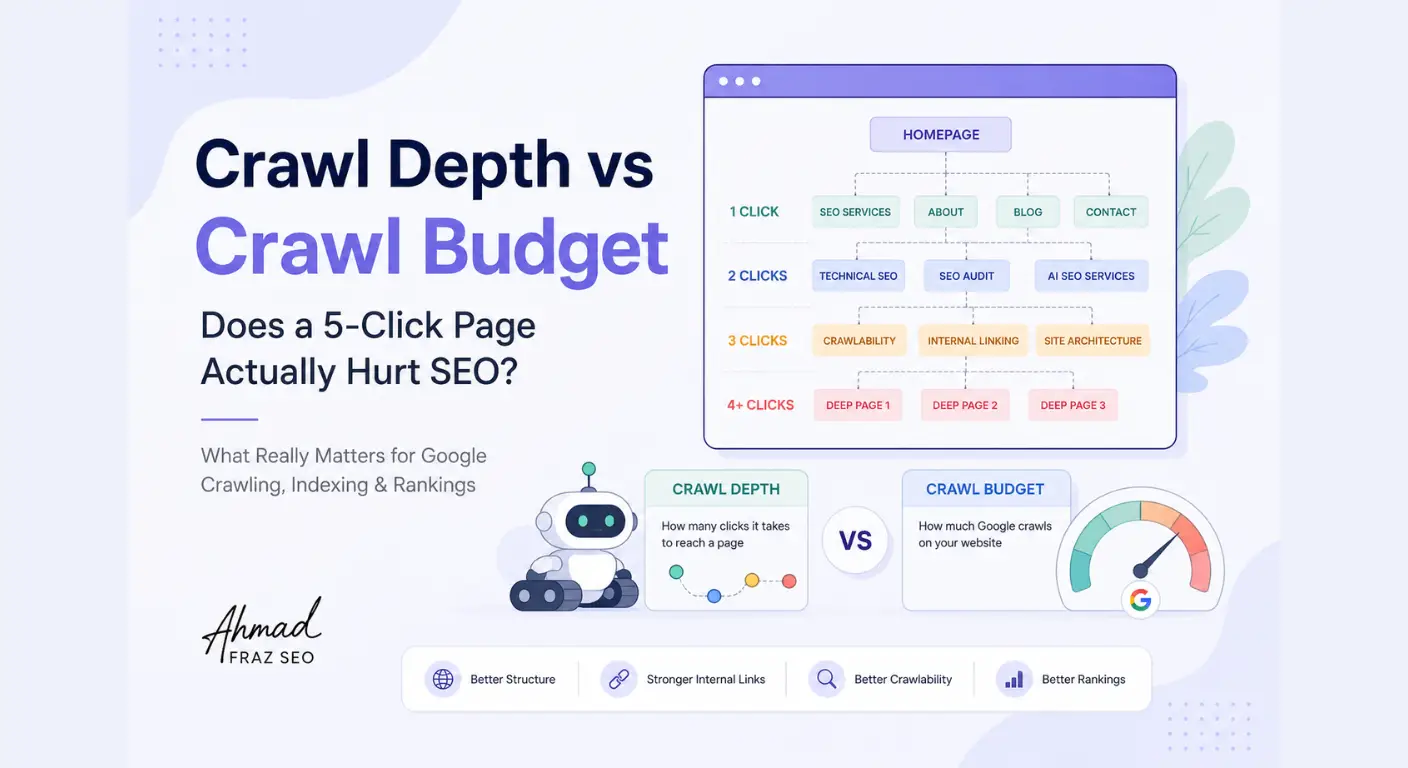
Click depth (or crawl depth) refers to the number of clicks it takes to reach a specific page starting from your homepage.
As a general rule in technical SEO, your most important revenue pages and primary content hubs should sit within 2 to 3 clicks from the homepage. When key URLs are pushed 5, 6, or 7 clicks deep into sub-directories, crawlers visit them far less frequently.
Internal link acts as a bridge for search engine bots. By passing structural authority (Link Equity) and providing clean contextual anchors, your internal link network tells crawlers which pages are critical and deserve regular re-crawling.
I’ve also written a guide on crawl depth and crawl budget, where I’ve covered deep clicks and the 3-click rule in detail. If you’re interested in going deeper into the topic, you can read it here: Crawl Depth vs Crawl Budget And if you’re a beginner and aren’t familiar with what crawl depth actually means, you can start with this beginner-friendly guide here: What is Crawl depth?
Find and Re-Integrate Isolated Orphan Pages
An orphan page is a URL that exists on your server and might even be accessible via a direct link, but has zero internal links pointing to it from your own website structure.
Because crawlers discover content primarily by traversing links, orphan pages are functionally invisible during routine site crawls.
While adding orphan URLs to an XML sitemap helps crawlers discover their existence, relying only on a sitemap without internal linking signals low priority. To fix orphan pages, you must integrate them contextually into parent category pages or related body content, bringing them back into the active crawl path.
Crawl Efficiency at Scale (Without the Crawl Budget Myths)
If you spend any time reading technical SEO forums, you have likely run into endless debates about “crawl budget.” The common narrative makes it sound like a ticking clock: every website gets a small bucket of crawl requests, and once it runs out, your site stops getting indexed.
For 90% of websites, this dramatic version of crawl budget is simply not true.
If your site has a few hundred or even a couple thousand clean URLs, search engines have more than enough resources to crawl your content regularly. However, if you manage an enterprise portal, a massive e-commerce catalog, or a programmatic publisher with tens of thousands of pages, crawl efficiency becomes a genuine performance bottleneck.
Here is how crawl efficiency actually operates when scaling a site.
Is Crawl Budget a Real Issue for Your Website Size?
Search engines allocate crawling resources based on two main factors:
- Crawl Demand (how popular, fresh, and authoritative your pages are)
- Crawl Rate Limit (how many requests your server can handle without slowing down).
If your site is small but suffering from slow indexation, the issue is almost never that you ran out of crawl budget. It is usually because your pages lack structural internal link signals, your server is returning errors, or the content lacks clear value signals.
Crawl efficiency only becomes a true primary constraint when your server generates millions of low-quality, duplicate, or useless URL paths that actively absorb crawler capacity away from your core landing pages.
Eliminating Crawl Waste on Low-Value URLs
When scale does matter, the goal of technical SEO isn’t to trick crawlers into fetching more URLs. It is to eliminate crawl waste.
Crawl waste happens when web crawlers spend precious server requests on pages that will never generate search traffic or business revenue. Common culprits include:
- Internal search result pages (/search?q=…)
- Tracking parameters and staging environments
- Endless pagination sets with duplicate items
- Auto-generated tag archives with single posts
By trimming these waste paths out of your crawl architecture using proper robots.txt rules, clean canonical structures, and parameter handling, you clear the path for crawlers to spend 100% of their effort on URLs that actually move your business forward.
Server Logs & Directives: What They Really Tell You
When diagnosing complex crawlability issues, relying solely on third-party site audit crawlers can leave major blind spots. Third-party tools only simulate how a crawler views your site, but server log files show you the exact, unfiltered history of how real search engine crawlers interact with your infrastructure.
By analyzing server logs alongside your crawling directives, you move from educated guesswork to precise technical execution.
Reading Search Engine Activity from Server Logs
Every time a web crawler requests a page, image, or stylesheet, your web server records the event in a raw log entry. This record includes the IP address, timestamp, requested URL, HTTP status code, and User-Agent string.
Analyzing these raw logs allows you to verify critical crawling behavior that standard analytics tools completely miss:
- Crawl Frequency: Are crawlers visiting your high-priority money pages daily, or are they returning once every few weeks?
- Genuinely Blocked Paths: Is a recent robots.txt update successfully stopping crawlers, or are bots still making requests to disallowed directories?
- Status Code Spikes: How often are search engine bots encountering 5xx server spikes or 429 rate limits during deep site crawls?
While full log file analysis on large enterprise sites often requires specialized log parsers, checking raw log samples during major site migrations or structural updates gives you direct visibility into how crawlers react to your technical changes.
Robots.txt & Sitemaps: Resolving Conflicting Access Signals
Log files often reveal another silent problem: conflicting signals between your robots.txt file and your XML sitemaps.
A classic implementation error occurs when site owners submit a URL in an XML sitemap while simultaneously blocking that same URL path in robots.txt. The sitemap signals, “This page is important, please crawl and index it,” while the robots.txt rule signals, “Do not access this directory.”
When search engine crawlers encounter these contradictory instructions, they default to protecting server rules, leaving your sitemap URLs unverified.
To keep your access signals clean and unambiguous:
- Use robots.txt strictly for crawler access control, not as a quick fix to manage page quality or indexation.
- Keep XML sitemaps 100% clean, including only indexable, 200 OK canonical URLs that you actively want search engines to discover and prioritize.
How to Monitor Crawl Health and Catch Issues Early
Fixing crawlability barriers isn’t a one-time project. As your site adds new pages, updates templates, or alters server configurations, new crawling issues will naturally emerge.
To prevent technical debt from silently eroding your indexation rates, you need an ongoing monitoring framework. You don’t need expensive enterprise software to get started. Search engines provide built-in reporting tools that give you immediate visibility into how their bots interact with your infrastructure.
Spotting Sudden Crawl Drops in Search Console
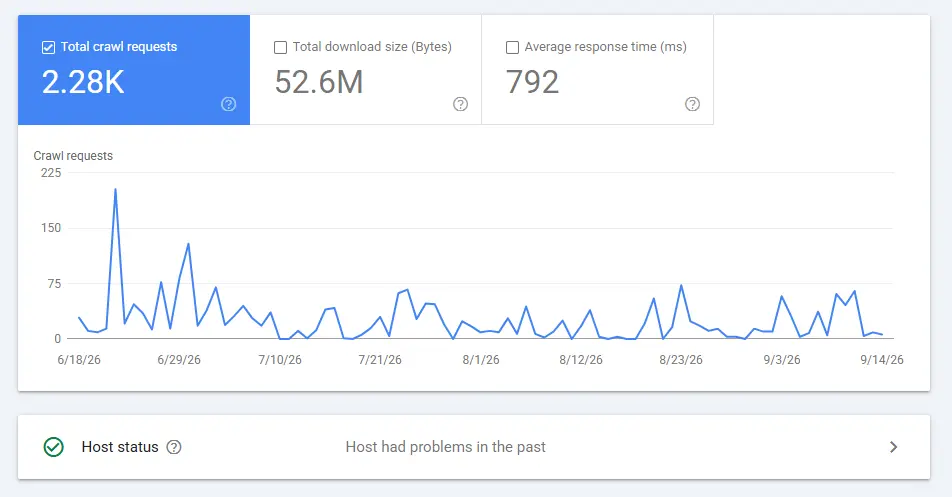
Google Search Console’s Crawl Stats Report (located under Settings > Crawl Stats) is one of the most underutilized diagnostic tools for technical site health. It provides a direct 90-day breakdown of crawler activity on your domain.
When monitoring this report, pay close attention to three primary metrics:
- Total Crawl Requests: Look for sudden, unexplainable drops or massive spikes. A sharp drop often points to server outages, aggressive firewall blocking (429/503 errors), or accidental robots.txt disallow rules. A massive spike usually indicates an uncontrolled URL parameter trap expanding across your server.
- Average Response Time: A gradual increase in response time (in milliseconds) signals that your server is struggling under crawler demand. If response times climb too high, crawlers automatically dial back their daily request frequency to protect host stability.
- Crawl Requests by Purpose: Distinguish between Discovery (finding new URLs) and Refresh (re-crawling known URLs). If a site update causes discovery requests to plummet while refresh requests stay flat, crawlers are struggling to find your newly published paths.
By setting up a routine monthly check of your crawl stats, you can catch infrastructure bottlenecks and directive conflicts before they translate into lost search visibility.
The Advanced Website Crawlability Diagnostic Checklist
Before launching a new site section or troubleshooting an indexation delay, run through this step-by-step diagnostic checklist to ensure search engines can reach your URLs without friction.
1. Server Infrastructure & Security
- HTTP Response Status: Verify that primary landing pages return a clean 200 OK status code.
- Server Capacity & Speed: Ensure average server response time stays below 300–500ms under crawler load.
- Rate Limiting & Firewalls: Confirm security tools (e.g., Cloudflare, AWS WAF) are not issuing 429 Too Many Requests or 403 Forbidden status codes to verified search engine user-agents.
2. Directives & Access Rules
- Robots.txt Validation: Check that high-value directories are not accidentally blocked by Disallow: rules.
- No Conflict with Directives: Ensure pages blocked in robots.txt do not rely on on-page noindex or canonical tags to communicate instructions (since blocked pages cannot be read).
- Clean XML Sitemaps: Verify that sitemaps contain only canonical, indexable, 200 OK URLs and are updated automatically.
3. Architecture & Internal Links
- Click Depth Optimization: Confirm key revenue-generating pages are reachable within 3 clicks from the homepage.
- Orphan Page Audit: Cross-reference crawl data with server logs or sitemaps to locate and internally link isolated pages.
- Redirect Hygiene: Audit internal links to ensure they point directly to final destination URLs rather than through 301/302 redirect chains.
4. Parameter & URL Control
- Faceted Navigation Controls: Implement canonical tags, URL parameter handling, or selective disallow rules on dynamic filters to prevent crawl traps.
- Clean Pagination: Ensure paginated sets utilize clean, discrete internal link paths without dynamic infinity loops.
Conclusion
Solving website crawlability is rarely about finding a single silver bullet or tweaking one line in your robots.txt. As websites expand, crawlability becomes an ongoing discipline of keeping your technical environment lean, transparent, and structurally sound.
By eliminating low-value URL bloat, reducing dynamic parameter loops, keeping key pages within 2 to 3 clicks, and monitoring raw crawler logs alongside Search Console stats, you remove the artificial friction that holds search engines back. When crawlers can easily fetch, render, and navigate your priority pages without draining server energy, you pave the fastest possible path from publishing content to driving organic search traffic.
Something on personal Note: Let's Clear a Concept Togather
The Problem I’m Facing: Is It Related to Crawlability or Indexability?
This is the most confusing question and often people mix it. I would like to clear it from my personal experience.
When pages fail to appear in search results, technical audits often conflate crawlability with indexability. Distinguishing between the two saves hours of misdirected engineering effort.
- Crawlability is about access and retrieval. Can a search engine bot request the page, fetch its content, and follow its links?
- Indexability is about evaluation and inclusion. Does the search engine decide that the page is worthy of being stored in its search database and shown to users?
If search bots visit a page frequently (verified in server logs) but refuse to index it, you do not have a crawlability problem. You have an indexability, content quality, or canonicalization issue.
Unlocking crawlability simply gets your pages to the examiner’s desk. Ensuring they pass the examination requires strong content value, clear entity signals, and proper technical tags.
Frequently Asked Questions
How often do search engine crawlers visit a website?
Crawl frequency varies based on site authority, publishing frequency, server responsiveness, and internal link structure. High-authority news sites are crawled constantly every few seconds, while smaller or lower-demand sites might be visited every few days or weeks.
Can a page be indexed if it cannot be crawled?
Yes, in rare cases. If a URL is blocked via robots.txt but receives strong external backlinks, search engines may index the URL based on anchor text and external signals alone, without ever fetching or reading the page content.
Does submitting an XML sitemap force search engines to crawl my pages?
No. An XML sitemap is a discovery suggestion, not a crawl command. Search engines use sitemaps to learn that URLs exist, but actual crawl priority depends on server health, click depth, and link equity.
How do I know if my website has a crawlability problem or a content quality problem?
Check your server logs or Google Search Console’s URL Inspection tool. If the bot status shows “Discovered – currently not indexed”, search engines know the URL exists but haven’t allocated resources to fetch it yet, pointing to a crawlability or internal linking issue. If the status reads “Crawled – currently not indexed”, the crawler successfully fetched and rendered your page, but search engine algorithms decided the content lacked sufficient unique value or quality to include in the index.
Why is Googlebot crawling my staging site or parameter URLs instead of my main pages?
Crawlers follow links wherever they find them. If your staging environment, internal site search results, or dynamic filter parameters are linked anywhere on the web (or within your own scripts), bots will discover and attempt to crawl them. If these non-canonical paths lack parameter management or proper robots.txt disallow rules, crawlers will treat them as valid paths, wasting server capacity on low-value URLs instead of your core revenue pages.
Does blocking a URL in robots.txt remove it from search engine indexes?
No. robots.txt controls crawler access, not indexation. If a page is blocked in robots.txt, crawlers cannot fetch the page to read on-page directives like <meta name=”robots” content=”noindex”>. If that blocked URL has external backlinks or internal signals elsewhere, search engines can still index the raw URL without ever crawling its content. To properly remove a page from the index, allow crawlers to access it and apply a noindex tag or a 410 Gone HTTP status code.
How long does it take for search engines to notice changes after fixing a crawl trap?
It depends on your site’s overall crawl demand and authority. High-traffic news portals and major e-commerce platforms may see crawler behavior adjust within 24 to 48 hours after removing a crawl trap or clearing redirect chains. For smaller or medium-sized sites, it typically takes 1 to 3 weeks for crawlers to recalculate your site structure, adjust their request rates, and process the backlog of un-crawled URLs.
Will fixing my XML sitemap resolve deep crawlability issues on my site?
An XML sitemap is a discovery hint, not a directive or a structural fix. While keeping a clean sitemap helps crawlers discover newly published or updated URLs quickly, it does not fix underlying crawlability barriers like poor click depth, server rate limits, or orphan pages. If a page sits 6 clicks deep with zero internal body links, adding it to a sitemap will rarely guarantee frequent re-crawling unless you also strengthen its internal linking structure.
Taking Control of Your Site’s Crawl Architecture
Fixing crawlability isn’t about applying quick patches or chasing search engine bots. It’s about creating a clean, logical infrastructure that lets search engines evaluate your site’s real value without technical friction.
For smaller websites, following the structural checks in this guide is often enough to keep crawling smooth. But as site architecture grows, dynamic parameters expand, or server complexities increase, unangling crawl traps and log file anomalies usually requires a deeper diagnostic audit.
If you’re managing a growing platform and want to ensure search engines are prioritizing your most important URLs, then explore my technical SEO services. I would like to help you identify hidden server bottlenecks, eliminate crawl waste, and build a scalable crawling strategy built for long-term organic growth.